Excel Courses for Beginners: Building a Strong Foundation
Intermediate Skills: The Bridge Between Beginner and Advanced
Advanced Excel Course: What to Expect and What to Look For
Key Insights
Excel training courses help professionals improve career opportunities, save time, reduce spreadsheet errors, and make better data driven decisions.
Beginners should start with basic formulas, data formatting, sorting, filtering, and charts before progressing to intermediate skills such as lookup functions, logical formulas, and PivotTables.
Advanced Excel courses cover dynamic arrays, Power Query, Power Pivot, dashboards, macros, VBA, Python in Excel, and AI tools to support data analysis and automation.
Choosing the right course involves assessing your current skill level, career goals, budget, available time, course content, and Excel version. Combining Microsoft Excel certification with practical projects can help demonstrate your abilities
In this blog, you'll learn about the top Excel training courses for 2027, beginner to advanced Excel skills, popular learning platforms, certification options, and a step by step roadmap to becoming an Excel expert.
Microsoft Excel has been part of the workplace for decades, and it is still one of the most requested skills in job listings. Accountants, marketers, analysts, project managers, teachers, and business owners all rely on it to organize information and make decisions. What has changed is the level of skill employers expect. Knowing how to add a column of numbers is no longer enough. In 2027, professionals are expected to clean data, build dynamic reports, automate repetitive work, and use new features such as AI-assisted tools.
The good news is that learning Excel has never been easier. There are structured programs for every level, from first-time users to experienced analysts. This blog explains the best excel training courses available today, how to choose the right one, and how to move from beginner to expert step by step.
Some people assume newer tools will replace Excel. In practice, the opposite has happened. Excel has absorbed many modern capabilities, including dynamic arrays, Power Query, Power Pivot, and built-in AI assistance. It remains the common language of business data, which is why excel training courses continue to deliver strong returns for learners.
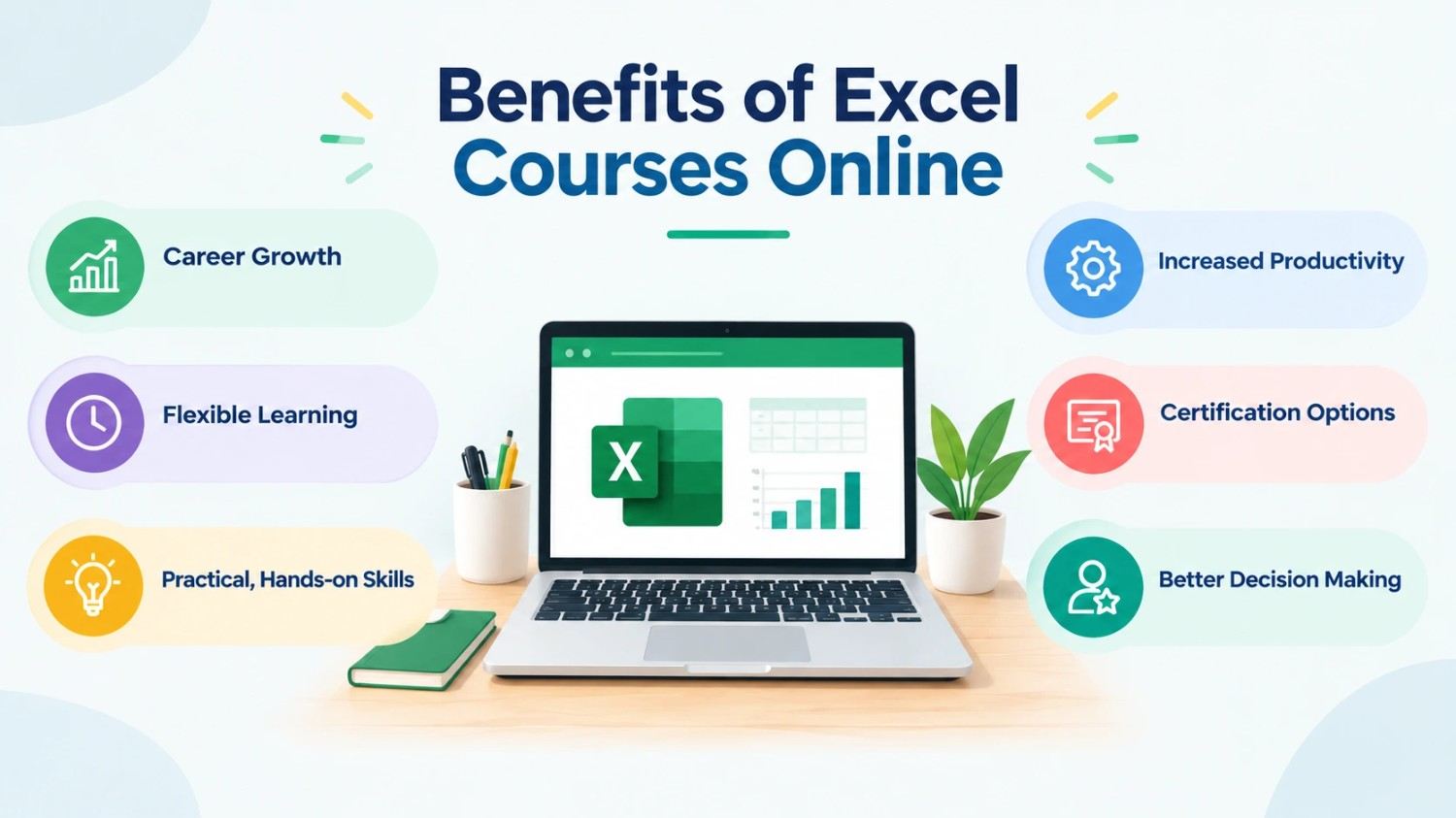
Here are a few reasons structured training is worth your time:
Career growth: Strong spreadsheet skills are linked to faster promotions and better job opportunities in finance, operations, sales, and human resources.
Time savings: Tasks that once took hours, such as consolidating reports, can be done in minutes with the right formulas and tools.
Fewer errors: Trained users build cleaner, more reliable workbooks, which reduces costly mistakes.
Better decisions: When you can analyze and visualize dataquickly, you can support your recommendations with evidence.
Self-teaching through random videos can work, but it often leaves gaps. A well-designed course gives you a clear path, practice exercises, and feedback, so your skills build in a logical order.
Excel Courses for Beginners: Building a Strong Foundation
If you are new to spreadsheets, start with excel courses for beginners. A good beginner program should not rush you. It should help you feel comfortable with the interface before introducing formulas.
What beginner courses should teach
A quality beginner course usually covers these topics:
Navigating the workspace: Understanding workbooks, worksheets, cells, rows, columns, the ribbon, and the formula bar.
Entering and formatting data: Working with text, numbers, dates, and currency, along with basic formatting and cell styles.
Basic formulas and functions: SUM, AVERAGE, MIN, MAX, COUNT, and simple arithmetic with cell references.
Relative and absolute references: Learning when to use the dollar sign in formulas, a concept that confuses many new users.
Sorting and filtering: Organizing data so you can find answers quickly.
Simple charts: Creating column, line, and pie charts to present results clearly.
Printing and sharing: Preparing a clean, professional file for others.
Where to find good beginner options
Several well-known platforms offer reliable introductory material. Microsoft’s own training resources on Microsoft Learn and Microsoft Support include free lessons that follow the latest version of the software. Coursera, Udemy, edX, and LinkedIn Learning each host beginner-friendly programs with guided exercises. Many community colleges also offer low-cost evening classes for learners who prefer a live instructor.
When you compare options, look for courses that include downloadable practice files. Excel is a hands-on skill, and reading about it is never enough. You should finish every lesson with a task you completed yourself.
Intermediate Skills: The Bridge Between Beginner and Advanced
Many learners stall between basic and advanced skills because they skip the middle stage. Before you enroll in any advanced excel course, make sure you are comfortable with these intermediate topics:
Logical functions: IF, AND, OR, and nested IF statements
Lookup functions:VLOOKUP HLOOKUP, and especially the newer XLOOKUP, which is easier and more flexible
Text functions: LEFT, RIGHT, MID, TEXTJOIN, and TRIM for cleaning messy data
Conditional formatting: Highlighting trends and exceptions automatically
Data validation: Creating drop-down lists and limiting what users can enter
PivotTables: Summarizing large datasets in a few clicks
Named ranges and tables: Making formulas easier to read and maintain
If you can build a simple sales summary using a PivotTable and a few lookup formulas, you are ready to move forward. If not, spend a few more weeks practicing. Strong fundamentals make advanced topics much easier to absorb.
Free Courses
Free Microsoft Excel course: : Beginner to Advanced
Advanced Excel Course: What to Expect and What to Look For
An advanced excel course should do more than teach additional formulas. It should change how you think about data. The best programs focus on real business problems, such as building a financial model, cleaning a messy export, or creating an interactive dashboard.
Core topics in a strong advanced program
Dynamic array functions. Modern Excel includes functions such as FILTER, SORT, UNIQUE, SEQUENCE, and XLOOKUP that spill results across multiple cells automatically. These functions replace many older, more complicated formulas.
LET and LAMBDA. These functions allow you to name values inside a formula and create your own reusable custom functions. They make complex calculations shorter and easier to audit.
Power Query. This tool connects to many data sources and cleans, reshapes, and combines data without manual copying. Once you set up a query, you can refresh it with one click.
Power Pivot and data models. You can work with millions of rows, build relationships between tables, and write DAX measures for advanced analysis.
Advanced PivotTables and dashboards. Slicers, timelines, and linked charts turn raw numbers into interactive reports that managers can explore on their own.
Macros and VBA. Recording macros and writing basic VBA code lets you automate repetitive tasks. Some courses also introduce Office Scripts for automation in Excel on the web.
Python in Excel and AI tools. Newer versions of Microsoft 365 includePython integration and Copilot features. A forward-looking course should show you how to use these tools responsibly, including how to check AI-generated formulas for accuracy.
Financial and statistical analysis. Scenario Manager, Goal Seek, Solver, and what-if analysis help you test assumptions and forecast outcomes.
Signs of a high-quality advanced course
It uses real-world case studies instead of tiny sample tables.
It updates content regularly to reflect new Excel features.
It includes projects you can add to your portfolio.
It gives you access to an instructor or community for questions.
difficult lessons, and study from anywhere. Find the list of the best platforms offering excel courses online.
1. Coursera
Coursera is an online learning platform that offers courses and specializations developed by universities and industry organizations. Its Excel-related learning options can help learners understand spreadsheet fundamentals, data analysis, business reporting, and related skills. Many programs include structured lessons, graded assignments, hands-on projects, and shareable certificates.
Type of platform: University and industry-led online learning.
Pricing: Some courses offer free access to selected learning materials, while paid courses, specializations, and subscriptions have different fees. Coursera lists individual course and program options, with some priced around $49 to $79 per month and Coursera Plus available through subscription plans. Check the current price before enrolling.
Pros: Structured curriculum, guided learning, practical assignments, and certificates that can demonstrate course completion.
Cons: Certificate access and graded assignments may require payment. Some programs also require more time and commitment than short tutorials.
Coursera is a suitable choice for learners who prefer a structured learning path rather than studying individual Excel functions separately.
2. Udemy
Udemy is a marketplace for online courses created by individual instructors and training providers. It offers a wide selection of Excel classes covering beginner concepts, formulas, PivotTables, lookup functions, Power Query, VBA, and dashboard creation. Learners can choose a complete beginner-to-advanced course or focus on a specific skill.
Type of platform: Instructor-led, on-demand video learning.
Pricing: Many courses can be purchased individually, while eligible courses are also included in subscription plans. Prices vary by course, promotions, and region, so check the current listing.
Pros: A broad course library, flexible learning schedules, practical demonstrations, and options for different skill levels.
Cons: Course quality and teaching styles vary. Some content may become outdated, so check the syllabus, reviews, and last update date before purchasing.
Udemy works well for learners who want affordable, topic-specific training without committing to a long academic program.
3. LinkedIn Learning
LinkedIn Learning provides professional development courses through short videos, guided lessons, and practice materials. Its Excel training covers spreadsheet basics, formulas, data analysis, reporting, and visualization. The lessons are particularly useful for professionals who want to improve their Excel skills alongside their regular work.
Type of platform: Subscription-based professional learning.
Pricing: Access generally requires an eligible LinkedIn Premium subscription or another supported subscription arrangement. Individual one-time course purchases are not offered. Subscription prices vary by plan and region.
Pros: Short lessons, professional development content, practical learning resources, and the option to display completed courses on your LinkedIn profile.
Cons: A subscription is needed for access, and learners who only want one short course may find the pricing model less convenient.
This platform is useful for working professionals who want to learn Excel in manageable sessions and connect their learning with broader career development.
4. edX
edX offers online education from universities and professional organizations. Learners can explore relevant courses in spreadsheet analysis, business data, and quantitative skills, depending on the available course catalogue. Its structured learning approach may appeal to those who prefer academic instruction, assignments, and defined learning outcomes.
Type of platform: University-based and professional online education.
Pricing: Many eligible courses offer a free audit option. Paid verified tracks provide additional features, such as graded assignments and certificates. edX states that verified certificates for many open courses generally range from $50 to $300, although prices depend on the course.
Pros: Academic structure, access to university-developed learning, and certificate options for eligible courses.
Cons: Not every course offers the same level of Excel-specific instruction. Certificates and graded activities may require payment.
edX is worth considering if you prefer a formal learning environment and want to understand how spreadsheet skills support broader analytical work.
5. Microsoft Learn and Microsoft Support
Microsoft’s official learning resources are useful for learning Excel directly from its developer. Microsoft Learn provides self-directed modules and learning paths, while Microsoft Support offers help articles and practical instructions for using individual features. Topics may include formulas, tables, charts, data organization, collaboration, and newer Microsoft 365 capabilities.
Type of platform: Official software training and self-paced learning resources.
Pricing: Many learning resources are available free of charge.
Pros: Direct guidance on Excel features, free resources, and explanations aligned with Microsoft’s software.
Cons: Learning materials may be spread across different modules and help articles. Learners who need a complete course with instructor feedback may need additional resources.
Microsoft’s official resources are particularly suitable for beginners and experienced users who want to understand specific features without paying for a course.
6. YouTube Educators
YouTube is another accessible option for learning Excel online. Independent educators publish tutorials on formulas, shortcuts, PivotTables, dashboards, Power Query, VBA, and other advanced features. You can follow a complete tutorial series or search for a solution to a specific Excel problem.
Type of platform: Free video-based learning.
Pricing: Most tutorials are free to watch, although optional paid content or channel memberships may be available.
Pros: Easy access, demonstrations of real tasks, a wide range of topics, and the ability to revisit difficult lessons.
Cons: Video quality and accuracy vary. Tutorials may follow different versions of Excel, and there is no guarantee of a consistent curriculum or recognized certificate.
YouTube works best as a supplementary learning resource. Following a planned playlist and practicing each technique in your own workbook can help you make steady progress.
Tips for getting the most from an online course
Set a regular schedule, even if it is only 30 minutes a day.
Practice with your own work files whenever possible.
Take notes on shortcuts and formulas you want to remember.
Do not just watch the videos. Pause and repeat each step in your own workbook.
Finish projects before moving to the next module.
How to Choose the Right Excel Training Courses for Your Goals
With so many options, it helps to match a course to your situation. Ask yourself these questions before enrolling.
What is my current level? Be honest. Many platforms offer free skill checks or introductory lessons so you can test the difficulty.
What is my goal? If you want to impress at your current job, a short, practical course may be enough. If you are aiming for adata analystrole, choose a longer program that includes Power Query, Power Pivot, and dashboards.
How much time can I commit? A self-paced course is ideal for busy schedules, but a cohort-based program can provide the structure some people need.
What is my budget? Free resources are a great start, but paid courses often add projects, feedback, and certificates. Compare the value, not just the price.
Is the content current? Make sure the course covers modern Excel, including XLOOKUP, dynamic arrays, and Power Query. A course built only around older versions may leave you behind.
Does it match my version of Excel? Some features are available only in Microsoft 365. Confirm that you have access to the tools taught in the course.
Excel remains one of the most valuable skills you can build, and the options for learning it have never been better. Whether you are just starting with excel courses for beginners, looking for a flexible excel course online, aiming to master automation with an advanced excel course, or planning to earn a microsoft excel certification, there is a path that fits your goals.
The key is to start where you are, practice consistently, and apply what you learn to real work. Pick the right excel training courses, commit to a schedule, and build projects that show your skills. In a few months, you can move from simple spreadsheets to confident, expert-level analysis.
Frequently Asked Questions
It depends on your starting point and the time you invest. With 4 to 6 hours of practice each week, many learners reach a solid intermediate level in two to three months and an advanced level in six to nine months. Consistent practice with real tasks speeds up progress.
For most learners, yes. A well-designed online course offers flexibility, repeat access to lessons, and hands-on exercises. Classroom or live virtual training can be better if you want immediate feedback from an instructor. Choose the format that matches how you learn best.
For many people, yes. Certification can strengthen a resume, validate your skills, and give you a clear study goal. It works best when combined with practical projects that show you can apply your knowledge. Always check the current exam options on Microsoft Learn.
Power Query is highly recommended because it saves time on data cleaning and is useful in many roles. Python in Excel and AI features such as Copilot are valuable additions for advanced users, but they should come after you master core formulas, PivotTables, and data modeling. Always review AI-generated results for accuracy.
Shubham Lal
Lead Software Developer
Shubham Lal joined Microsoft in 2017 and brings 8 years of experience across Windows, Office 365, and Teams. He has mentored 5,000+ students, supported 15+ ed-techs, delivered 60+ keynotes including TEDx, and founded AI Linc, transforming learning in colleges and companies.
Get Free Upskilling Guidance
Fill in the details for a free consultation
Related Courses
Explore our programs
Post Graduate Certificate Programme in Operations Management & Analytics
 HOME > BLOG > Data Science and BI Analytics > Top Advanced Excel Training Courses: From Beginner to Expert 2027
 October 27, 2026
 11 min read




 Key Insights
 ChatGPT
 Perplexity
 Claude
 Grok










 ROI Calculator