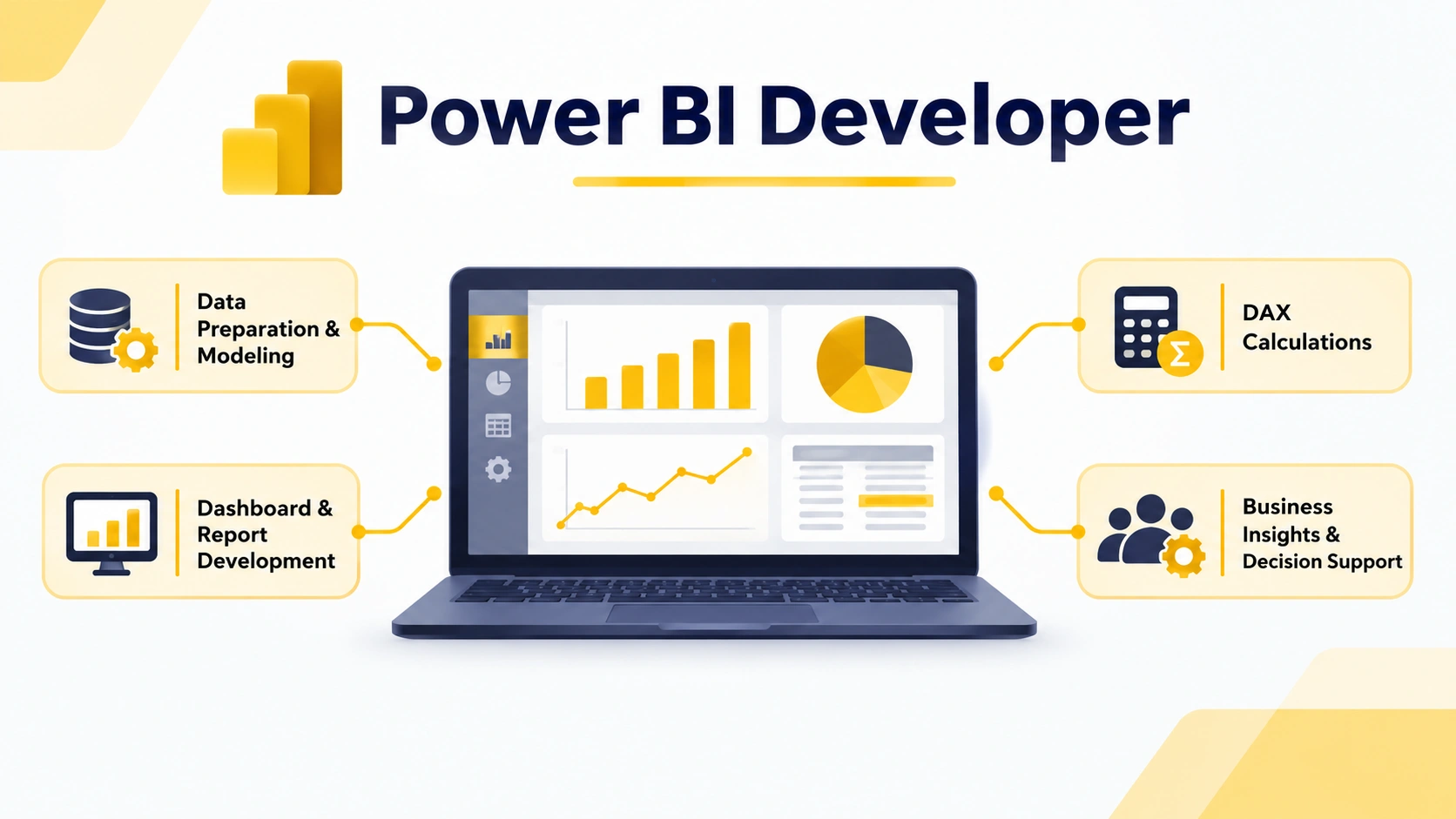
A Power BI developer transforms raw data into interactive reports and dashboards by combining data preparation, modeling, visualization, and analytical skills.
Key technical skills include Power BI, Power Query, DAX, data modeling, SQL, and data visualization, along with analytical thinking and communication.
Power BI developer jobs can include roles such as BI Developer, Data Analyst, Reporting Analyst, Business Intelligence Consultant, and Power BI Consultant.
Power BI developer salary varies based on experience, skills, location, industry, organization, and role responsibilities, while practical projects can help demonstrate job-ready capabilities.
In this blog, you'll learn about the role and responsibilities of a Power BI developer, required skills, career opportunities, salary factors, qualifications, a Power BI developer course, career growth, and FAQs.
Data has become an important part of how businesses understand customers, monitor performance, and make decisions. As organizations collect data from multiple sources, they need professionals who can transform that information into clear reports, dashboards, and actionable insights. This is where a Power BI developer plays an important role.
A Power BI developer works with data, business requirements, visualization tools, and analytical techniques to create reports and dashboards that help organizations understand their performance. The role can involve data preparation, modeling, visualization, report development, security, and collaboration with business stakeholders.
For professionals interested in analytics, business intelligence, or data visualization, Power BI can be a valuable skill to develop. This guide covers the role of a Power BI developer, responsibilities, essential skills, career opportunities, Power BI developer jobs, salary expectations, qualifications, and how a Power BI developer course can support career growth.
A Power BI developer is a professional who uses Microsoft Power BI to connect, prepare, model, visualize, and present data. The role involves converting business data into interactive dashboards and reports that users can understand and use for decision-making.
The work goes beyond creating attractive charts. A developer may need to understand where data comes from, clean and transform it, create relationships between datasets, develop calculations, design reports, manage access, and maintain published solutions.
Power BI development can also extend to areas such as embedded analytics, custom visuals, automation, and Power BI APIs.
What Does a Power BI Developer Do?
The exact responsibilities can vary depending on the organization and project. However, the role generally combines technical, analytical, and business skills.
Applying filters, slicers, drill-throughs, and other report features.
Managing workspaces and published content.
Implementing appropriate security controls.
Maintaining and improving existing reports.
Working with business users and data teams.
The role can therefore involve the complete journey from raw data to a usable business report. Microsoft’s current Power BI learning framework also groups key activities around preparing data, modeling data, visualizing and analyzing information, and managing and securing Power BI solutions.
Before building a report, developers need to understand what the business actually wants to measure.
For example, a sales team may need to track revenue, sales performance, customer trends, or regional performance. A developer needs to convert these requirements into suitable reports and metrics.
This requires communication with stakeholders and an understanding of the business context behind the data.
2. Connect and Prepare Data
Data may come from spreadsheets, databases, cloud services, or other sources. A developer needs to connect Power BI to the appropriate sources and prepare the information for analysis.
Power Query can be used to clean and transform data before it is modeled. This stage is important because inaccurate or poorly structured data can affect the quality of the final report.
3. Build Data Models
Data modeling is one of the important technical areas for a bi developer.
A developer creates relationships between tables and structures data so that reports can return meaningful results. Good modeling can also make reports easier to maintain and analyze.
4. Create Reports and Dashboards
The developer turns prepared data into visual reports. These may include charts, tables, cards, slicers, filters, and other interactive elements.
The objective is to present information in a way that users can understand without having to analyze raw datasets themselves.
5. Write DAX Calculations
Data Analysis Expressions, or DAX, is used to create calculations and measures in Power BI.
A developer may use DAX to calculate business metrics, create measures, and build analytical logic required by a report. Understanding concepts such as filter context and relationships can help developers create more effective calculations.
6. Manage Security and Access
Power BI solutions may contain business-sensitive information. Developers can therefore work with workspace permissions, access controls, and row-level security.
Security and governance are also part of the skills measured in Microsoft’s current Power BI Data Analyst framework.
7. Publish and Maintain Reports
Creating a report is only one part of the process. Developers may also publish reports, manage workspaces, configure refresh schedules, monitor performance, and update reports as business requirements change.
A typical Power BI workflow can move from data preparation and modeling to report creation, publishing, and distribution.
Skills Required to Become a Power BI Developer
A successful Power BI developer needs a combination of technical and soft skills.
Power BI
The first requirement is a strong understanding of Power BI Desktop and the Power BI service. Professionals should know how to create reports, connect data sources, work with models, publish content, and manage reports.
Power Query
Power Query is useful for extracting, cleaning, and transforming data. It helps developers prepare datasets before they are used for analysis.
DAX
DAX is essential for creating measures and calculations. Developers should understand the logic behind DAX instead of simply copying formulas.
Data Modeling
Knowledge of relationships, tables, dimensions, measures, and efficient model design is important. Strong modeling skills can help create reports that are easier to use and maintain.
SQL
SQL is a valuable complementary skill for professionals working with databases. It helps developers retrieve, filter, and work with data before bringing it into analytical workflows.
Data Visualization
A Power BI developer needs to know how to choose appropriate visualizations and organize reports logically. The goal is to make complex information easier to interpret.
Analytical Thinking
Technical knowledge alone is not enough. Developers should be able to identify patterns, understand business questions, and determine which metrics can help address those questions.
Communication
Power BI developers often work with business teams, analysts, managers, and other technical professionals. The ability to explain data and report functionality clearly is therefore important.
The terms Power BI developer and BI developer are sometimes used interchangeably, but they can represent slightly different scopes.
A Power BI developer generally focuses heavily on Microsoft’s Power BI ecosystem, including report development, dashboards, data modeling, DAX, Power Query, and Power BI services.
A BI developer may have a broader role involving business intelligence platforms, databases, data warehouses, reporting systems, ETL processes, and other analytics technologies.
In practice, the responsibilities depend on the organization. Some BI developers may work extensively with Power BI, while a Power BI developer may also need supporting skills such as SQL, data modeling, cloud technologies, and data engineering concepts.
Power BI Developer Jobs
The growing use of business intelligence and data-driven reporting has created opportunities for professionals with Power BI skills.
The exact job title can differ between companies. Therefore, candidates should look beyond job titles and examine the skills and responsibilities mentioned in job descriptions.
For professionals searching for Power BI developer jobs, building practical skills can be as important as understanding the software itself. A portfolio containing dashboards, data models, and analytical projects can help demonstrate practical ability to prospective employers.
Power BI Developer Salary
The Power BI developer salary can vary significantly based on experience, location, organization, technical skills, industry, and job responsibilities.
Entry-level professionals may start with roles involving reporting, dashboard development, and data analysis. As professionals gain experience, they may move into positions involving advanced data modeling, performance optimization, security, consulting, architecture, or team leadership.
Instead of focusing on a single salary figure, candidates should consider the factors that can influence earning potential:
Years of experience
Power BI expertise
DAX and data modeling skills
SQL knowledge
Industry experience
Analytical and business skills
Location
Organization and role scope
Additional certifications or specialized training
Professionals who expand beyond basic dashboard creation and develop strong skills in data modeling, analytics, security, and related technologies can position themselves for more advanced responsibilities.
There is no single academic route that guarantees a career as a Power BI developer. Candidates can enter the field through backgrounds such as computer science, information technology, engineering, business analytics, statistics, mathematics, finance, or other data-oriented disciplines.
For professionals already working in areas such as finance, operations, marketing, sales, IT, or analytics, learning Power BI can provide an opportunity to add data visualization and business intelligence capabilities to their existing expertise.
How to Become a Power BI Developer
A structured learning path can make it easier to move into Power BI development.
Step 1: Learn Data Fundamentals
Start with basic concepts such as data types, tables, relationships, databases, and data analysis.
Step 2: Learn Power BI
Understand the Power BI interface, data connections, report creation, visualizations, and publishing.
Step 3: Master Power Query
Practice cleaning, transforming, and preparing datasets using Power Query.
Step 4: Learn Data Modeling
Understand how tables and relationships work together and how to build an efficient model.
Step 5: Develop DAX Skills
Learn how to create measures and calculations and understand how filters affect results.
Step 6: Improve Visualization Skills
Practice designing dashboards that present information clearly and logically.
Step 7: Learn SQL
Develop basic to advanced SQL skills depending on the type of Power BI role you are targeting.
Step 8: Build Projects
Create practical dashboards based on business scenarios such as sales, finance, customer analytics, operations, or marketing.
Step 9: Consider a Power BI Developer Course
A structured Power BI developer course can help learners follow a guided curriculum rather than learning individual features randomly.
A good course should ideally combine Power BI fundamentals with data preparation, data modeling, DAX, visualization, reporting, and practical projects. Depending on your career goals, you can also consider programs that include broader business intelligence or analytics concepts.
Is a Power BI Developer Course Worth It?
A Power BI developer course can be useful for beginners as well as professionals who want to formalize their existing knowledge.
For beginners, structured learning can provide a clear sequence from data fundamentals to dashboard development. For working professionals, it can help fill gaps in areas such as DAX, data modeling, Power Query, and report management.
The value of a course ultimately depends on its curriculum, practical exposure, learning format, projects, and how closely it matches your career goals.
Career Growth for Power BI Developers
Power BI development can provide several potential career directions. A professional may begin with reporting or dashboard development and gradually move toward senior development, business intelligence consulting, analytics, or specialized technical roles.
As responsibilities increase, professionals may work on larger data models, enterprise reporting environments, security, deployment processes, automation, or embedded analytics.
Microsoft’s developer documentation also covers areas such as Power BI Embedded, custom visuals, REST APIs, automation, and semantic models, showing that the Power BI ecosystem extends beyond basic report creation.
Professionals can therefore continue expanding their skills instead of limiting their learning to dashboard design.
Future Scope of Power BI Development
Power BI development continues to evolve as organizations look for faster ways to analyze and share data. Professionals can benefit from keeping their knowledge current and learning how Power BI connects with broader analytics and data platforms.
Current Power BI capabilities and learning paths cover areas such as semantic models, report development, security, deployment, APIs, automation, and embedded analytics.
For aspiring developers, this means that learning Power BI can be treated as an ongoing skill-building journey rather than a one-time technical course.
Conclusion
A Power BI developer combines data preparation, modeling, visualization, analytical thinking, and business understanding to turn data into useful reports and dashboards. The role can offer career opportunities across business intelligence, analytics, reporting, and data visualization.
The Power BI developer salary depends on factors such as experience, skills, location, organization, and role complexity. Similarly, opportunities for Power BI developer jobs can vary depending on the industry and employer.
For anyone considering this career path, developing Power BI, DAX, Power Query, SQL, data modeling, visualization, and communication skills can provide a strong foundation. A well-designed Power BI developer course can also provide structured learning and practical exposure for professionals looking to build or strengthen their skills.
Frequently Asked Questions
A Power BI developer prepares and models data, creates interactive reports and dashboards, develops calculations, manages Power BI content, and works with stakeholders to meet reporting and analytics requirements.
Important skills include Power BI, Power Query, DAX, data modeling, SQL, data visualization, analytical thinking, problem-solving, and communication.
The Power BI developer salary varies based on experience, location, organization, industry, technical expertise, and job responsibilities. Candidates should evaluate current job descriptions and salary information for their specific location and experience level.
Start by learning Power BI fundamentals, Power Query, DAX, data modeling, SQL, and visualization. Build practical projects and dashboards that demonstrate your ability to work with data and solve business problems.
Yes. A structured Power BI developer course can help learners develop technical skills systematically and gain practical exposure. The best choice depends on the curriculum, projects, learning format, and your career goals.
Shubham Lal
Lead Software Developer
Shubham Lal joined Microsoft in 2017 and brings 8 years of experience across Windows, Office 365, and Teams. He has mentored 5,000+ students, supported 15+ ed-techs, delivered 60+ keynotes including TEDx, and founded AI Linc, transforming learning in colleges and companies.
 HOME > BLOG > Data Science and BI Analytics > Power BI Developer: Salary, Jobs, Skills & Responsibilities Guide
 August 27, 2026
 9 min read





 Key Insights
 ChatGPT
 Perplexity
 Claude
 Grok
Grok










 ROI Calculator