HomeHOME > BLOG > IT/Software Development > Java Operator Explained: Ternary, Bitwise, Logical, and More
IT/Software Development

Java Operator Explained: Ternary, Bitwise, Logical, and More

J
By Shubham Lal
UpdatedMarch 26, 2026Read time4 min read
Published on March 26, 2026
SHARE THIS ARTICLE
Jaro Education Facebook PageJaro Education Instagram PageJaro Education Twitter PageJaro Education Whatsapp Page Jaro Education Linkedin PageJaro Education Youtube Page
Java operator
Table of Contents

Table Of Content

  • What is a Java Operator?
  • Why Operators are Important in Java Programming
  • Types of Java Operators
  • Arithmetic Operators in Java

When someone begins learning Java programming, one of the earliest concepts they encounter is the Java operator. Operators may look like small symbols, but they play a massive role in how programs perform calculations, make decisions, and process data.

Think about everyday applications:

  • Calculating discounts in e-commerce apps
  • Validating login credentials
  • Checking eligibility for exams
  • Comparing product ratings
  • Filtering search results
  • Analysing data in software systems

All of these operations depend on operators.

Without operators, programs would not be able to perform even basic tasks such as adding numbers or comparing values.

In simple terms, operators help programs think logically and act intelligently.

In this complete beginner-friendly guide, readers will understand:

  • What a Java operator is
  • Types of operators in Java
  • Ternary operator Java explained simply
  • Bitwise operators in Java with examples
  • Logical operators in Java for decision-making
  • Operator precedence and evaluation
  • Practical coding examples
  • Best practices for beginners

The language is conversational and easy to understand, making this guide suitable even for those who are completely new to programming.

What is a Java Operator?

A Java operator is a symbol that tells the compiler to perform a specific operation.

Operators act on variables and values known as operands.

Example:

int a = 10;

int b = 5;

int result = a + b;

In this example:

a and b → operands

  • → operator

The operator performs addition.

Operators help perform:

  • Mathematical calculations
  • Comparisons
  • Logical operations
  • Assignments
  • Bit manipulations

Without operators, programs would not be able to process data.

Also Read:

Why Operators are Important in Java Programming

Operators help convert instructions into meaningful output.

They are used in:

  • Mathematical calculations
  • Decision-making statements
  • Loops and conditions
  • Data processing algorithms
  • Application logic
  • User input validation

Example:

if(score >= 50)

The >= operator checks whether the student has passed.

Operators help transform simple code into intelligent applications.

Types of Java Operators

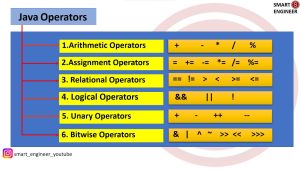
Java provides multiple types of operators based on functionality.

Types of Java Operators

*smartengineer

Major categories include:

  • Arithmetic operators
  • Relational operators
  • Logical operators
  • Bitwise operators
  • Assignment operators
  • Unary operators
  • Ternary operator
  • Shift operators

Each operator serves a unique purpose.

Understanding these types helps beginners write efficient code.

Arithmetic Operators in Java

Arithmetic operators perform mathematical calculations.

They are similar to operations learned in school mathematics.

Common arithmetic operators:

OperatorMeaningExample
+Additiona + b
Subtractiona – b
*Multiplicationa * b
/Divisiona / b
%Modulusa % b

Example:

int x = 15;
int y = 4;

System.out.println(x + y);
System.out.println(x – y);
System.out.println(x * y);
System.out.println(x / y);
System.out.println(x % y);

Output:

19
11
60
3
3

Arithmetic operators are used in almost every Java program.

Relational Operators in Java

Relational operators compare two values.

They return a boolean output:

true or false.

OperatorMeaning
==equal to
!=not equal
>greater than
<less than
>=greater than or equal
<=less than or equal

Example:

int marks = 75;

if(marks > 50)

{

   System.out.println(“Pass”);

}

Relational operators help programs evaluate conditions.

Logical Operators in Java

Logical operators in Java combine multiple conditions.

They are widely used in decision-making.

Logical operators return Boolean values.

Types of logical operators:

  • AND (&&)
  • OR (||)
  • NOT (!)

These operators help evaluate complex conditions.

Example:

int age = 22;

boolean hasLicense = true;

if(age >= 18 && hasLicense)

{

   System.out.println(“Eligible to drive”);

}

Both conditions must be true.

Understanding Logical Operators in Detail

Here’s a basic understanding of the Boolean operators for you:

AND Operator (&&)

Returns true if both conditions are true.

Example:

if(a > 10 && b < 50)

Both conditions must be satisfied.

OR Operator (||)

Returns true if at least one condition is true.

Example:

if(score > 90 || grade == ‘A’)

Either condition can be true.

NOT Operator (!)

Reverses boolean value.

Example:

boolean isLoggedIn = false;

if(!isLoggedIn)

Logical operators help handle real-world decision logic.

Ternary Operator Java Explained Simply

The ternary operator in Java is a compact version of the if-else statement.

Syntax:

condition? value_if_true : value_if_false

Example:

int age = 16;

String result = (age >= 18) ? “Adult” : “Minor”;

Output:

Minor

Ternary operator reduces code length.

It improves readability when conditions are simple.

More Examples of Ternary Operator

Example 1:

int number = 10;

String result = (number % 2 == 0) ? “Even”: “Odd”;

Example 2:

int a = 30;

int b = 20;

int max = (a > b) ? a : b;

Example 3:

int temperature = 35;

String weather = (temperature > 30) ? “Hot” : “Normal”;

The ternary operator is widely used in modern applications.

Free Courses

Explore courses related to Data science

Online MBA Degree ProgrammeOnline MBA Degree Programme
Python for Data Analysis
  • Duration Icon
    Duration : 11 - 15 Hours
  • Aplication Date Icon
    Application Closure Date :
Enquiry Now
Online MBA Degree ProgrammeOnline MBA Degree Programme
Finance for All – Free Finance Certification Course
  • Duration Icon
    Duration : 2 - 4 Hours
  • Aplication Date Icon
    Application Closure Date :
Enquiry Now

Bitwise Operator in Java

Bitwise operator in Java works at the binary level.

These operators manipulate individual bits.

Bitwise operations are commonly used in:

  • Encryption
  • Compression
  • Image processing
  • Network programming
  • Performance optimisation
  • Game development

Bitwise operators include:

OperatorMeaning
&AND
^XOR
~NOT
<<left shift
>>right shift

Bitwise AND Operator Example

int a = 5;

int b = 3;

System.out.println(a & b);

Binary form:

5 = 101
3 = 011

Result:

001 = 1

Bitwise AND compares each bit.

Bitwise OR Operator Example

System.out.println(5 | 3);

Binary:

101
011

Result:

111 = 7

Bitwise XOR Operator Example

System.out.println(5 ^ 3);

Result:

110 = 6

Shift Operators in Java

Shift operators move bits left or right.

Left shift (<<)

Multiply the number by 2.

Example:

System.out.println(5 << 1);

Result:

10

Right shift (>>)

Divides the number by 2.

Example:

System.out.println(8 >> 1);

Result:

4

Shift operators improve performance.

Assignment Operators in Java

Assignment operators assign values to variables.

Examples:

=
+=
-=
*=
/=

Example:

int a = 10;

a += 5;

Result:

15

Assignment operators simplify expressions.

Unary Operators in Java

Unary operators operate on a single operand.

Examples:

++ increment,
— decrement

Example:

int x = 5;

x++;

Result:

6

Unary operators are often used in loops.

Operator Precedence in Java

Operator precedence defines execution order.

Example:

int result = 10 + 5 * 2;

Multiplication executes first.

Result:

20

Using parentheses improves clarity.

Example:

int result = (10 + 5) * 2;

Result:

30

Understanding precedence prevents logical errors.

Real-Life Applications of Java Operators

Operators are used in almost every software system.

Examples:

  • ATM balance calculations
  • Shopping cart totals
  • Search filtering logic
  • Login validation systems
  • AI decision-making models
  • Bank interest calculations
  • Data analysis algorithms

Operators form the foundation of programming logic.

Best Practices for Using Java Operators

Here are the best practices you must follow when using Java operators:

  • Keep expressions simple
  • Avoid complex nested ternary operators
  • Use parentheses when needed
  • Test logical conditions carefully
  • Understand operator precedence
  • Use meaningful variable names

Well-written expressions improve readability.

Common Mistakes Beginners Make

Here are a few common mistakes that beginners make when starting with Java operators:

  • confusing = with ==
  • using complex ternary expressions
  • ignoring precedence rules
  • using logical operators incorrectly
  • forgetting parentheses

Practising examples helps avoid errors.

Also Read:

Conclusion

Understanding the Java operator concept is essential for every beginner programmer.

Operators help perform calculations, evaluate conditions, and manipulate data.

By learning:

  • Ternary Operator Java
  • Bitwise Operator in Java
  • Logical Operators in Java

Mastering operators is crucial for building a strong programming foundation, as they are essential in nearly every application. Consistent practice enhances coding ability and confidence, enabling learners to write programs that are both efficient and readable.

Understanding operators also makes it easier to learn advanced topics like data structures and algorithms.

Frequently Asked Questions

A Java operator is a symbol used to perform operations on variables and values. Operators allow programs to perform calculations, comparisons, logical decisions, and assignments. They are fundamental building blocks of Java programming and are used in almost every application.

The ternary operator is a shorthand version of an if-else statement. It is used when a simple condition needs to return one of two values. It reduces code length and improves readability, but should not be used for complex logic.

Bitwise operators work directly on binary values. They perform operations on individual bits. These operators are commonly used in encryption, performance optimization, image processing, and low-level programming tasks.

Logical operators are used to combine multiple conditions. They return true or false values. Common logical operators include AND (&&), OR (||), and NOT (!). These operators are widely used in decision-making statements.

Operator precedence determines the order in which operators are evaluated. Operators with higher precedence are executed first. Using parentheses helps control evaluation order and prevents logical errors.

Operators help beginners understand how programs process data and make decisions. Learning operators builds strong programming logic, which is essential for advanced topics like algorithms, data structures, and software development.
Shubham Lal

Shubham Lal

Lead Software Developer
Shubham Lal joined Microsoft in 2017 and brings 8 years of experience across Windows, Office 365, and Teams. He has mentored 5,000+ students, supported 15+ ed-techs, delivered 60+ keynotes including TEDx, and founded AI Linc, transforming learning in colleges and companies.

Get Free Upskilling Guidance

Fill in the details for a free consultation

*By clicking "Submit Inquiry", you authorize Jaro Education to call/email/SMS/WhatsApp you for your query.

Find a Program made just for YOU

We'll help you find the right fit for your solution. Let's get you connected with the perfect solution.

Confused which course is best for you?

Is Your Upskilling Effort worth it?

LeftAnchor ROI CalculatorRightAnchor
Confused which course is best for you?
Are Your Skills Meeting Job Demands?
LeftAnchor Try our Skill Gap toolRightAnchor
Confused which course is best for you?
Experience Lifelong Learning and Connect with Like-minded Professionals
LeftAnchor Explore Jaro ConnectRightAnchor
EllispeLeftEllispeRight
whatsapp Jaro Education