Modern applications rely heavily on databases to store and manage information. Whether it’s an e-commerce platform tracking orders, a banking system managing transactions, or a hospital database storing patient records, maintaining data accuracy and integrity is essential.
This is where constraints in SQL play a crucial role.
Constraints are rules applied to database tables that ensure only valid and reliable data is stored. They prevent incorrect, duplicate, or inconsistent values from being inserted into the database. Without constraints, databases could quickly become filled with inaccurate or unusable data.
For example:
A user ID should be unique
A product price should not be negative
An order should always be linked to a valid customer
By enforcing such rules, SQL constraints help maintain the quality and reliability of the data stored in a system.
In this guide, readers will learn:
What constraints in SQL are
The type of constraint in SQL used in databases
How constraints enforce data integrity
Practical examples, including the SQL unique constraint and check constraint in SQL
How to implement constraints while creating or modifying tables
Understanding SQL constraints is essential for anyone working with databases, including developers, data analysts, and data engineers.
Constraints in SQL are rules applied to columns or tables to control the type of data that can be stored in a database.
These rules help enforce data integrity, ensuring that information stored in the database is accurate, valid, and consistent.
*EDUCBA
When a constraint is applied to a column or table, the database management system automatically checks every insert or update operation to ensure the rule is not violated.
For example:
Prevent duplicate values in a column
Ensure a column cannot contain NULL values
Verify that a value falls within a specific range
If a user attempts to insert data that violates a constraint, SQL will reject the operation and return an error.
This automatic enforcement is what makes constraints extremely powerful in maintaining reliable databases.
This table uses several types of constraints in SQL:
Column
Constraint
Purpose
ProductID
Primary Key
Unique product identifier
ProductName
NOT NULL
Product name required
Price
CHECK
Prevent a negative price
SKU
UNIQUE
Prevent duplicate product codes
Together, these constraints ensure the product database remains reliable.
Common Mistakes When Using SQL Constraints
Although constraints are powerful tools, incorrect implementation can cause problems.
Here are some common mistakes developers should avoid.
1. Overusing Constraints
Too many constraints can make database updates more complex.
2. Ignoring Data Validation
Constraints should complement, not replace, validation in application logic.
3. Poor Naming Conventions
When adding constraints, it is good practice to name them clearly.
Example:
CONSTRAINT salary_check
This makes debugging easier.
Conclusion
Constraints in SQL are fundamental tools for maintaining data integrity in relational databases. By defining rules for how data can be stored, constraints ensure that databases remain accurate, consistent, and reliable.
Understanding the type of constraint in SQL—including primary keys, foreign keys, the SQL unique constraint, and the check constraint in SQL—is essential for anyone working with databases.
When implemented correctly, constraints help:
prevent invalid data
enforce relationships between tables
maintain consistency across large datasets
Whether designing a small application database or managing large enterprise systems, using SQL constraints effectively is a critical skill for developers, analysts, and data engineers.
Frequently Asked Questions
Constraints in SQL are rules applied to database tables that control the type of data allowed in columns. They help maintain data integrity by preventing invalid, duplicate, or inconsistent data from being inserted into the database.
Common types of constraints include NOT NULL, UNIQUE, PRIMARY KEY, FOREIGN KEY, CHECK, and DEFAULT constraints. Each constraint enforces specific rules that maintain the accuracy and consistency of database records.
The SQL unique constraint ensures that all values in a column are different. It prevents duplicate entries and is commonly used for attributes like usernames, email addresses, or product codes.
The check constraint in SQL ensures that values stored in a column meet a specific condition. For example, a salary column can be restricted to values greater than zero.
Yes. A table can have multiple constraints applied to different columns. For example, one column can have a primary key constraint while another may have a check constraint or a unique constraint.
Shubham Lal
Lead Software Developer
Shubham Lal joined Microsoft in 2017 and brings 8 years of experience across Windows, Office 365, and Teams. He has mentored 5,000+ students, supported 15+ ed-techs, delivered 60+ keynotes including TEDx, and founded AI Linc, transforming learning in colleges and companies.
Get Free Upskilling Guidance
Fill in the details for a free consultation
Related Courses
Explore our programs
Admission Open
Post Graduate Certification Programme in Business Analytics & Artificial Intelligence (AI) Applications

 March 22, 2026
 5 min read





 ChatGPT
 Perplexity
 Claude
 Grok
Grok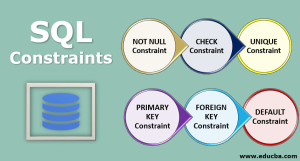




 Admission Open

 Admission Closed
 Admission Closed
 Admission Closed

 ROI Calculator