Computers may look sophisticated, but at their core, they operate using an extremely simple language made up of just two digits: 0 and 1.
Every website, mobile app, ATM transaction, social media post, and online purchase ultimately runs on binary numbers. These binary values represent electrical signals that computers use to process and store information.
However, humans are more comfortable using the decimal number system, which includes digits from 0 to 9.
Because of this difference, students, programmers, engineers, and data professionals frequently need to understand how to convert binary to decimal.
Whether someone is learning programming, preparing for exams, or trying to understand how computers work internally, binary conversion is a fundamental concept.
This complete guide explains:
How to convert binary number into decimal number step-by-step
Logic behind binary number systems
Conversion shortcuts
Practical examples
How to convert decimal to binary in calculator
Real-world use cases
Practice questions to test understanding
The explanations are simple, conversational, and beginner-friendly.
Understanding how to convert binary to decimal is one of the most fundamental skills required in mathematics, programming, and computer science.
Binary numbers form the backbone of computing systems.
By learning:
How to convert binary number into a decimal number
Positional value logic
How to convert decimal to binary in calculator
Real-life applications
Learners can develop strong analytical thinking skills.
Binary conversion becomes easier with practice.
Mastering number systems creates a strong foundation for programming, data science, and emerging technologies in 2026 and beyond.
Frequently Asked Questions
Write powers of 2 under each binary digit starting from the right. Multiply each binary digit by its corresponding power of 2. Add the results to obtain the decimal equivalent. This method is widely used in mathematics and programming.
Start from the rightmost digit and multiply each digit by increasing powers of 2. Add all the results to obtain the decimal value. Practising small binary numbers helps build confidence and improves speed.
Computers use binary because electronic circuits operate in two states: ON and OFF. Binary digits 1 and 0 represent these states efficiently. This simplifies data processing, storage, and communication inside computer systems.
Scientific calculators include number system modes that allow conversion between decimal and binary formats. Users can enter decimal numbers and convert them instantly. Online tools also provide fast results.
Binary conversion is used in programming, cybersecurity, networking, AI, and electronics. Every digital system processes information using binary numbers, making this concept extremely important in technology fields.
Yes. Binary helps programmers understand how data is stored and processed internally. Concepts like memory, data representation, and machine-level operations rely heavily on binary logic.
Dr. Sanjay Kulkarni
Data & AI Transformation Leader
Dr. Sanjay Kulkarni is a Data & AI Transformation Leader with over 25 years of industry experience. He helps organizations adopt data-driven and responsible AI practices through strategic guidance and education. With experience across startups and global enterprises, he bridges the gap between theory and real-world application. His work empowers teams to innovate and thrive in AI-driven environments.
Get Free Upskilling Guidance
Fill in the details for a free consultation
Related Courses
Explore our programs
Admission Open
Post Graduate Certification Programme in Business Analytics & Artificial Intelligence (AI) Applications

 March 26, 2026
 4 min read





 ChatGPT
 Perplexity
 Claude
 Grok
Grok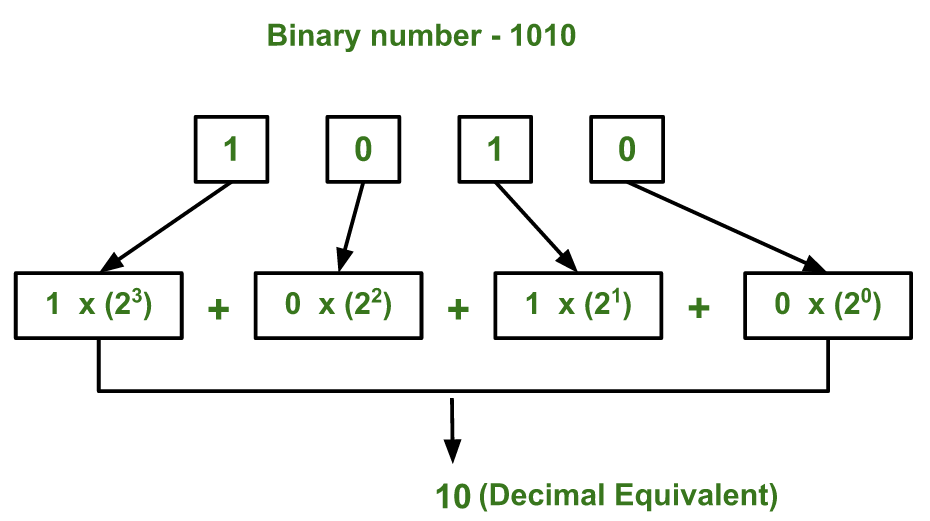






 Admission Open
 Admission Closed
 Admission Closed
 Admission Open

 ROI Calculator