Why a Payment Gateway India Businesses Rely On Matters
How Payment Gateway Works: A Step-by-Step Process
Payment Gateway vs. Payment Processor vs. Payment Aggregator
Key Insights
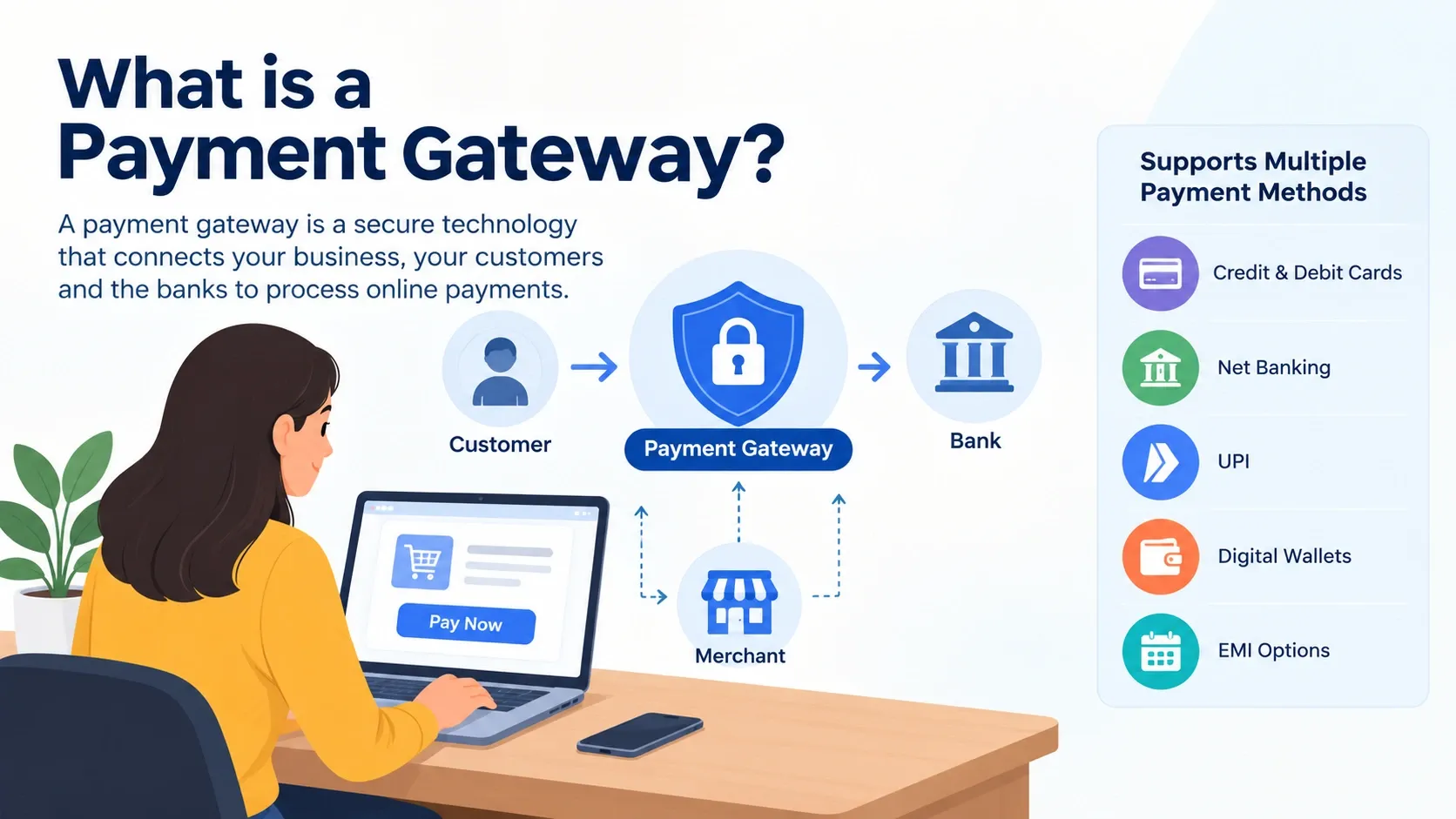
A payment gateway securely collects, encrypts, and transfers payment information between customers, merchants, and banks to authorize or decline online transactions.
Payment gateways support multiple payment methods, including UPI, credit and debit cards, net banking, digital wallets, and EMI options, helping businesses offer a convenient checkout experience.
The main types of payment gateways include hosted, self hosted, API based, platform based, and local bank gateways, each offering different levels of customization and security responsibilities.
Choosing the right payment gateway requires comparing transaction fees, payment success rates, settlement speed, security standards, integration support, and customer service.
In this blog, you'll learn the meaning of payment gateways, how they work, their types, key features, security measures, Cashfree payment gateway services, how to integrate a gateway into a website, and how to choose the best payment gateway in India.
Online shopping, food delivery, bill payments, and digital subscriptions have become part of everyday life in India. Behind every successful online payment, there is a technology that quietly moves money from a customer to a business in a matter of seconds. That technology is called a payment gateway.
For business owners, understanding how a payment gateway works is no longer optional. Whether you run a small online store, a service website, or a growing app, the right payment setup canimprove sales, build customer trust, and reduce failed transactions. In this blog, we explain the meaning of a payment gateway, its types, how the process works, how to integrate one into your website, and how to choose the right provider.
A payment gateway is a technology service that securely collects, encrypts, and transfers payment information between a customer, a merchant, and the banks involved in a transaction. You can think of it as the digital version of a card swipe machine at a physical store. Just as the machine reads your card and sends the details to the bank for approval, a payment gateway does the same thing for online purchases.
Its main job is to authorize or decline a payment. When a customer clicks “Pay Now,” the gateway sends the payment details to the bank in a protected format, receives a response, and informs the merchant whether the payment was successful. All of this usually happens within a few seconds.
A payment gateway supports many payment methods, including credit and debit cards, net banking, UPI, digital wallets, and EMI options. This flexibility lets customers pay in the way they prefer, which is important in a diverse market like India.
Why a Payment Gateway India Businesses Rely On Matters
The growth of digital payments in India has been remarkable. The Unified Payments Interface (UPI) alone now handles billions of transactions every month, and more shoppers are comfortable paying online than ever before. For any business operating a website or app, a reliable payment gateway India customers trust has become a basic requirement.
Here is why it matters:
Wider customer reach. Customers across cities and towns can pay you from anywhere, at any time.
Multiple payment options. Offering UPI, cards, wallets, and net banking reduces the chance that a customer abandons the cart.
Faster settlements. Many gateways transfer funds to your bank account within one or two business days, and some offer quicker options.
Stronger security. Encryption and fraud checks protect both you and your customers.
Better record keeping. Dashboards and reports make reconciliation, accounting, and tax filing easier.
In India, online payment companies that handle merchant funds are regulated by the Reserve Bank of India (RBI). Payment aggregators must be authorized, and they must follow guidelines on security, data storage, and settlement. This adds a layer of safety for businesses and consumers alike.
How Payment Gateway Works: A Step-by-Step Process
Many people want to know how payment gateway works behind the scenes. The process looks complicated, but it can be broken down into a few simple steps.
The customer places an order. The shopper adds products to the cart, goes to checkout, and selects a payment method such as a card or UPI.
Payment details are encrypted. When the customer enters card details or approves a UPI request, the gateway encrypts the information so that it cannot be read or misused while traveling over the internet.
The request goes to the payment processor. The gateway passes the encrypted data to the payment processor, which communicates with the card network, such as Visa, Mastercard, or RuPay, or with the UPI system.
The issuing bank reviews the request. The customer’s bank checks whether the account is valid, the funds are available, and the transaction looks genuine. It may also ask for extra verification, such as a one-time password (OTP).
The bank approves or declines. The bank sends its decision back through the same route to the gateway.
The customer sees the result. The gateway shows a success or failure message on the checkout page, and the merchant receives a confirmation.
Settlement happens. The money moves from the customer’s bank to the merchant’s bank account after deducting applicable fees. This usually takes one to three business days, depending on the provider and the agreement.
Although this feels like a long journey, the entire authorization part is completed in just a few seconds.
Payment Gateway vs. Payment Processor vs. Payment Aggregator
These terms are often used together, so it helps to know the difference.
Payment gateway: The technology that captures and securely transmits payment data from the customer to the processor and back.
Payment processor: The entity that handles the actual communicationwith banks and card networks to approve the transaction.
Payment aggregator: A company that lets many merchants accept online payments under a single account. Merchants do not need to set up their own bank arrangements, which makes onboarding faster and simpler.
Most modern providers in India combine these roles into one service, so business owners can sign up, integrate, and start accepting payments without dealing with each layer separately.
Types of Payment Gateways
Payment gateways can be grouped based on how they handle the checkout experience and the payment data. Understanding these types helps you pick the one that suits your business.
Hosted payment gateway. The customer is redirected to the gateway’s secure page to enter payment details. Once the payment is done, they return to your website. This option is easy to set up and reduces your security burden, since sensitive data never touches your server. It is a good choice for small and medium businesses.
Self-hosted (direct) payment gateway. Customers enter their details directly on your website, and the data is sent to the gateway from your server. This gives you full control over the checkout design, but you must follow strict security standards such as PCI DSS, which can be costly and complex.
API-based payment gateway. The gateway offers APIs that developers can use to build a customized payment experience inside a website or app. Customers stay on your platform throughout the process. It suits businesses with technical teams that want a seamless, branded checkout.
Platform-based payment gateway. Some e-commerce platforms come with built-in payment features or plug-ins. Merchants can enable them with minimal setup, which is helpful for those who do not have a development team.
Local bank payment gateway. Here, payments are processed through a specific bank’s network. These are often used by large businesses or institutions with direct bank relationships.
Key Features to Look For in a Payment Gateway
Before choosing a provider, review the features that affect your daily operations:
Payment method coverage. Look for support for UPI, cards, net banking, wallets, and EMI.
Transparent pricing. Understand setup fees, transaction charges, and any hidden costs.
Security and compliance. Check for PCI DSS compliance, tokenization, and fraud detection tools.
Success rate and uptime. A gateway with a high success rate means fewer failed payments and happier customers.
The Cashfree payment gateway is one of the well-known options among Indian businesses. Cashfree Payments is a financial technology company that offers a suite of services, including payment collection, payouts, payment links, and subscription tools. Startups,e-commercebrands, and large enterprises use it to accept payments online.
Businesses often consider the Cashfree payment gateway for a few reasons:
Multiple payment modes. It supports cards, UPI, net banking, wallets, and other popular options.
Developer-friendly integration. Cashfree offers APIs, SDKs, and plug-ins for common platforms, which can simplify the setup.
Payment links and no-code tools. Small sellers can collect payments by sharing a link, without building a website.
Payouts and settlements. Beyond collecting money, businesses can manage vendor payments, refunds, and disbursements from one place.
As with any provider, you should check the latest pricing, onboarding requirements, and supported features on the official website before signing up, since terms can change over time.
Which Is the Best Payment Gateway in India?
This is one of the most common questions business owners ask: which is the best payment gateway in India? The honest answer is that there is no single best option for everyone. The right choice depends on your business size, industry, technical resources, and budget.
Some widely used names in the Indian market include Razorpay, Cashfree Payments, PayU, CCAvenue, PhonePe Payment Gateway, and Paytm Payment Gateway. Each has its own strengths, such as quick onboarding, strong developer tools, wide payment coverage, or special features for subscriptions and marketplaces.
To decide which is the best payment gateway in India for your needs, compare providers on these points:
Business type. A small online store, a SaaS company, and a marketplace have very different requirements.
Total cost. Compare transaction fees, setup costs, and charges for refunds or chargebacks.
Payment success rate. Ask about performance, especially for UPI and cards, since failed payments directly reduce revenue.
Integration ease. Check whether the provider offers plug-ins for your platform or clear APIs for custom builds.
Settlement timeline. Faster payouts help with working capital.
Support and reliability. Read reviews and test the support team before committing.
International payments. If you plan to sell overseas, confirm that multi-currency support is available.
A practical tip is to shortlist two or three providers, review their documentation, and run a small pilot. Real experience with your own customers will tell you more than any comparison chart.
How to Integrate Payment Gateway in Website
Many beginners ask how to integrate payment gateway in website without technical headaches. While the exact steps vary by provider, the general process is similar.
Step 1: Choose a provider and create an account. Sign up with your selected gateway and submit the required details about your business.
Step 2: Complete KYC and verification. You will usually need to provide your PAN, business registration documents, bank account details, and website information. Approval can take a few days.
Step 3: Get your API keys. Once approved, the provider gives you a set of credentials, typically a public key and a secret key. Keep the secret key safe and never expose it in front-end code.
Step 4: Test in sandbox mode. Most gateways offer a test environment with dummy card numbers and UPI IDs. Use it to confirm that orders, success messages, and failures behave correctly.
Step 5: Integrate using the method that fits you. You have three common options:
Plug-in or extension. If your site runs on WordPress, Shopify, WooCommerce, or similar platforms, install the gateway’s plug-in and enter your keys.
Hosted checkout page. Redirect customers to the gateway’s secure page. This needs minimal coding.
API or SDK integration. Developers can embed the payment flow directly into the website or app for a more customized experience.
Step 6: Set up webhooks. Webhooks notify your server when a payment succeeds, fails, or is refunded. They ensure your order status stays accurate, even if the customer closes the browser early.
Step 7: Test again and go live. Run a few real low-value transactions, verify settlements, and then switch from test to live mode.
A few best practices will help: use HTTPS on your entire website, verify payment signatures on your server, display clear refund and privacy policies, and keep a record of all transactions for reconciliation.
Trust is the foundation of online payments. Reputable gateways use several layers of protection:
Encryption (SSL/TLS) to protect data in transit.
Tokenization, which replaces sensitive card details with a unique token, so actual card numbers are not stored by merchants.
PCI DSS compliance, a global security standard for handling card data.
Two-factor authentication, such as OTPs, for added verification.
Fraud detection systems that flag unusual behavior.
In India, the RBI has also introduced rules on card data storage and authentication, which encourage safer practices across the industry. As a merchant, you should always choose providers that follow these standards.
Conclusion
A payment gateway is the link that makes online payments quick, secure, and reliable. By understanding its meaning, types, and the process behind it, you can make better decisions for your business. Whether you are exploring the Cashfree payment gateway or comparing other options, focus on security, pricing, success rates, and ease of integration. Start small, test carefully, and choose the partner that supports your growth. With the right payment gateway India customers can trust, you can offer a smooth checkout experience and buildlasting confidence in your brand.
Frequently Asked Questions
A payment gateway is a service that securely carries payment information from a customer to a business and its bank. It checks whether the payment is approved and then confirms the result to both sides, usually within a few seconds.
When a customer pays, the gateway encrypts the payment details and sends them to the payment processor. The processor contacts the customer’s bank or UPI network, which approves or declines the request. The result is sent back to the customer and the merchant, and the money is settled into the merchant’s account after a short period.
There is no single answer, because the best choice depends on your needs. Popular options include Razorpay, Cashfree Payments, PayU, CCAvenue, and others. Compare pricing, supported payment methods, onboarding time, and support quality, and then test one or two before deciding.
Sign up with a provider, complete KYC, collect your API keys, and test in sandbox mode. Then add the gateway using a plug-in, hosted checkout, or API integration, set up webhooks, and switch to live mode after a few successful test payments.
Arif Siddiqui
Head of Accounting and Treasury
Arif Siddiqui is a finance leader specializing in accounting, treasury, and financial strategy. As Head of Finance at Generali Employee Benefits, he brings extensive experience in managing global financial operations. He is known for driving financial efficiency and governance across organizations. His leadership supports sustainable business growth and financial excellence.
Get Free Upskilling Guidance
Fill in the details for a free consultation
Related Courses
Explore our programs
Post Graduate Certificate Programme in FinTech, AI in Finance, and Risk Management

 October 31, 2026
 10 min read




 Key Insights
 ChatGPT
 Perplexity
 Claude
 Grok










 ROI Calculator