Digital banking apps make everyday banking faster and more convenient, allowing users to manage accounts, transfer money, pay bills, handle deposits, and access financial services without visiting a branch.
A good bank mobile app should offer essential banking, smart money, and support features, including fund transfers, bill payments, deposits, investments, spending insights, alerts, and in-app customer support.
Mobile banking uses multiple security layers such as strong authentication, two-factor verification, encryption, device binding, session timeouts, fraud monitoring, and regulatory oversight to protect users.
Most digital banking risks come from human mistakes, including phishing, vishing, fake apps, and screen-sharing scams. Users can improve security by using official apps, protecting their OTPs, keeping software updated, and enabling transaction alerts.
Choosing the right mobile banking application depends on your needs and security preferences, including the bank or provider, ease of use, available services, security features, user reviews, and customer support.
In this blog, you'll learn… how digital banking apps work, their key features and security measures, popular apps in India, HDFC Bank Internet banking, safe banking habits, how to choose an app, and the future of digital banking.
Think back to the last time you stood in a bank queue. Now think about the last time you transferred money from your sofa in under a minute. That gap is exactly why digital banking apps have become part of everyday life in India. Paying rent, splitting a restaurant bill, investing in a fixed deposit or checking a loan balance now takes a few taps.
But with so many choices and so many promises, a few questions naturally come up. Which app is right for me? Is it really safe? And what actually happens behind the screen when I press "Pay"?
This blog answers all of that in plain language. We will look at how mobile banking apps work, the features worth looking for, the security layers protecting you, how some of the best-known apps compare, and even how traditional options like HDFC Bank Internet banking fit into the picture.
Digital banking apps let you carry out banking activities online without visiting a branch. They are offered either by traditional banks (such as HDFC Bank, SBI, ICICI Bank, and Axis Bank) or by digital-first institutions andfintech platforms working with licensed banks.
A good way to see the difference:
A bank mobile app is the official app of a bank, linked directly to your savings, current, loan or card accounts held with that bank.
A payments or UPI app (like Google Pay or PhonePe) works across many banks and focuses mainly on payments, though many now add extra financial services.
A neobank or digital-first app offers banking features through a partner bank, usually with a very smooth, modern interface.
All three fall under the broad umbrella of digital banking, but when people say “banking app,” they usually mean the first one.
How Do Mobile Banking Apps Actually Work
It feels like magic, but the process is surprisingly logical. Here is what happens in the background when you use a mobile banking application.
You log in. The app verifies who you are using your MPIN, password, fingerprint, or face ID.
Your device is recognized. Most apps use device binding, which links your account to your registered mobile number and SIM so strangers cannot simply install the app and get in.
The request is encrypted. When you tap “Send Money,” your instructions are scrambled into unreadable code before leaving your phone.
The bank’s server checks everything. It confirms your balance, daily limits, and any risk flags.
The payment network processes it. Depending on the method, the transfer travels through UPI, IMPS, NEFT or RTGS rails.
You get confirmation. An on-screen message and an SMS or notification confirm the transaction.
The whole journey usually finishes in seconds, which is why UPI and IMPS transfers feel instant.
Must-Have Features in a Good Bank Mobile App
Not every app is equal. When you are choosing or evaluating a bank mobile app, look for these features.
Everyday Banking Essentials
Account balance and mini statements: Check balances and recent transactions without visiting an ATM.
Fund transfers: Send money through UPI, IMPS, NEFT, or RTGS to saved beneficiaries.
Bill payments and recharges: Electricity, water, gas, broadband, DTH, and mobile recharges in one place.
Cheque and card services: Request a chequebook, block a lost card, or change card limits instantly.
Smart Money Features
Fixed and recurring deposits: Open and manage deposits within minutes.
Loans and credit cards: Check pre-approved offers, apply, and track EMIs.
Investments: Many apps now let you buy mutual funds, track SIPs, or explore insurance.
Spending insights: Category-wise breakdowns that show where your money really goes each month.
Convenience and Support
Instant alerts and notifications for every transaction.
In-app customer support through chat or an AI assistant.
Offers and cashback on shopping, travel, and dining.
Multilingual support, which is a real advantage in a country with so many regional languages.
Top Digital Banking Apps in India: A Quick Look
There is no single “best” app for everyone, but these are among the most widely used names. Features change often, so always check the latest version on the app store.
1. HDFC Bank MobileBanking App and PayZapp
HDFC Bank offers its MobileBanking App for customers who want to access their banking services digitally. Users can manage their accounts, check balances, review transaction history, transfer money, pay utility bills, and access various banking services. The app also offers features related to debit and credit card management, helping customers monitor their financial activities conveniently.
PayZapp, another digital payment offering from HDFC Bank, focuses on making everyday transactions easier. It supports digital payments and provides access to selected offers and payment-related services. While the MobileBanking App is more suitable for comprehensive banking requirements, PayZapp can be useful for users looking for a convenient digital payment experience.
2. SBI YONO
YONO, offered by the State Bank of India (SBI), brings several banking and lifestyle services together on a single platform. It allows eligible customers to access banking facilities, check account details, transfer funds, pay bills, and explore other financial services. Its integration of banking and shopping-related features makes it different from apps that focus exclusively on money transfers.
YONO can be particularly useful for SBI customers who prefer managing multiple financial activities through one application. Depending on eligibility and availability, users may also find services related to deposits, loans, investments, and other SBI offerings. Customers should review the app’s current features and eligibility requirements before using specific services.
3. ICICI iMobile Pay
ICICI Bank’s iMobile Pay provides access to a broad range of digital banking and payment facilities. Customers can check account balances, transfer funds, pay bills, manage cards, and access other banking services through the application. Its UPI functionality also supports convenient digital transactions.
One notable feature is that selected payment services may be available to users who are not ICICI Bank customers, subject to the applicable requirements. This makes the app worth considering for people who want to explore digital payment facilities alongside banking services. However, the features available to existing customers and non-customers may differ.
4. Axis Mobile
Axis Mobile is Axis Bank’s digital banking application, designed to help customers manage their accounts and perform routine transactions without visiting a branch. Users can access account information, transfer money, pay bills, and use available card management features. These facilities make it useful for people who regularly handle their banking through a smartphone.
The app also provides access to eligible banking products and services, depending on the customer’s account and requirements. Its combination of account management, payments, and card-related controls can help users keep track of their everyday financial activities. Before choosing the app, customers should check its current interface, available services, and device compatibility.
5. Kotak Mobile Banking and Kotak 811
Kotak Mahindra Bank offers its Mobile Banking app for customers who want to access banking services digitally. Common facilities include checking balances, reviewing transactions, transferring money, paying bills, and managing eligible banking products. The app is designed to make routine account-related tasks more convenient.
Kotak 811, meanwhile, is associated with Kotak’s digital savings account offering. It is particularly relevant to users exploring digital account opening and paperless banking options, subject to eligibility and verification requirements. Together, these offerings cater to customers looking for convenient ways to open or manage accounts and access savings-related services.
6. Google Pay, PhonePe, and Paytm
Google Pay, PhonePe, and Paytm are popular digital payment platforms that support everyday transactions. Their UPI features allow users to send and receive money, make merchant payments, and pay participating service providers directly through their smartphones.
Google Pay is widely used for person-to-person transfers and merchant payments. PhonePe combines UPI payments with selected recharges, bill payments, and other financial services. Paytm also offers digital payments, recharges, bill payments, and access to additional services, depending on availability and eligibility.
Unlike full-service bank apps, these platforms primarily focus on payments and related financial activities. Their exact features, offers, and supported services can change over time. Users should also understand that a payment app is not necessarily a replacement for their bank’s official mobile banking application.
Ultimately, the best digital banking app depends on whether you need comprehensive account management, digital savings facilities, or quick UPI payments. Before installing an app, verify the developer, review permissions, and download it only from an official app store or the bank’s verified website. Always use secure authentication and never share your UPI PIN, passwords, or one-time passwords with anyone.
A quick tip: if you want everything, such as your savings account, loans, deposits and cards, in one place, a full bank-issued app usually serves you best. If you mostly pay friends and shops, a UPI app may feel quicker and lighter.
Free Courses
Finance for All – Free Finance Certification Course
This is the question that matters most. The honest answer: mobile banking apps are generally very safe when you use them properly, because banks layer several protections on top of each other.
Security Layers Built Into Banking Apps
Strong authentication. Logging in requires something you know (MPIN or password) and often something you are (fingerprint or face recognition).
Two-factor verification. Sensitive actions, such as adding a new payee or making a large transfer, usually need an OTP or extra confirmation.
End-to-end encryption. Your data is scrambled while travelling between your phone and the bank, so anyone intercepting it sees only gibberish.
Device binding. The app is tied to your registered phone number and device, which blocks unauthorized installs.
Session timeouts. If you leave the app idle, it logs you out automatically.
Fraud monitoring. Banks use systems that watch for unusual behaviour, like a sudden large payment from a new location, and can pause or flag it.
Regulatory oversight. In India, the Reserve Bank of India (RBI) sets security and customer protection rules that banks must follow.
Where Risks Still Exist
Here is the catch: the technology is strong, but most fraud happens through human mistakes. Common traps include:
Phishing messages and fake links pretending to be from your bank.
Vishing calls where someone poses as a bank executive and asks for your OTP.
Fake apps that imitate real banking apps.
Screen-sharing scams where you are tricked into installing remote access software.
Remember this one golden rule: your bank will never ask for your PIN, password, CVV, or OTP, whether over a call, SMS, or email.
The Future of Digital Banking
The next few years look exciting. Expect digital banking apps to lean more heavily on artificial intelligence for personalized advice, voice-based banking in regional languages, smarter fraud detection, and even more seamless payments. Features like instant credit, wealth management, and unified financial dashboards are becoming common, so your banking app may soon feel more like a personal financial assistant than a simple transaction tool.
Digital banking is not just about convenience anymore; it is about control, speed, and smarter money habits. Whether you rely on a bank mobile app for daily payments or prefer HDFC Bank Internet banking for detailed account management, the key is to choose a trusted platform and practice basic digital safety.
Get the combination right, and your phone becomes one of the most powerful money tools you own.
Frequently Asked Questions
Yes, they are generally safe when you download the official app and follow good habits. Banks use encryption, device binding, biometric login, and fraud monitoring to protect your account. The biggest risks come from sharing OTPs or clicking suspicious links, so stay alert.
Mobile banking is done through a bank mobile app on your smartphone, while internet banking, such as HDFC Bank Internet banking, is accessed through a bank’s website on a computer or browser. Both link to the same account, but apps are built for quick, on-the-go tasks, and NetBanking suits detailed or longer tasks.
In most cases, yes. Many banks let you register for mobile banking using your debit card details and registered mobile number, or through video verification. Some services may still need a branch visit depending on the bank’s rules.
Act fast. Call your bank’s helpline to block your cards and temporarily restrict mobile or UPI access, lock your SIM through your telecom provider, and use another device to change your passwords. Also report the loss to the police if needed, and file a complaint with your bank.
Arif Siddiqui
Head of Accounting and Treasury
Arif Siddiqui is a finance leader specializing in accounting, treasury, and financial strategy. As Head of Finance at Generali Employee Benefits, he brings extensive experience in managing global financial operations. He is known for driving financial efficiency and governance across organizations. His leadership supports sustainable business growth and financial excellence.
Get Free Upskilling Guidance
Fill in the details for a free consultation
Related Courses
Explore our programs
Professional Certificate Programme in Investment Banking, Risk & Capital Markets

 October 9, 2026
 9 min read




 Key Insights
 ChatGPT
 Perplexity
 Claude
 Grok
Grok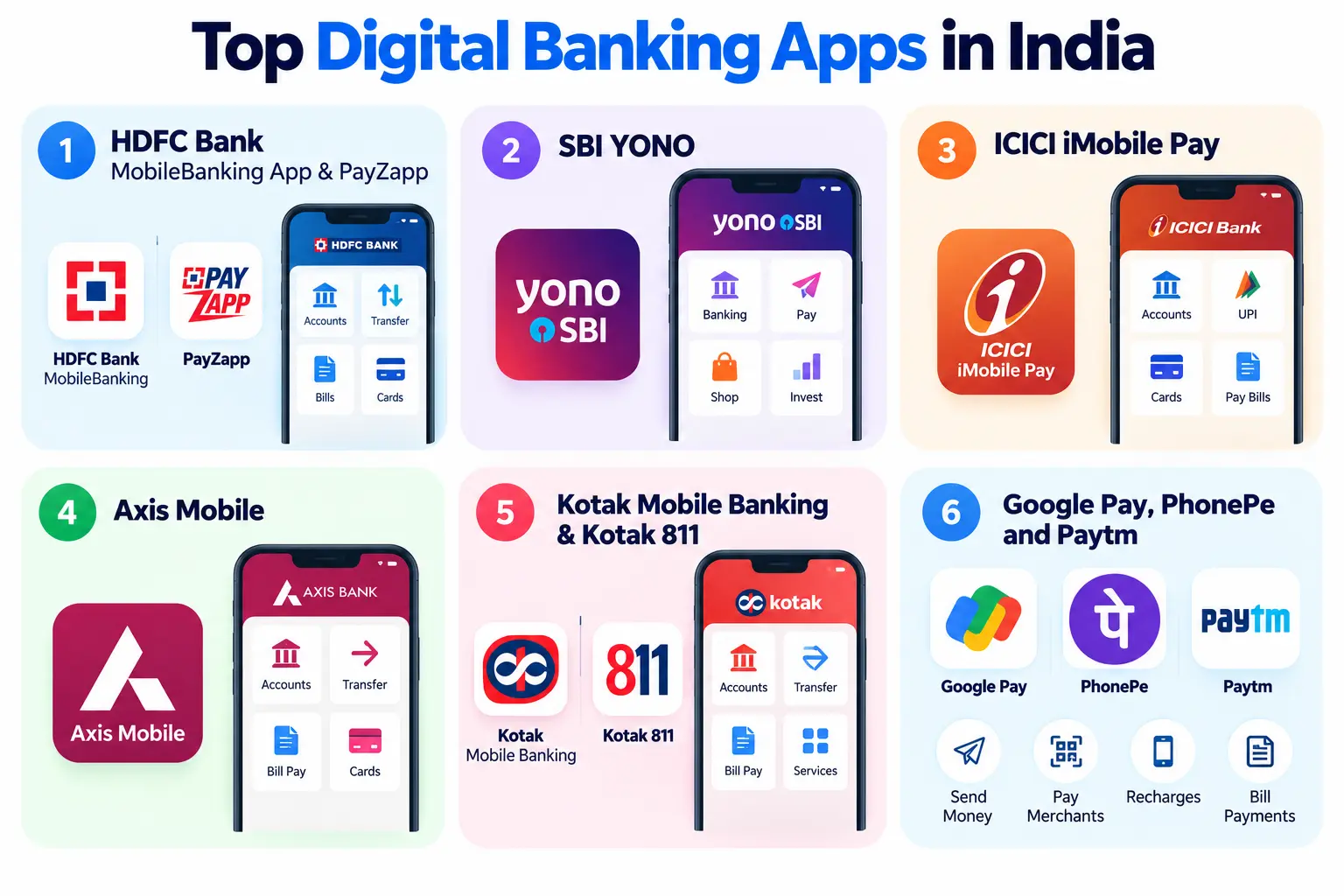








 ROI Calculator