
How to Build a LinkedIn Profile: Tips to Stand Out
 September 2, 2026
 8 min read




Table Of Content
- Why Is a Strong LinkedIn Profile Important?
- How to Build a LinkedIn Profile Step by Step
- How to Make Your LinkedIn Profile Attractive to Recruiters
- Optimize Your Experience Section
 Key Insights
- A strong LinkedIn profile helps professionals present their skills, experience, achievements, and career goals while building a professional brand and network.
- Effective LinkedIn optimisation involves using a professional photo, strong headline, compelling About section, relevant keywords, updated experience, skills, certifications, and education.
- To make your LinkedIn profile attractive to recruiters, focus on relevant keywords, highlight achievements, keep your experience updated, and maintain consistency across your profile.
- Building a LinkedIn presence requires more than creating a profile. Sharing useful content, engaging in professional conversations, building relevant connections, and showcasing selected work can strengthen your professional presence.
- In this blog, you'll learn how to build a LinkedIn profile, make your resume and portfolio stand out, attract recruiters, build a LinkedIn presence, optimize your profile, and avoid common LinkedIn mistakes.
In 2026, having a strong LinkedIn profile is increasingly important for professionals, job seekers, students, and entrepreneurs. LinkedIn reported in April 2026 that it has more than 1.3 billion members, with more than 70 million companies listed on the platform. (LinkedIn Pressroom) With such a large professional audience, simply having a profile is not enough. Your profile needs to clearly communicate your skills, experience, career goals, and professional value. Whether you are searching for a job, changing careers, building your network, or showcasing your expertise, knowing how to build LinkedIn profile effectively can help you create a stronger professional presence.
 ChatGPT
 Perplexity
 Claude
 Grok
GrokWhy Is a Strong LinkedIn Profile Important?
LinkedIn is more than an online resume. It can function as a professional identity, networking platform, career discovery tool, and place to demonstrate your expertise.
Recruiters and hiring professionals can use LinkedIn to discover candidates, review professional backgrounds, understand skills, and assess whether someone’s experience aligns with an opportunity. LinkedIn also provides professionals with opportunities to share knowledge and participate in industry conversations.
A well-structured profile can therefore help you:
- Present your professional experience clearly
- Highlight relevant skills and achievements
- Build professional connections
- Showcase projects and work samples
- Increase your visibility to recruiters
- Establish a professional brand
- Discover career and networking opportunities
The goal of LinkedIn optimisation should not simply be to fill every available profile section. Instead, your profile should tell a consistent professional story.
How to Build a LinkedIn Profile Step by Step
If you are wondering how to build LinkedIn profile from scratch, focus on the following sections.
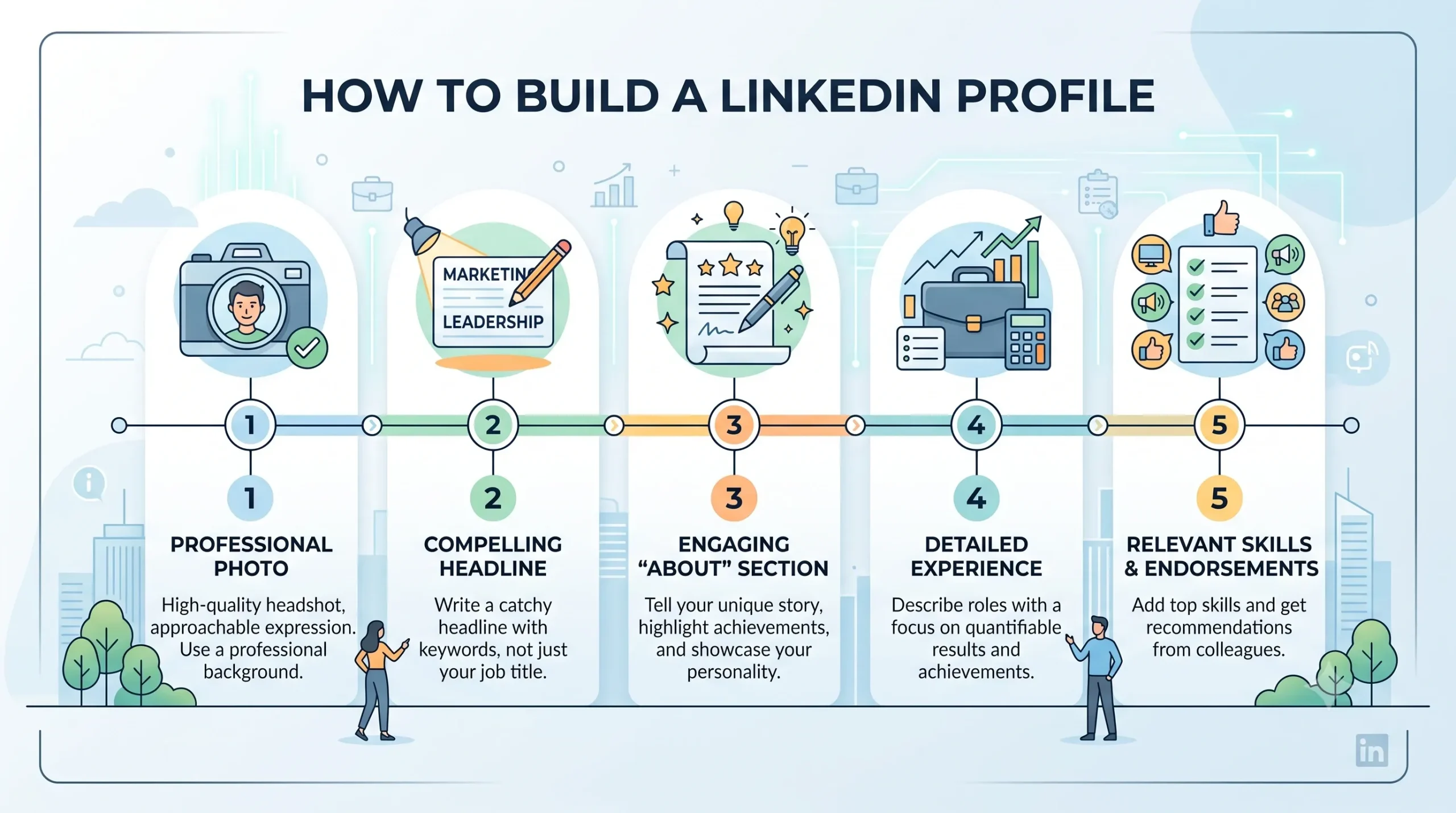
1. Use a Professional Profile Photo
Your profile photo is one of the first elements people notice.
Choose a clear, recent photograph where your face is visible. Use good lighting and a simple background. Your clothing should also be appropriate for your industry and professional goals.
Avoid using group photographs, heavily edited images, unclear pictures, or casual photos that do not represent your professional identity.
2. Create a Strong Headline
Your headline appears prominently alongside your name and profile photo. It should communicate what you do and the professional value you offer.
Instead of using only a job title, consider combining your role, specialization, and key expertise.
For example:
Digital Marketing Specialist | SEO | Content Strategy | Brand Growth
A strong headline can make your profile easier to understand when someone discovers it through search, networking, or professional conversations.
3. Write a Compelling About Section
The About section gives you an opportunity to explain your professional story in your own words.
Start with what you currently do or specialize in. Then discuss your key skills, experience, achievements, interests, and career direction.
Keep the writing easy to scan. Short paragraphs can make the section more readable than one large block of text.
You can structure it around:
- Who you are professionally
- What you specialize in
- What you have accomplished
- What skills you bring
- What areas you are interested in
- What opportunities or connections you are looking for
Avoid turning the About section into a list of generic buzzwords. Use specific skills and experiences that support your professional positioning.
How to Make Your LinkedIn Profile Attractive to Recruiters
If your objective is to understand how to make your LinkedIn profile attractive to recruiters, focus on relevance, clarity, and evidence.
Recruiters should be able to understand your professional background quickly.
Use Relevant Keywords
Think about the roles you want to pursue and identify the skills, job titles, tools, and areas of expertise commonly associated with them.
For example, someone targeting a data analytics role might naturally mention relevant areas such as:
- Data analytics
- SQL
- Power BI
- Excel
- Data visualization
- Business intelligence
Use relevant keywords naturally across your headline, About section, experience, skills, and other appropriate areas.
Highlight Achievements
Your experience section should not simply describe your responsibilities. Where possible, demonstrate what you achieved.
Instead of:
Managed social media accounts.
You could write:
Managed social media campaigns and developed content strategies to improve audience engagement.
The second version provides more context about the contribution you made.
Keep Your Experience Updated
Review your profile regularly and update your current role, responsibilities, skills, certifications, projects, and accomplishments.
An outdated profile may not accurately represent your current professional capabilities.
Optimize Your Experience Section
Your Experience section should provide a clear picture of your career progression.
For each relevant position, include:
- Job title
- Company
- Employment period
- Key responsibilities
- Important achievements
- Relevant skills or projects
Focus on experiences that support your current career direction. If you have several years of experience, you do not necessarily need to provide extensive detail for every older position.
Use concise descriptions and action-oriented language to make the section easier to read.
Add Relevant Skills
The Skills section can reinforce your professional expertise.
Select skills that are relevant to your target roles rather than adding every skill you have encountered.
For example, a product management professional might highlight skills such as product strategy, market research, product development, stakeholder management, and data analysis.
Keep your skills aligned with the rest of your profile. If your headline says you specialize in SEO but SEO is absent from your skills and experience, your profile may appear inconsistent.
Showcase Certifications and Education
Professional certifications can add credibility to your profile, particularly when they are relevant to your target career.
Add applicable certifications, courses, degrees, and educational qualifications. Include the institution and relevant details where appropriate.
Students and recent graduates can use the Education section to highlight academic projects, activities, coursework, achievements, and relevant experiences.
How to Make a Resume on LinkedIn
A common question among job seekers is how to make a resume on LinkedIn.
LinkedIn can help you build a professional profile that contains much of the information typically included in a resume, such as education, experience, skills, certifications, projects, and achievements.
However, your LinkedIn profile and resume do not need to be identical.
Your resume should generally be tailored to a specific job application, while your LinkedIn profile can provide a broader view of your professional background.
Before applying for a position, review your LinkedIn profile and resume together. Make sure important information such as job titles, dates, qualifications, and key achievements is consistent.




How to Create a Portfolio on LinkedIn
If you work in a field where examples of your work matter, learning how to create a portfolio on LinkedIn can help you demonstrate your capabilities.
A portfolio can be particularly useful for professionals in areas such as:
- Content writing
- Graphic design
- Marketing
- Software development
- Data analytics
- Product management
- Consulting
- Photography
- UI/UX design
You can showcase relevant projects, presentations, articles, publications, certifications, or other professional work through appropriate LinkedIn profile sections and featured content.
For example, a content writer could highlight published articles, while a designer could showcase selected design projects.
The key is to prioritize quality and relevance instead of uploading everything you have ever created.
Request Recommendations
Recommendations can provide additional perspectives on your professional capabilities.
You can request recommendations from people who have worked with you, such as managers, colleagues, clients, mentors, or project collaborators.
A useful recommendation should ideally provide context about your work, strengths, collaboration style, or contributions rather than simply saying that you are a good professional.
You can also provide thoughtful recommendations to people you have genuinely worked with. Professional relationships are often strengthened through meaningful recognition.
How to Build a LinkedIn Presence
Creating a profile is only the first step. If you want to understand how to build a LinkedIn presence, you also need to participate consistently.
Share Useful Content
You do not need to post every day. Instead, focus on sharing content that reflects your professional interests and knowledge.
You could post about:
- Industry developments
- Lessons from projects
- Professional experiences
- Career insights
- Useful resources
- Skills you are learning
- Industry events
- Relevant achievements
LinkedIn’s 2026 updates indicate that original posts increased 14% year over year, while knowledge-oriented comments increased 11%. (LinkedIn Pressroom) This highlights the platform’s continuing focus on professional knowledge and conversations.
Engage With Other Professionals
Building a presence is not only about publishing posts.
Comment thoughtfully on relevant discussions, congratulate connections on professional achievements, participate in industry conversations, and share useful perspectives.
Avoid comments that add no value, such as simply writing “Great post!” Instead, contribute an observation, question, example, or useful perspective.
Build a Relevant Network
Quality matters more than simply accumulating connections.
Connect with professionals from your industry, alumni, colleagues, recruiters, mentors, subject-matter experts, and people whose work genuinely interests you.
When sending a connection request, a short personalized message can make the interaction more meaningful.
LinkedIn Optimisation: A Practical Checklist
Effective LinkedIn optimisation is an ongoing process rather than a one-time task.
Use this checklist to review your profile:
| Profile Element | What to Check |
| Profile photo | Professional and recent |
| Headline | Clear role and expertise |
| About section | Strong professional story |
| Experience | Updated and achievement-focused |
| Skills | Relevant to target roles |
| Education | Complete and accurate |
| Certifications | Relevant credentials added |
| Portfolio | Selected work samples |
| Recommendations | Meaningful professional feedback |
| Activity | Consistent and relevant engagement |
Review your profile every few months and make updates as your skills, experience, and career goals change.
Common LinkedIn Profile Mistakes to Avoid
Even a complete profile can become less effective if it contains common mistakes.
Using a Generic Headline
A headline such as “Looking for Opportunities” tells recruiters very little about your professional capabilities.
Writing a Resume-Like About Section
Your About section should provide context and personality rather than simply repeating your resume.
Adding Too Many Skills
A long list of unrelated skills can make your professional positioning unclear. Prioritize skills that support your target career.
Ignoring Your Profile After Creating It
An inactive profile may fail to reflect your latest experience and interests.
Posting Without a Clear Purpose
Posting frequently without providing useful or relevant information may not help build a strong professional presence.
Focusing Only on Self-Promotion
LinkedIn is also a platform for professional conversations. Share knowledge, engage with others, and contribute meaningfully to discussions.
How to Make Your LinkedIn Profile Stand Out
Standing out does not necessarily mean using an unusual profile design or writing exaggerated claims.
Instead, focus on creating a profile that is:
Clear: Visitors should quickly understand what you do.
Relevant: Your skills and experience should align with your career goals.
Specific: Use concrete examples instead of generic statements.
Consistent: Your headline, About section, experience, skills, and content should communicate a similar professional direction.
Active: Participate in relevant professional conversations and share useful content.
A strong LinkedIn profile should answer three questions quickly:
Who are you?
What can you do?
What professional direction are you pursuing?
Conclusion
Learning how to build LinkedIn profile effectively is about more than completing profile sections. It involves creating a clear professional identity, showcasing relevant experience, using appropriate keywords, demonstrating achievements, and maintaining an active professional presence.
From writing a compelling headline and About section to optimizing skills, creating a portfolio, sharing useful content, and building meaningful connections, each element can contribute to a stronger LinkedIn presence.
Whether you are a student, recent graduate, experienced professional, freelancer, entrepreneur, or career changer, regular LinkedIn optimisation can help ensure that your profile accurately represents your skills and professional goals.
Frequently Asked Questions
To understand how to make your LinkedIn profile attractive to recruiters, use relevant industry keywords, highlight measurable or specific achievements, keep your experience updated, and clearly communicate your skills and professional direction.
If you are wondering how to make a resume on LinkedIn, complete the key profile sections, including experience, education, skills, certifications, projects, and achievements. Your LinkedIn profile can complement your resume by providing a broader view of your professional background.
To understand how to create a portfolio on LinkedIn, showcase selected projects, articles, presentations, publications, certifications, or other relevant work through the appropriate profile and featured-content sections.
Review your profile regularly and update it whenever you gain new skills, complete certifications, change roles, finish significant projects, or develop new career goals. Regular updates help keep your professional profile current.

Related Courses
Explore our programs



Find a Program made just for YOU
We'll help you find the right fit for your solution. Let's get you connected with the perfect solution.
Is Your Upskilling Effort worth it?
 ROI Calculator
Are Your Skills Meeting Job Demands?
Try our Skill Gap tool
Experience Lifelong Learning and Connect with Like-minded Professionals
Explore Jaro Connect
