15 Best GitHub Projects to Build a Job-ready Developer Portfolio
J
By Shubham Lal
September 12, 202610 min read
Published on September 12, 2026
SHARE THIS ARTICLE
Table Of Content
Why Are GitHub Projects Important for Your Developer Portfolio?
15 Best GitHub Projects for Your Portfolio
How to Choose the Right GitHub Project Ideas
What Should You Include in Your GitHub Repository?
Key Insights
GitHub projects help demonstrate practical development skills by showing how you write code, structure projects, solve problems, work with APIs and databases, and document your work.
A strong portfolio can include projects across different development areas, such as web applications, APIs, databases, artificial intelligence, data science, real-time applications, and DevOps.
Choosing projects based on your target developer role is important. Frontend, backend, data science, and full-stack roles require different types of projects and technical skills.
A well-documented GitHub repository can make your projects more valuable. Include a clear README, key features, technologies, installation steps, screenshots or demos, challenges, solutions, and future improvements.
In this blog, you'll learn 15 GitHub project ideas for building a job ready developer portfolio, how to choose the right projects, what to include in your repositories, and how GitHub can support your job search.
Getting your first developer job is not only about knowing programming languages. Employers also want to see whether you can use those skills to build something useful. This is where a strong GitHub portfolio can make a difference.
Your GitHub profile can give recruiters a practical view of how you write code, structure projects, solve problems, and document your work. If you are a student, fresher, or aspiring software developer, choosing the right GitHub projects can help you demonstrate your technical skills more effectively.
This blog covers 15 GitHub project ideas that can help you create a stronger portfolio. The list moves from beginner-friendly applications to more advanced projects involving APIs, databases, artificial intelligence, security and deployment.
Why Are GitHub Projects Important for Your Developer Portfolio?
A resume just gives the gist of what you know and have achieved in your educational and professional career. However, a project gives recruiters an opportunity to see much more beyond that. They can see how you apply your theoretical knowledge practically.
A good repository can demonstrate your ability to write readable code, organize files, work with APIs, manage databases, use Git, solve problems, and explain technical decisions.
GitHub is also more than a place to store source code. The platform supports collaboration through features such as issues, pull requests, discussions, and project management tools. These features can help developers showcase how they approach software developmentas a process rather than simply uploading finished code.
Let us take a look at some of the best GitHub projects for your portfolio.
1. Personal Developer Portfolio Website
A personal portfolio website is one of the most useful projects you can build because it can become the central place where you present your skills, projects, resume, and contact information.
You can start with HTML, CSS, and JavaScript and later rebuild it using React, Next.js, or another framework.
Include sections for your introduction, technical skills, selected projects, education, experience, and contact details.
To make this project more valuable, add responsive design, accessibility improvements, a contact form, and deployment. You can also connect the website to your GitHub profile so visitors can explore your repositories.
GitHub currently has thousands of developer portfolio repositories, with React, TypeScript, JavaScript and modern web technologies commonly represented.
Skills you can showcase: HTML, CSS, JavaScript, responsive design, React, deployment and Git.
2. Task Management Application
A task management application is a better portfolio project when it goes beyond simply adding and deleting tasks.
Build features such as user accounts, task categories, due dates, priority levels, search, filters and task status.
You can create the frontend with React and build a backend using Node.js, Express and a database such as PostgreSQL or MongoDB.
This project demonstrates that you understand CRUD operations and can connect different parts of a web application.
Skills you can showcase: React, APIs, authentication, database management and CRUD operations.
3. E-Commerce Application
An e-commerce application can demonstrate several development skills within a single project.
Build product listings, search, filtering, categories, a shopping cart, user authentication, and an order management system.
You do not need to create a real payment system for a portfolio project. A simulated checkout process can be enough to demonstrate the workflow.
You can make the project more impressive by adding an admin dashboard where products and orders can be managed.
Skills you can showcase: frontend development, backend development, databases, authentication, APIs and application architecture.
4. Expense Tracker
An expense tracker is a practical project that can show how you handle data and present it visually.
Allow users to add income and expenses, create categories, set dates and view spending summaries.
You can add charts that show monthly spending and category-wise expenses. For an advanced version, allow users to export their records as CSV files.
This project is particularly useful because it combines application development with data visualization.
Skills you can demonstrate: JavaScript or React, databases, charts, data handling and API development.
5. Weather Application Using an API
A weather application is a simple way to learn how external APIs work.
Instead of building a static weather page, connect your application to a weather API and allow users to search for locations.
Display information such as temperature, weather conditions, humidity, and forecasts based on the API response.
To make the project more portfolio worthy, include error handling, loading states, location search and a responsive interface.
Basic weather applications are common in beginner portfolios, so the key is to improve the functionality rather than simply copying a tutorial.
Skills you can showcase: API integration, asynchronous JavaScript, error handling, and frontend development.
6. Real-Time Chat Application
A chat application can take your portfolio beyond basic CRUD projects.
Create user accounts and allow users to send messages in real time. You can use WebSockets or Socket.IO to handle live communication.
Add features such as online status, message timestamps, chat rooms, and message history.
This type of project can demonstrate that you understand how applications handle real time data.
Skills you can showcase: JavaScript, Node.js, WebSockets, authentication, databases and backend development.
7. Job Search Application
A job search platform is a strong choice if you want to build something with a clear real-world use case.
Users could search jobs by location, experience, skills, and employment type. You can connect the application to a suitable public API or use your own sample dataset.
Add features such as saved jobs, user profiles, and application tracking.
This project can also demonstrate your understanding of search, filtering, and data management.
Skills you can showcase: APIs, search functionality, databases, authentication, and frontend development.
8. Blog Management Platform
Instead of creating only a basic blog website, build a complete content management system.
Allow registered users to create, edit, and delete articles. Add categories, tags, comments, and an administrative section.
You could store articles in a database or explore a Markdown based approach. Current open source project collections include blog engines that convert Markdown into published pages and add features such as tags, RSS and SEO metadata.
Skills you can showcase: backend development, databases, authentication, content management and API design.
9. AI-Powered Resume Analyzer
Artificial intelligence projects can add another dimension to a developer portfolio when they solve a specific problem.
For example, create a resume analyzer that accepts a resume and extracts skills, education, and experience. You can then compare the extracted information against a job description.
The project can generate a basic match report and identify areas that could be improved.
The important part is to clearly explain how the AI component works instead of presenting an application that simply calls an external AI API.
Skills you can showcase: Python, AI APIs, natural language processing, file processing and backend development.
10. Recommendation System
Build a recommendation system that suggests products, books, movies or courses based on user preferences.
You can begin with a simple content based recommendation approach and later experiment with collaborative filtering.
Include a clear explanation of your dataset, recommendation logic and evaluation method in the README.
This project is useful for developers interested in Python, data science, and machine learning.
Skills you can showcase: Python, machine learning, data processing, algorithms, and visualisation.
11. URL Shortener
A URL shortener may appear simple, but it can become an excellent backend project.
Users can submit a long URL and receive a shorter link. You can store the original URL and generated code in a database.
For a more advanced version, add click tracking, expiration dates, and user accounts.
This project gives you an opportunity to think about databases, API design and application performance.
Skills you can showcase: backend development, REST APIs, databases, and system design.
12. Online Quiz Platform
Build an online quiz platform where users can select categories, answer questions, and receive scores.
You can add difficulty levels, timers, user accounts, leaderboards, and an administration panel for creating questions.
Students can start with a simple version and gradually add more functionality. This makes the project suitable for different levels of development experience.
Skills you can showcase: frontend development, databases, authentication, APIs and application logic.
13. Inventory Management System
An inventory management system is a practical project for demonstrating business application development.
Create features for adding products, updating stock, tracking suppliers, and monitoring inventory levels.
You can also create an analytics dashboard showing stock movement and low inventory items.
This type of application can demonstrate that you understand how software can solve operational problems rather than simply creating applications for demonstration.
Skills you can showcase: database design, CRUD operations, dashboards, APIs and backend development.
14. DevOps Deployment Dashboard
If you want to demonstrate skills beyond application development, consider building a deployment dashboard.
The dashboard could display information about application deployments, build status, version history and server health.
You can connect it with a continuous integration workflow and display information from your development pipeline.
This type of project can help demonstrate your understanding of development workflows and deployment practices.
Skills you can showcase: Git, GitHub Actions, APIs, cloud platforms, deployment and DevOps concepts.
15. Full Stack AI Application
For an advanced portfolio project, combine frontend development, backend services, databases and AI into one complete application.
For example, build an AI study assistant that allows users to upload learning material, ask questions, and organize notes.
The application could include user authentication, document processing, an AI-powered question and answer feature and a dashboard for saved content.
The objective is not to add AI simply because it is popular. Instead, use it to solve a genuine problem and explain the technical decisions in your repository.
This type of project can demonstrate several skills at once and create a strong final project for your portfolio.
Skills you can showcase: React, backend development, databases, AI APIs, authentication and deployment.
Building three or four well-developed projects is useful rather than working on too many unfinished repositories. It is important to choose projects based on the type of developer role you want. If you want to become a frontend developer, then focus on applications with strong user interfaces and responsive design.
However, if you are aiming for a backend developer position, then build projects involving APIs, authentication, databases, and server-side logic.
If you are interested in data science, focus on projects involving data processing, visualization, and machine learning.
For full stack roles, build applications that connect the frontend, backend, and database into one complete system.
What Should You Include in Your GitHub Repository?
Uploading code is only one part of creating a strong portfolio. Every important repository should have a clear README that explains what the project does and how someone can run it.
Include the following:
Project overview
Main features
Technologies used
Installation instructions
Screenshots or a short demonstration
Project structure where useful
API or database details where relevant
Challenges you faced
Solutions you implemented
Future improvements
A well-written README helps someone understand your project without having to inspect every file. GitHub project collections also commonly recommend clear objectives, user stories, resources, and opportunities to extend projects with additional features.
The applications of GitHub go beyond storing code.
You can use GitHub to collaborate with other developers, contribute to open source projects, manage issues, review code, and maintain a visible record of your development work.
GitHub also gives you a place to showcase consistent development habits. Public repositories can show how you structure projects, write documentation, and improve applications over time.
Current GitHub portfolio repositories also show that developers use technologies such as React, TypeScript, Next.js, Python, and other tools to create portfolio and application projects.
Final Thoughts
The best projects for GitHub portfolio are not necessarily the most complicated ones. They are projects that demonstrate how you think, build, and solve problems.
Start with one project that matches your current skill level. Build it properly, document it clearly, and deploy it if possible. Then improve it by adding features that demonstrate more advanced skills.
As your experience grows, add projects involving APIs, databases, authentication, AI, data processing, or deployment.
The 15 projects in GitHub discussed in this blog give you several directions to explore, whether you are a beginner, student, fresher, or aspiring full stack developer.
Most importantly, treat GitHub as part of your professional portfolio rather than simply a place to upload Git projects. A few thoughtful, complete, and well-documented repositories can tell employers much more about your development abilities than a long list of unfinished projects.
Frequently Asked Questions
Full stack applications, AI powered tools, real time applications, API based projects, data driven applications and DevOps projects can make a strong portfolio. The key is to build projects that solve a real problem and demonstrate your technical skills.
You do not need dozens of repositories. A few complete, well-documented, and preferably deployed projects can be more valuable than many unfinished or tutorial based projects.
Yes. Well-built GitHub projects can help freshers demonstrate practical coding, problem-solving, and development skills when they have limited professional experience. Projects are particularly useful when you can explain your technical decisions and show a working version.
Include a clear README, project description, features, technologies used, installation instructions, screenshots or a live demo, and an explanation of important technical decisions. A deployed project can also make it easier for recruiters to see what you have built.
Shubham Lal
Lead Software Developer
Shubham Lal joined Microsoft in 2017 and brings 8 years of experience across Windows, Office 365, and Teams. He has mentored 5,000+ students, supported 15+ ed-techs, delivered 60+ keynotes including TEDx, and founded AI Linc, transforming learning in colleges and companies.
Get Free Upskilling Guidance
Fill in the details for a free consultation
Related Courses
Explore our programs
Executive Certificate Programme in Advanced Project Management and Analytics
 HOME > BLOG > IT/Software Development > 15 Best GitHub Projects to Build a Job-ready Developer Portfolio
 September 12, 2026
 10 min read





 Key Insights
 ChatGPT
 Perplexity
 Claude
 Grok
Grok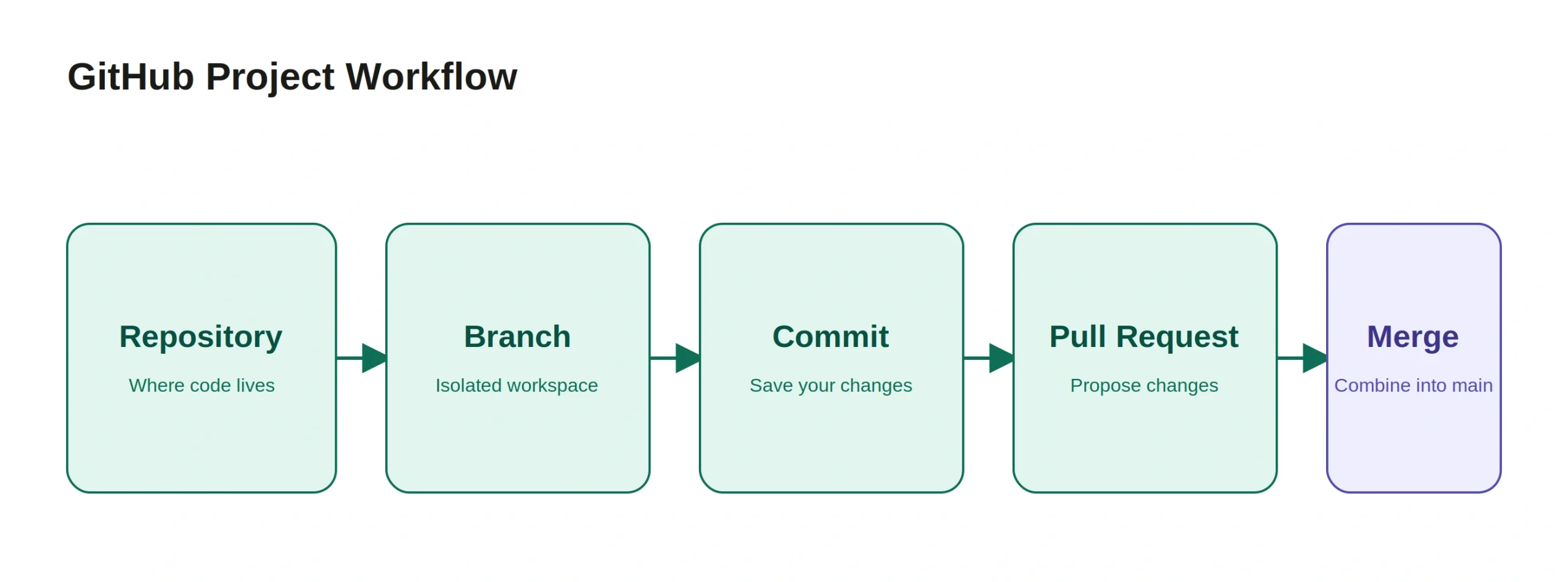









 ROI Calculator