Collections in Java: Complete Beginner’s Guide with Examples
J
By Shubham Lal
March 25, 20264 min read
Last updated on April 3, 2026
SHARE THIS ARTICLE
Table Of Content
What Are Collections in Java?
Why Collections Are Important in Modern Programming
What is Collection Framework in Java?
Collection Hierarchy in Java
Java is everywhere in 2026 — from banking applications and Android apps to enterprise software and cloud platforms. Behind almost every Java application is one common requirement: managing data efficiently.
Think about the apps used daily:
E-commerce platforms storing product lists
Banking systems managing transactions
Learning platforms tracking student progress
Social media apps handling millions of posts
All of these applications rely heavily on collections in Java to store and organise information.
For beginners, collections may initially sound technical, but the idea is actually simple. Collections help store multiple pieces of data in an organised way so they can be accessed, updated, or analysed easily.
Without collections, developers would have to manually manage large volumes of data using basic structures like arrays, which can quickly become inefficient and difficult to maintain.
This guide explains everything a beginner needs to know about:
What is collection framework in java
Collection hierarchy in java
Collections class in java
Set collection in java
Garbage collection in java
Real examples used in software development
By the end, readers will clearly understand how collections work and why they are essential for Java programming.
What Are Collections in Java?
Collections in Java refer to a structured way of storing and managing groups of objects dynamically.
In simple words, a collection acts like a container that can hold multiple items together.
For example:
List of employees in a company
List of products in an online store
List of students in a course
List of orders in a food delivery app
Instead of creating separate variables for each value, collections allow storing everything in one place.
Real-life analogy
Imagine a playlist on a music app.
A playlist stores:
Multiple songs
In a particular order
With the ability to add or remove songs anytime
Collections work in a similar way.
Basic Example
Here’s a basic example:
import java.util.ArrayList; public class Example { public static void main(String[] args) {ArrayList subjects = new ArrayList<>();subjects.add(“Math”); subjects.add(“Science”); subjects.add(“English”);System.out.println(subjects); } }
Output:
[Math, Science, English]
The collection stores multiple values and allows easy modification.
ArrayList is one of the most commonly used collection classes.
LinkedList Explained Simply
LinkedList is similar to ArrayList, but stores elements differently.
It connects elements using links.
LinkedList is useful when frequent changes are required.
Example:
import java.util.LinkedList; LinkedList cities = new LinkedList<>(); cities.add(“Mumbai”); cities.add(“Pune”);
Set Collection in Java
The set collection in java stores only unique values.
Duplicates are automatically removed.
Example use cases:
storing unique usernames
storing product IDs
storing unique email addresses
Example of HashSet
import java.util.HashSet;HashSet numbers = new HashSet<>();
numbers.add(5);
numbers.add(5);
numbers.add(10);
System.out.println(numbers);
Output:
[5, 10]
Only unique values are stored.
Queue Interface in Java
Queue follows FIFO order.
FIFO means First In First Out.
Example:
A queue at a ticket counter.
The first person entering the queue is served first.
Queue is useful in:
scheduling tasks
managing requests
handling messages
Example:
import java.util.PriorityQueue; PriorityQueue<String> tasks = new PriorityQueue<>(); tasks.add(“Task1”); tasks.add(“Task2”);
Map Interface Explained in Simple Words
Map stores data in key-value pairs.
Each key is unique.
Example:
Employee ID → Employee name
Example code:
import java.util.HashMap; HashMap<Integer,String> students = new HashMap<>(); students.put(1,”Rahul”); students.put(2,”Megha”); Maps help retrieve data faster.
Collections Class in Java
The collections class in java provides utility methods to perform operations on collections.
Here are a few best practices that you must follow when using collections in Java:
Choose collection based on requirement.
Use ArrayList for fast access.
Use HashSet for unique values.
Use HashMap for key-value storage.
Understand collection hierarchy before implementation.
Use generics to avoid errors.
Example:
ArrayList<String> names = new ArrayList<>();
Conclusion
Understanding collections in Java is an important milestone for beginner developers.
Collections simplify data storage, improve efficiency, and make applications scalable.
By learning:
What is the collection framework in Java
Collection hierarchy in Java
Collections class in Java
Set collection in Java
Garbage collection in Java
Developers can write cleaner and more efficient programs.
Collections are used in almost every real-world application.
Practising examples and understanding concepts step-by-step helps build confidence.
Mastering collections makes learning advanced Java topics much easier.
Frequently Asked Questions
The collection framework in Java is a set of interfaces and classes that help store and manage groups of objects efficiently. It provides ready-made methods for sorting, searching, updating, and deleting data. Developers use collections to simplify coding and improve performance in real-world applications such as e-commerce systems, banking apps, and enterprise software.
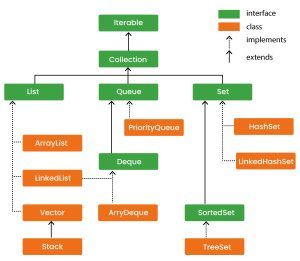
The collection hierarchy in Java represents the structure of interfaces and classes used to organise data. It begins with Iterable, followed by Collection, which is divided into List, Set, and Queue. A map is another structure that stores key-value pairs. Understanding hierarchy helps developers choose the correct data structure for different programming needs.
The collections class in Java is a utility class that provides useful methods to perform operations on collection objects. These methods include sorting elements, reversing order, finding maximum and minimum values, and shuffling elements randomly. It reduces manual coding effort and improves efficiency.
A set collection in Java is used to store unique elements. Duplicate values are not allowed. A set is useful when data must remain distinct, such as usernames, product IDs, or email addresses. Common implementations include HashSet, TreeSet, and LinkedHashSet.
Garbage collection in java is an automatic process that removes unused objects from memory. It helps free up space and improves application performance. Developers do not need to manually delete objects, making Java memory management simpler compared to many other programming languages.
Beginners should use collections when data size is not fixed or when frequent changes are required. Collections provide flexibility, built-in methods, and better scalability. Arrays are suitable only when the number of elements is known and constant.
Shubham Lal
Lead Software Developer
Shubham Lal joined Microsoft in 2017 and brings 8 years of experience across Windows, Office 365, and Teams. He has mentored 5,000+ students, supported 15+ ed-techs, delivered 60+ keynotes including TEDx, and founded AI Linc, transforming learning in colleges and companies.
Get Free Upskilling Guidance
Fill in the details for a free consultation
Related Courses
Explore our programs
Admission Closed
Post Graduate Certification Programme in Business Analytics & Artificial Intelligence (AI) Applications
 HOME > BLOG > IT/Software Development > Collections in Java: Complete Beginner’s Guide with Examples
 March 25, 2026
 4 min read










 Admission Closed
 Admission Closed
 Admission Closed
 Admission Open

 ROI Calculator