Difference Between SQL and MySQL: Key Differences & Examples
J
By Shubham Lal
September 24, 20268 min read
Published on September 24, 2026
SHARE THIS ARTICLE
Table Of Content
What Is SQL?
What Is MySQL?
Difference Between SQL and MySQL
SQL vs MySQL: How Do They Work Together?
Key Insights
SQL is a standardized language used to communicate with relational databases, while MySQL is a relational database management system that uses SQL to manage data.
MySQL stores and organizes data in tables, while SQL provides commands to retrieve, insert, update, and delete that data.
SQL can be used with multiple database systems, including MySQL and Microsoft SQL Server, but each system can have its own syntax variations and features.
MySQL and SQL Server are different database management systems with differences in tools, licensing, ecosystems, operating systems, and database-specific features.
In this blog, you'll learn the difference between SQL and MySQL, how they work together, SQL vs MySQL syntax, the difference between MySQL and SQL Server, common SQL commands, and which one to learn first.
When you start learning databases, you will often hear SQL and MySQL mentioned together. This can make it seem like they are the same technology, but they are not. In fact, understanding the difference between SQL and MySQL is one of the first concepts you should learn if you are planning to work with databases, web development, data analysis, or backend development.
SQL remains widely used by developers.
Did you know? SQL has been around since the 1970s. It was originally developed at IBM as a way to work with data stored in relational databases and was initially called SEQUEL, short for Structured English Query Language. Over the years, it evolved into SQL and became a widely used language for working with relational databases.
So, what exactly separates SQL from MySQL? The simplest way to understand it is this: SQL is a language, while MySQL is a database management system that uses SQL. Let us explore the difference with examples further in this blog.
SQL stands for Structured Query Language. It is a standardized language used to communicate with relational databases. SQL allows users to create database structures, retrieve information, add records, update existing data, delete records, and control access to databases.
For example, suppose a database contains a table called employees. You can use SQL to retrieve employees whose department is IT:
Example
SELECT name, department FROM employees WHERE department = ‘IT’;
Here, SQL provides the instructions for retrieving the required information.
SQL is not limited to one database product. Several relational database management systems use SQL, including MySQL, Microsoft SQL Server, PostgreSQL, Oracle Database, and others. Different database systems can have their own extensions and syntax variations, but SQL provides the common foundation for working with relational data.
What Is MySQL?
MySQL is a relational database management system (RDBMS). It is software used to store, organize, manage, and retrieve data in relational databases.
MySQL uses SQL as its primary language for interacting with the database. It organizes information into tables consisting of rows and columns and supports features such as indexes, keys, relationships, transactions, and user permissions.
For example, a MySQL database might contain an employees table:
Employee ID
Name
Department
Salary
101
Alex
IT
$70,000
102
Maria
HR
$65,000
103
John
Finance
$75,000
You can then use SQL statements to insert, retrieve, update, or delete information stored in these MySQL tables.
MySQL is commonly used for web applications and can run across multiple operating systems. It is also an open-source database product developed and maintained by Oracle.
The main difference between SQL and MySQL is their role.
SQL is a language used to communicate with relational databases, while MySQL is a database management system that stores and manages the data and uses SQL to interact with it.
Think of it this way:
SQL = the language
MySQL = the software that understands and uses that language
For example, when you write:
Example
SELECT * FROM customers;
SELECT is an SQL command. If the query is executed against a MySQL database, MySQL processes the SQL statement and returns the requested data.
SQL vs MySQL: Key Differences
Basis
SQL
MySQL
Full form
Structured Query Language
MySQL is the name of the database product
Type
Query and database language
Relational database management system
Main purpose
Communicates with relational databases
Stores, manages, and retrieves data
Used with
Multiple relational database systems
Uses SQL to manage its databases
Nature
Language or standard
Software/database platform
Ownership
SQL is a standardized language
MySQL is developed and maintained by Oracle
Examples
SELECT, INSERT, UPDATE, DELETE
MySQL Server, MySQL client tools
Syntax
Provides common SQL syntax
Implements SQL with some MySQL-specific features
Use
Writing database queries
Running and managing databases
This distinction is important because saying “SQL vs MySQL” is not exactly like comparing two competing database products. SQL is the language, while MySQL is one system in which that language is used.
SQL vs MySQL: How Do They Work Together?
The difference between SQL and MySQL becomes clearer when you look at how they work together.
Imagine an online shopping website. The website needs to store customer details, products, orders, and payment records.
MySQL can store these records in databases and tables. SQL can then be used to interact with that information.
For example, an application could use:
Example
SELECT product_name, price FROM products WHERE price < 50;
Output
Products with a price below 50 are returned.
The SQL query tells the database what information is required. MySQL receives and processes the query and returns the matching records.
Similarly, you could add a new product using:
Example
INSERT INTO products (product_name, price) VALUES (‘Wireless Mouse’, 25);
In this example, SQL provides the command, while MySQL is the database system executing it.
Consider a university database containing student information.
Suppose you want to find all students enrolled in a Computer Science program. You could write:
Example
SELECT student_name FROM students WHERE program = ‘Computer Science’;
The statement is SQL.
If the students table exists inside a MySQL database, MySQL executes this statement and returns the relevant records.
This example shows why SQL and MySQL are closely related but cannot be treated as identical technologies.
Difference Between SQL and Microsoft SQL
Another common confusion is the difference between SQL and Microsoft SQL.
SQL and Microsoft SQL Server are not the same thing.
SQL is the standardized language used to interact with relational databases.
Microsoft SQL Server is a relational database management system developed by Microsoft. It uses SQL, along with Microsoft’s extensions known as Transact-SQL, or T-SQL.
Therefore:
SQL → Language
MySQL → RDBMS
Microsoft SQL Server → RDBMS
Both MySQL and SQL Server use SQL, but they are separate database products with their own features, tools, syntax variations, and ecosystems.
Difference Between MySQL and SQL Server
The difference between MySQL and SQL Server is more appropriate when comparing two database management systems.
Feature
MySQL
Microsoft SQL Server
Type
Relational database management system
Relational database management system
Developer
Oracle
Microsoft
Query language
SQL with MySQL-specific features
SQL with T-SQL extensions
Licensing
Open-source editions and commercial offerings
Proprietary commercial product with different editions
Ecosystem
Commonly associated with web and open-source stacks
Strong integration with Microsoft’s technology ecosystem
Operating systems
Supports multiple operating systems
Supports Windows and also Linux deployments
Tools
MySQL Workbench and other tools
SQL Server Management Studio and other Microsoft tools
Database engine
Uses storage engines such as InnoDB
Uses Microsoft’s SQL Server database engine
The choice between MySQL and SQL Server depends on the application’s requirements, existing technology stack, development environment, licensing considerations, and database features.
It is therefore inaccurate to say that SQL itself is an alternative to MySQL or SQL Server. SQL is the language used to interact with these systems.
SQL vs MySQL Syntax: Are the Queries the Same?
SQL provides a common foundation, but database systems can implement SQL differently.
For example, MySQL supports the LIMIT clause for restricting the number of returned rows:
Example
SELECT * FROM employees LIMIT 5;
SQL Server commonly uses TOP for a similar purpose:
Example
SELECT TOP 5 * FROM employees;
Both examples use SQL concepts, but the syntax differs because MySQL and SQL Server implement their own database-specific features.
There can also be differences in functions, date handling, string operations, data types, procedural extensions, and other features.
This is an important point for beginners: learning SQL gives you transferable database knowledge, but working with a particular RDBMS also requires learning its specific syntax and tools.
SQL Commands You Can Use in MySQL
SQL commands used with MySQL generally fall into several categories.
1. DDL Commands
Data Definition Language commands are used to define or modify database structures.
For example:
CREATE TABLE students ( student_id INT, student_name VARCHAR(100) );
Other common DDL commands include ALTER, DROP, and TRUNCATE.
2. DML Commands
Data Manipulation Language commands work with the data stored in tables.
Common examples include:
INSERT UPDATE DELETE
For example:
UPDATE students SET student_name = ‘Emma’ WHERE student_id = 101;
3. DQL
Data Query Language is commonly associated with retrieving information using SELECT.
SELECT * FROM students;
4. DCL and TCL
Database systems also support commands related to permissions and transaction management. Examples include GRANT, REVOKE, COMMIT, and ROLLBACK, depending on the database system and context.
These commands demonstrate how SQL provides the language layer, while MySQL provides the environment in which the commands can be executed.
Similarities Between SQL and MySQL
Although SQL and MySQL are different, they are closely connected.
Some key similarities include:
Both are used with relational databases. MySQL uses SQL to manage relational data.
Both are involved in data management. SQL provides commands for manipulating and retrieving data, while MySQL provides the database environment.
Both support table-based data. MySQL organizes relational information using tables containing rows and columns.
SQL knowledge helps with MySQL. Understanding SQL syntax and concepts makes it easier to start working with MySQL .
Both are widely relevant to database development. SQL skills are applicable across several relational database systems, not just MySQL.
When Should You Learn SQL and MySQL?
If you are starting with databases, learning SQL first can give you a strong foundation because SQL concepts can be applied across different relational database systems.
Once you understand concepts such as tables, primary keys, foreign keys, joins, filtering, aggregation, subqueries, and transactions, you can apply those skills while working with MySQL or another RDBMS.
MySQL is particularly useful when you want practical experience with a real database management system. You can create databases, build tables, add users, manage permissions, insert records, and run SQL queries.
For aspiring data analysts, database developers, backend developers,software engineers, and data professionals, knowing how SQL works and how a specific RDBMS implements it can be valuable.
SQL vs MySQL vs SQL Server: Quick Comparison
Technology
What is it?
Main purpose
SQL
Database language
Query and manage relational data
MySQL
RDBMS
Store and manage relational databases
SQL Server
RDBMS
Store and manage relational databases
T-SQL
Microsoft’s SQL extension
Add programming and database features to SQL Server
Which One Should You Learn: SQL or MySQL?
The answer does not have to be either-or.
If you are new to databases, start with SQL fundamentals. Learn how queries work, how tables are related, and how commands such as SELECT, INSERT, UPDATE, DELETE, JOIN, and GROUP BY are used.
Then practice those concepts using MySQL or another relational database system.
This approach gives you both the transferable language skills provided by SQL and practical experience with a database platform such as MySQL.
The difference between SQL and MySQL becomes simple once you understand their roles. SQL is a language used to communicate with relational databases, while MySQL is a relational database management system that uses SQL to store, manage, and retrieve data.
SQL can be used with multiple database systems, including MySQL and Microsoft SQL Server. MySQL and SQL Server are therefore better compared as database products, while SQL should be understood as the language and standard that helps users interact with relational data.
For beginners, learning SQL fundamentals and then practicing them in MySQL can provide a practical introduction to relational databases. Once you understand this distinction, concepts such as SQL Server, MySQL, PostgreSQL, and other relational database technologies become much easier to understand.
Frequently Asked Questions
SQL is a programming language used to manage and query databases, while MySQL is a relational database management system that uses SQL to store, organize, and retrieve data.
No. SQL and MySQL are different. SQL is the language used to interact with databases, whereas MySQL is a database management system that uses SQL commands.
SQL is generally the starting point because it focuses on database queries and commands. Once you understand SQL basics, learning MySQL becomes easier as you apply those commands in a real database system.
Yes. SQL can be used with several database management systems, including PostgreSQL, Microsoft SQL Server, Oracle Database, and MySQL. Each system may have its own features and variations in SQL syntax.
Shubham Lal
Lead Software Developer
Shubham Lal joined Microsoft in 2017 and brings 8 years of experience across Windows, Office 365, and Teams. He has mentored 5,000+ students, supported 15+ ed-techs, delivered 60+ keynotes including TEDx, and founded AI Linc, transforming learning in colleges and companies.
 HOME > BLOG > IT/Software Development > Difference Between SQL and MySQL: Key Differences & Examples
 September 24, 2026
 8 min read




 Key Insights
 ChatGPT
 Perplexity
 Claude
 Grok
Grok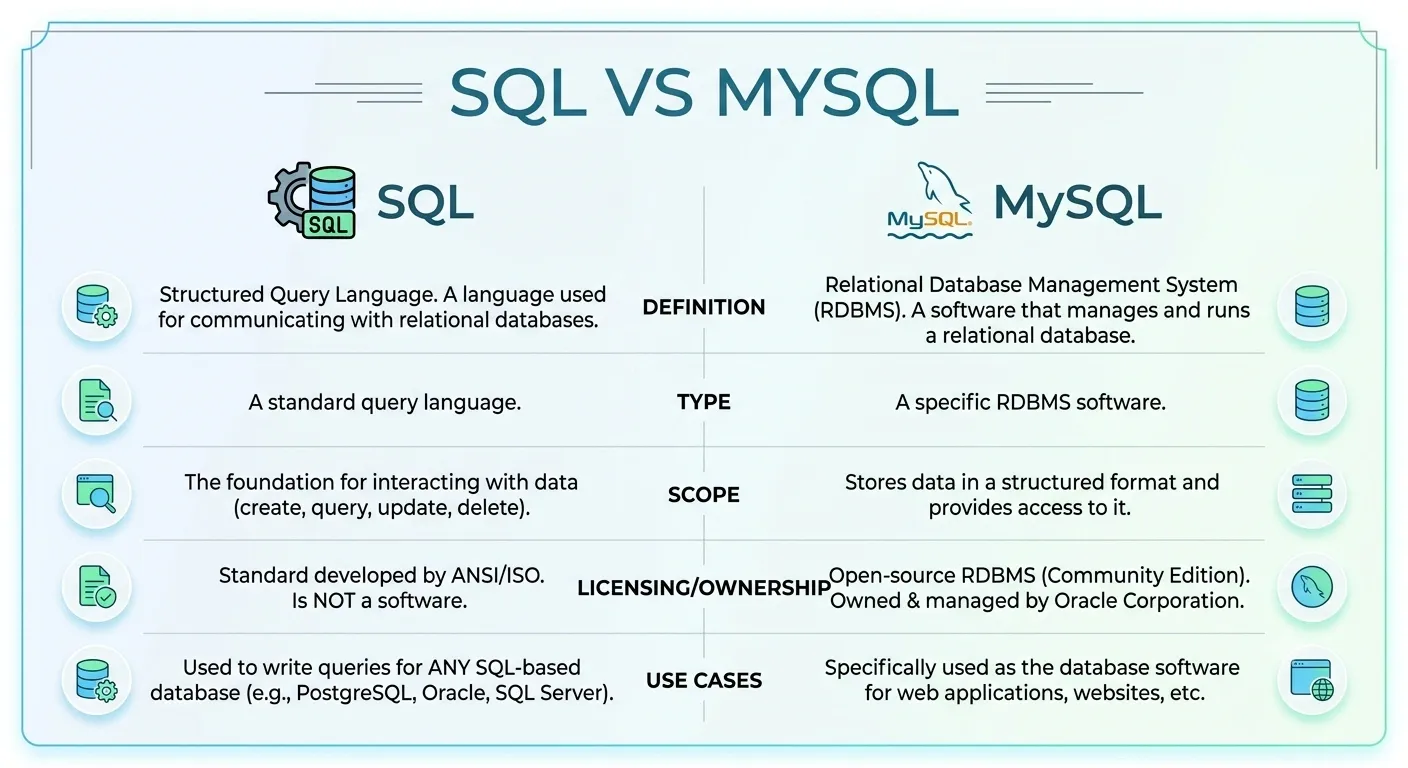









 ROI Calculator