A Code Example That Makes the HTML and CSS Difference Clear
Every website you see online is built on HTML and CSS. HTML adds content, including text and links, and configures the layout. After that, CSS styles the content to improve its visual appeal. There wouldn't be anything to show without HTML. Everything would seem disorganised and uninteresting without CSS. For new people, learning web design is considerably simpler and less confusing when they comprehend how HTML and CSS interact. Let's begin, then!
Clarity on the functions of HTML and CSS in a contemporary online environment is necessary before we can comprehend their differences.
A webpage’s structure is based on HTML, or HyperText Markup Language. It provides meaning and definitions for the elements that are present on a page. When you create a heading, a paragraph, an image, a navigation bar, or a form, you are using HTML. It tells the browser what each piece of content represents. For example, when you use an <h1> tag, you are not just making text bigger; you are declaring that text as the primary heading of the page. That semantic meaning matters for accessibility, search engines, and content hierarchy.
CSS, or Cascading Style Sheets, controls how those HTML elements look and are arranged. It manages visual presentation, colors, typography, spacing, alignment, layout systems, and responsiveness. When a button appears blue with rounded corners and a hover animation, that is CSS at work. The button itself exists because of HTML, but its appearance is defined by CSS.
If you’re just starting your coding journey, understanding how these technologies evolve into real development workflows becomes easier when you follow a structured web development roadmap that outlines the progression from basic markup to full-scale application development.
The difference between HTML and CSS becomes clearer when you examine their functions in the browser rendering process.
When a webpage loads, the browser first reads the HTML document. It constructs something called the Document Object Model (DOM), which is essentially a structured representation of all the elements on the page. Only after that does CSS apply styling rules to those elements, which means that HTML is foundational and CSS is applied afterwards.
Another key aspect of the HTML vs. CSS comparison lies in purpose. HTML focuses on content semantics. It answers questions like:
Is this item a heading?
Is this a list?
Is this navigation?
CSS, on the other hand, focuses on visual hierarchy. It answers questions like:
How far apart should these sections be?
What color scheme defines the brand?
How should elements adjust on mobile devices?
Here’s a closer look at the separation that can be mapped across several key dimensions:
Dimension
HTML
CSS
Primary Role
Defines the structure and meaning of content
Controls visual presentation and layout
Browser Processing Stage
Parsed first to build the DOM (Document Object Model)
Applied after DOM creation to style elements
Core Focus
Semantics and content organization
Design, aesthetics, and user experience
Type of Language
Markup language
Stylesheet language
Creates Content?
Yes — builds elements like headings, paragraphs, forms
No — only styles existing HTML elements
Dependency Relationship
Can function independently
Requires HTML (or structured markup) to work
Impact on Accessibility
Critical for screen readers and SEO
Supports accessibility through visual clarity and responsiveness
Role in Responsive Design
Defines structural containers
Enables media queries, flexible layouts, and adaptive design
Typical Use Cases
Creating page structure, embedding media, and defining navigation
Branding, spacing, typography, animations, and layout grids
Example Question: It Answers
“What is this element?”
“How should this element look?”
Effect If Removed
Page loses structure and meaning
Page becomes unstyled but remains functional
Maintainability Strategy
Organized via semantic elements
Managed through reusable classes and modular stylesheets
Now that the structural difference between HTML and CSS is clear, let’s see how they collaborate in an actual project. Imagine you are building a simple landing page for a product. The first step is defining the structure using HTML, which includes:
A header section
A hero section with a headline and button
A features section
A footer
HTML might define this layout using semantic elements like:
<header>
<section>
<article>
<footer>
At this stage, the page looks plain. Everything stacks vertically. Fonts are default. There is no visual hierarchy. Now CSS steps in. CSS controls:
How wide is the hero section?
Whether features appear in a grid or a column
The spacing between elements
The font sizes
Background colors
Button hover effects
Without CSS, your website is technically functional. But visually weak. Without HTML, your website doesn’t exist. This layered workflow is the practical explanation of HTML and CSS working together.
A Code Example That Makes the HTML and CSS Difference Clear
Let’s make this tangible.
HTML Structure
<section class=”hero”> <h1>Build Better Websites</h1> <p>Learn web development the right way.</p> <button>Get Started</button> </section>
If you run this alone, it renders as plain stacked text and a basic button.
The content didn’t change. The structure didn’t change. Only the presentation changed. That is the operational HTML and CSS difference.
Common Beginner Mistakes When Learning HTML and CSS (And Why They Actually Happen)
Understanding the difference between HTML and CSS helps avoid these early mistakes:
1. Using HTML for Styling
Beginners sometimes try to control appearance using inline styles or outdated attributes. This makes code messy and unscalable. Modern practice is structured in HTML and styled in CSS.
2. Ignoring Semantic HTML
Some learners treat HTML as just containers like <div> everywhere. But HTML is not just about layout blocks. It carries meaning.
Using <nav>, <main>, <article>, <header> improves:
CSS does not magically fix structural mistakes. If HTML hierarchy is broken, layout becomes harder to manage. That’s why in the HTML vs. CSS comparison, HTML always comes first in development thinking.
Many of these beginner mistakes appear frequently during technical screenings as well. Reviewing commonly asked HTML interview questions can help you understand how recruiters test these core concepts.
The Role of HTML and CSS in Responsive Design
Websites nowadays need to function on computers, tablets, mobile devices, and enormous screens. The division of responsibilities is as follows:
Structured containers, sections, wrappers, and grids are defined by HTML.
Still rely on HTML-like structure and CSS styling principles. Even in component-based systems, the separation remains:
JSX or template syntax defines structure
CSS (or styled components) handles presentation
The fundamentals don’t disappear. They evolve. That’s why mastering HTML and CSS at a deep level gives you long-term leverage. Developers who master the relationship between structure and styling usually move deeper into modern frameworks, performance optimization, and UI architecture. Many professionals start this journey by exploring practical concepts covered in frontend development blogs that break down real-world implementation patterns.
Interview Perspective: How to Explain HTML vs CSS Clearly
If asked in an interview, “What is the difference between HTML and CSS?”.
A strong answer would be: HTML is a markup language used to define the structure and semantics of web content, while CSS is a stylesheet language used to control the visual presentation and layout of that structured content. HTML builds the DOM, and CSS applies styling rules to it.
Short. Clear. Structured. Avoid vague answers like “HTML is content and CSS is design.” Go one layer deeper.
The difference between HTML and CSS also affects performance. Well-structured HTML:
Improves SEO crawling
Enhances accessibility
Reduces DOM complexity
Well-optimized CSS:
Reduces render-blocking resources
Improves load time
Keeps styling modular
In large projects, CSS architecture patterns like:
BEM (Block Element Modifier)
Utility-first styling
Modular stylesheets
Exist specifically to manage complexity at scale. HTML rarely changes frequently in stable applications. CSS evolves with branding, redesigns, and UX updates. That strategic flexibility is why separation matters.
When HTML and CSS Overlap Slightly
Now, even after understanding the difference between HTML and CSS, you’ll notice something interesting when you start building real pages, the separation isn’t always perfectly clean. There are small areas where things blur a little. Not in a dramatic way. But enough to confuse beginners. Take inline styles, for example.
You can write styling directly inside an HTML tag using the style attribute. Something like:
<p style=”color: red;”>Hello</p>
It works. The browser doesn’t complain. In fact, when you’re testing something quickly, it feels convenient. Change a color, refresh, done. But this approach doesn’t scale. The moment your project grows beyond a few elements, inline styles become messy. You lose consistency. You repeat yourself. And updating the design later becomes painful.
So yes, technically, HTML can contain styling through attributes. But that doesn’t mean it should, especially in production-level code.
Then there are CSS pseudo-elements like ::before and ::after. These can “inject” visual content into the page. For example, adding decorative icons, quotes, or small labels without touching the HTML at all. That sometimes makes beginners wonder: wait, isn’t CSS adding content now? Not really.
CSS can create visual additions, but it cannot define meaningful structure. It cannot create a real heading, form input, or navigation system. Anything injected via pseudo-elements is purely presentational. Screen readers often ignore it. Search engines don’t treat it as core content. So even though it looks like CSS is adding content, structurally it isn’t.
There’s also the case of older HTML attributes that controlled presentation, things like bgcolor or <font> tags. Those existed in earlier web development days. But modern standards moved away from that for a reason. Mixing presentation into structure created long-term maintenance problems.
So yes, there are small intersections. Inline styles exist. Style attributes exist. CSS can visually insert things. But the core philosophy hasn’t changed. HTML is still responsible for structure and meaning. CSS is still responsible for presentation and layout.
The overlap doesn’t cancel the distinction. It just shows that tools evolve but the architectural principle stays strong. At this point, many learners start mapping their skills against a structured web development roadmap to identify the next technologies to master.
Free Courses
Stakeholder Communication & Negotiation Skill Sets
Turning Foundational Web Skills into Career Momentum
If reading about the difference between HTML and CSS made you think, “Okay, I get the basics… but how do I actually turn this into a real skill?”, that’s a valid next step. Learning structure and styling is just the beginning. To build real applications, the kind companies hire for, you need to move beyond static pages into full stack capability. That’s where Jaro Education becomes relevant.
The difference between HTML and CSS is not just a technical distinction, it is a foundational concept that shapes how every website is built. HTML defines structure and meaning, while CSS defines presentation and layout. When you understand how these two work together, you move from simply writing code to actually engineering web experiences. Mastering both gives you clarity, scalability, and confidence as you step deeper into frontend or full stack development.
Frequently Asked Questions
HTML is used to create the structure and content of a webpage, while CSS is used to style and design that content. HTML builds the foundation, and CSS enhances its appearance.
The main difference between HTML and CSS is that HTML defines the structure and semantics of content, whereas CSS controls the visual presentation, layout, and styling of that structured content.
Yes, a website can function without CSS because HTML alone can display structured content. However, it will look plain and lack proper design and layout styling.
No, CSS cannot function independently because it needs HTML (or structured markup) elements to apply styling rules.
You should learn HTML first because it builds the structure of a webpage. Once you understand HTML, learning CSS becomes easier since you will be styling elements that already exist.
Shubham Lal
Lead Software Developer
Shubham Lal joined Microsoft in 2017 and brings 8 years of experience across Windows, Office 365, and Teams. He has mentored 5,000+ students, supported 15+ ed-techs, delivered 60+ keynotes including TEDx, and founded AI Linc, transforming learning in colleges and companies.

 March 12, 2026
 9 min read





 ChatGPT
 Perplexity
 Claude
 Grok
Grok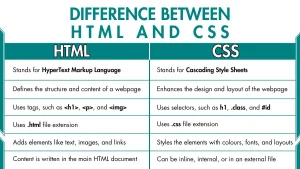







 Admission Open
 Admission Closed
 Admission Open

 ROI Calculator