A Quick Guide to HTML Editors: Choose the Right Tool
J
By Shubham Lal
February 14, 202612 min read
Last updated on September 11, 2026
SHARE THIS ARTICLE
Table Of Content
What Is an HTML Editor?
Why Do You Need an HTML Editor?
Types of HTML Editors
Integrated Development Environment (IDE) HTML Editors
Have you ever opened a website and thought, “How does all this come together?” From simple landing pages to complex web platforms, everything starts with HTML. But here’s the thing: writing HTML directly in a plain text file can quickly become confusing, especially when your code grows longer. That’s exactly where an HTML editor steps in.
An HTML editor is more than just a place to type codes. It’s your workspace, your assistant, and often your problem-solving while building web pages. Whether you’re a beginner learning the basics of tags and elements or a professional developer managing large-scale projects, choosing the right HTML editor can save time, reduce errors, and make development far more enjoyable.
In this guide, we’ll break down what is HTML editor, explore different types, discuss features that actually matter, compare offline and HTML editor online tools, and help you choose the right option based on your goals. If you’ve ever felt confused by the number of tools available, this blog will clear things up step by step.
An HTML editor is basically a software application that allows users to easily create, edit and manage a website’s (HTML) code (HyperText Markup Language) The HTML editor makes it easier, quicker and more organised to work with HTML code compared to using a simple text editor like Notepad. An HTML editor provides many features that enhance the coding experience, including syntax highlighting, automatic completion of code, error checking and even the ability to preview how a web page will look visually. These features allow web developers to see visually what the structure of their HTML code looks like.
When people ask themselves what is HTML editor, they typically want to know if it is just for developers. The answer is No; HTML Editors are used by:
An HTML editor simplifies the process of writing, composing, and managing HTML code. It enhances both efficiency and accuracy while enabling you to concentrate on developing higher-quality websites instead of being hampered by syntax issues.
Let us look at some of the reasons that make HTML editors such great tools.
Faster Development
Speed is one of the most significant benefits of using an HTML editor. Today, many HTML editors offer features such as auto-complete and tag suggestions that allow you to write your code quickly and accurately since you will not have to remember every tag you need to write or how to type each one correctly.
This is especially beneficial when:
Creating long HTML documents
Dealing with a large number of nested elements
Frequently switching between multiple tags
Fewer Errors and Easy Debugging
When it comes to HTML, creating a layout or a web page can be very easy. However, if a closing tag is missing or tags are not nested properly, the entire layout of a web page could potentially be affected.
HTML editors provide ways to ensure that all of your tags are closed properly or nested correctly by the following means:
Better Code Readability and Organization
When HTML files grow larger, reading plain black-and-white text becomes difficult. This is where syntax highlighting plays an important role.
HTML editors use different colors for:
Tags
Attributes
Values
Comments
This visual separation makes your code easier to scan and understand at a glance. You can quickly identify sections, locate errors, and follow the structure of the page without confusion.
For developers working on large projects or revisiting old code, good readability is essential.
Live Preview for Instant Feedback
The ability to see how your web page looks through a live preview while you are writing or editing your code is an attribute that many HTML Editors provide.
The benefits of live preview include:
You’ll see your changes immediately
You will have an understanding of how the HTML structure affects the layout
You won’t have to continually refresh your web browser
Live preview is especially helpful for beginners as it provides a direct relationship between what they have learned about HTML coding to what they are able to see visually.
A More Professional Workflow
If you’re considering a career in web development, (freelancer, designer, developer, etc.) then you should use an appropriate HTML Editor to develop your skills.
Professional HTML Editors support:
Clean Code
Project organization
Collaboration with other Developers
Integration of CSS, JavaScript and Frameworks.
Becoming proficient in using an HTML Editor today will prepare you today for many of the “real world” projects you will be faced with in your future career within the web development industry as well as prepare you for quickly adapting when collaborating with a team of developers and/or contributing to a large code base.
Types of HTML Editors
Not all HTML editors are built the same way. Depending on how you prefer to work and what your goals are, editors generally fall into the categories given below.
Text-Based HTML Editors
These kinds of HTML editors are suited for developers who want to create and manage their own code. The raw HTML structure is shown in a text-based document view and allows for creating the HTML tags, element structures and attributes manually.
These editors are ideal for:
Learning HTML from the basics
Understanding how HTML tags, elements, and nesting work
Building scalable and custom websites
Working on professional and long-term web projects
Popular examples of text-based HTML editors include Visual Studio Code, Sublime Text, and Notepad++.
Integrated Development Environment (IDE) HTML Editors
IDEs provide a complete environment to work on your HTML coding instead of simply being a text-based document editor. They incorporate more than one method of editing your HTML, including advanced features such as project navigation, debugging, version control, and error checking in real time. IDEs are helpful for developing complicated or large projects.
Popular IDE-style HTML editors include Visual Studio Code and JetBrains WebStorm.
WYSIWYG HTML Editors
WYSIWYG HTML editors provide a graphical design interface for users to create their web pages without writing the actual HTML code. As you design your page graphically, a WYSIWYG HTML editor will generate the HTML code in the background.
These editors are ideal for:
Beginners with little or no coding experience
Designers and content creators
Quickly building simple web pages
Visual layout-focused projects
Popular WYSIWYG HTML editors include Adobe Dreamweaver and BlueGriffon.
Online (Cloud-Based) HTML Editors
Online HTML editors allow you to write and edit HTML code directly in a web browser. These tools are perfect for quick testing, learning, and collaboration without installing any software.
These editors are ideal for:
Practicing HTML online
Testing code snippets quickly
Collaborative development and sharing
Working on different devices
Popular online HTML editors include CodePen, JSFiddle, and Google Web Designer, which is often considered one of the best free online HTML editors.
Command-Line HTML Editors
Command-line HTML editors operate directly within the terminal using text-based commands. These editors are highly efficient and are commonly used by experienced developers working on servers or remote environments.
These editors are ideal for:
Advanced developers
Server-side editing
Remote development workflows
High-speed text editing
Popular command-line HTML editors include Vim and Emacs.
Popular HTML Editor Online Tools
HTML editor online tools are widely used for quick coding, testing ideas, and learning front-end concepts without installing software. They run directly in the browser and provide an instant way to write and preview HTML code.
Some of the most commonly used HTML editor online platforms include:
CodePen
CodePen is a web-based platform that is the most popular among front-end developers who want to learn how to use HTML/CSS/JavaScript together; they enjoy testing the layout of web pages, developing animations, and creating User Interface (UI) Components quickly; this platform also allows users to share their code and view and learn from other users’ projects (through “Forking” and “Commenting”) and showcase their creative work in the developer community.
JSFiddle
JSFiddle is another popular tool for testing and debugging HTML, CSS and JS. It provides a very clean environment in which developers are able to test isolated sections of their code, verify functionality and troubleshoot their code quickly. Many developers use JSFiddle to emulate and debug various bugs, test how different browsers render code and share working code examples in discussion or tutorial settings.
HTML Online Editors
Simple HTML editor online tools are designed for quick edits and instant previews. These tools usually offer a basic text editor with a live preview panel, making them suitable for beginners who want to practice HTML structure or check how a small piece of code behaves. They are also useful when you need to make fast changes without setting up a local development environment.
Free Courses
Stakeholder Communication & Negotiation Skill Sets
Not all HTML editors offer the same experience. Choosing the right one depends largely on the features it provides and how well they support your workflow. A good HTML editor should make coding easier, cleaner, and more efficient.
Below are some essential features you should look for when selecting an HTML editor.
Syntax Highlighting
Tracking the syntax visually separates each component of your code by using colour. Being able to distinguish between tags, attributes, values and comments by colours makes it easier to read and comprehend the HTML code. This is more evident with longer files and with very complex layouts because it allows the developer to find structure and also identify where errors may reside in the code easily.
Auto-Completion
Auto-completion suggests HTML tags, attributes, and values as you type. This reduces the need to remember every syntax detail and minimizes typing mistakes. For beginners, auto-completion acts as a learning aid, while for experienced developers, it significantly speeds up development.
Live Preview
A live preview feature is a tool that allows a developer to see in real time how the HTML will render in the browser. Developers can now get a better sense of how the code connects and how it will look, thus allowing for improved design, speed and overall workflow of coding.
Error Detection
Good HTML editors automatically detect common mistakes such as missing closing tags, incorrect nesting, or invalid syntax. By highlighting these issues instantly, the editor helps you fix problems early and maintain clean, functional code.
Customization Options
Customisation features provide users with the ability to customise their HTML editor according to their own workflow through the use of themes, keyboard shortcuts and extended functionality.
Multi-Language Support
Most modern web projects involve more than just HTML. An editor that supports CSS, JavaScript, and even backend languages allows you to work on complete projects within a single environment. This becomes increasingly important as your skills grow.
Top HTML Editors for Developers
Below are some of the most trusted and widely used HTML editors that developers continue to rely on for everyday coding tasks.
1. Notepad++
*theknowledgeacademy.com
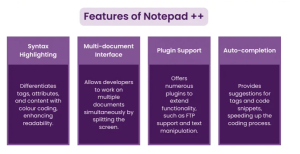
Notepad++ is often the first HTML editor developers encounter, and for good reason. It’s lightweight, fast, and incredibly easy to use, especially on Windows systems. Despite its simplicity, Notepad++ supports a wide range of programming languages, including HTML, CSS, JavaScript, PHP, and more.
It offers features like syntax highlighting, tabbed editing, and basic auto-completion, making it suitable for both beginners and experienced developers. Since its launch in 2003, Notepad++ has been actively maintained, ensuring long-term reliability and consistent updates.
2. Visual Studio Code
*theknowledgeacademy.com
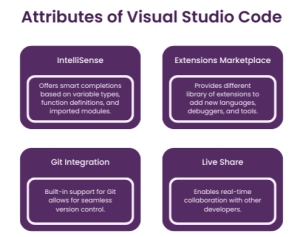
Visual Studio Code has quickly become one of the most popular HTML editors worldwide. Released in 2015, it gained massive adoption due to its flexibility, performance, and strong community support. VS Code works seamlessly across Windows, macOS, and Linux, making it accessible to almost everyone.
It supports HTML, CSS, JavaScript, PHP, and many other languages, eliminating the need to switch tools during development.
3. Atom
*theknowledgeacademy.com
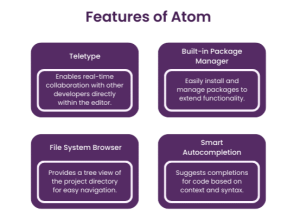
This is the most popular HTML Editor on the market. It is an open-source code editor designed to offer premium features to developers entirely free of charge. Maintained by the GitHub community, this editor allows developers to add, modify, and share various source codes to enhance its functionality.
Developers can also personalise the editor’s interface by changing themes. Atom is not a visual editor, so real-time output of HTML code cannot be viewed. It supports multiple programming languages, including JavaScript, Node.js, and Cascading Style Sheets (CSS). Additionally, it integrates with Teletype, enabling collaboration on projects with other developers.
4. Sublime Text
*theknowledgeacademy.com
Sublime Text is a powerful and highly customizable HTML editor favored by developers who value speed and efficiency. It supports multiple programming languages, including HTML, CSS, JavaScript, Python, Java, and C, making it a versatile option for web and software development.
One of Sublime Text’s biggest strengths is its performance. It opens large files quickly and handles complex projects smoothly.
5. Brackets
*theknowledgeacademy.com
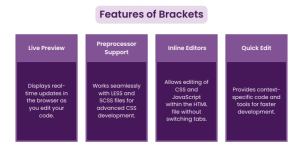
Brackets is a lightweight HTML editor designed specifically for web development. It focuses on simplicity and clarity, offering just the right set of features without overwhelming the user. Available on Windows, macOS, and Linux, Brackets provides a clean and minimal workspace.
One of its standout features is live preview, which allows developers to see changes instantly in the browser as they edit HTML and CSS.
6. Adobe Dreamweaver CC
*theknowledgeacademy.com
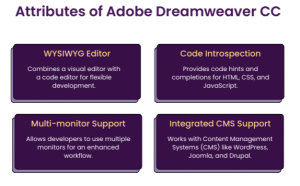
Adobe Dreamweaver CC is an Integrated Development Environment (IDE) that supports both back-end and front-end development. It offers web design and development toolkits to simplify website creation. The powerful code editor supports HTML, CSS, and JavaScript and provides tools to work with SCSS, offering a more advanced approach compared to CSS. To understand the key differences between SCSS and CSS, it’s important to explore how Dreamweaver handles both for more efficient web development.
The text editor includes features like syntax highlighting, code completion, and multi-language support, while the visual editor offers drag-and-drop functionality. Although there is no free version, a seven-day trial is available. Payment plans start from approximately £16.17 per month, with licences available on a monthly, annual, or prepaid basis. Dreamweaver CC’s comprehensive toolset and flexibility make it a popular choice for both novice and experienced Web Developers.
Conclusion: Choosing the Right HTML Editor for Your Journey
An HTML editor is more than just a tool; it’s the foundation of how you build, test, and refine web pages. Whether you’re just starting out and learning what HTML editor is, experimenting with a free online HTML editor, or managing complex projects using advanced IDEs, the right editor can significantly improve your speed, accuracy, and confidence. As this guide shows, there’s no single “best” option for everyone. Your choice depends on your goals, experience level, and the kind of projects you want to work on. The key is to start with an editor that feels comfortable, then gradually move toward more powerful tools as your skills grow.
If you’re serious about building a strong career in web development or software quality, technical knowledge alone isn’t enough. This is where Jaro Education can make a real difference. Through industry-aligned online courses and certifications in Quality Assurance, software testing, and related tech domains, Jaro helps you deepen your understanding, gain practical exposure, and stay relevant in a competitive job market. Whether you’re upskilling alongside your HTML learning or planning a structured career transition, Jaro Education offers guided learning, expert mentorship, and recognized credentials to support your growth.
Frequently Asked Questions
An HTML editor is software or online tool that helps users write, edit, and manage HTML code efficiently. It provides features like syntax highlighting, auto-completion, and live preview, making web development faster and more accurate than using plain text editors.
Yes, a free online HTML editor is a fantastic starting point for beginners. It allows you to practice HTML without installing software and offers instant previews, which helps in understanding how code translates into web pages.
Professional developers often prefer editors like Visual Studio Code, Sublime Text, or IDE-based tools such as WebStorm. These offer advanced features, extensions, debugging tools, and support for large projects.
Absolutely. Understanding HTML editors helps QA professionals analyze front-end issues, test web applications effectively, and collaborate better with developers. Combined with structured learning through platforms like Jaro Education, it can significantly enhance career prospects in QA and software testing.
Shubham Lal
Lead Software Developer
Shubham Lal joined Microsoft in 2017 and brings 8 years of experience across Windows, Office 365, and Teams. He has mentored 5,000+ students, supported 15+ ed-techs, delivered 60+ keynotes including TEDx, and founded AI Linc, transforming learning in colleges and companies.

 February 14, 2026
 12 min read




 ChatGPT
 Perplexity
 Claude
 Grok
Grok





 Admission Closed
 Admission Closed
 Admission Closed
 Admission Open

 ROI Calculator