Claude AI is a generative artificial intelligence assistant developed by Anthropic, an AI safety company founded in 2021. Claude can write, code, analyse documents and data, search the web, and complete multi-step tasks autonomously. In 2026, it is widely regarded as the leading AI for coding, long-document analysis, and professional writing, available free at claude.ai with paid plans starting at $20 per month.
If you have heard developers rave about Claude Code, seen “Claude Skills” trending on tech Twitter, or simply wondered how Claude compares to ChatGPT, this guide explains everything: what Claude is, how it works under the hood, its standout features in 2026, what you get for free, and the use cases where it genuinely shines.
Claude is a family of large language models (LLMs) and the AI assistant built on top of them, created by Anthropic. The company was founded by former OpenAI research leaders Dario Amodei and Daniela Amodei with a specific mission: to build AI systems that are safe, reliable, and honest by design.
You can interact with Claude in several ways:
Claude.ai — the web, desktop, and mobile chat interface (this is what most people mean when they say “Claude”)
Claude Code — an agentic coding tool that works from your terminal, IDE, or desktop app
Claude Cowork — a desktop app for agentic knowledge work aimed at non-developers
The Anthropic API — for developers building Claude into their own products
Cloud platforms — Claude is also available through Amazon Bedrock and Google Cloud Vertex AI
The name “Claude” is widely believed to be a nod to Claude Shannon, the father of information theory — fitting for a model built around processing and generating language.
Anthropic is a San Francisco–based AI research company that has grown into one of the most valuable private technology companies in the world. Unlike many AI labs, Anthropic positions safety research as a core product differentiator, not an afterthought. Its flagship technique, Constitutional AI, trains Claude against a written set of principles — a “constitution” — rather than relying purely on human ratings of outputs. The result, in practice, is an assistant that tends to be more careful with facts, more transparent about uncertainty, and less prone to producing harmful content.
By 2026, Anthropic’s revenue is driven heavily by enterprise and developer adoption. While ChatGPT still dominates consumer chatbot traffic, Claude has become the default choice inside many engineering teams, financial firms, and research organisations — the places where accuracy and long-context reasoning are worth paying for.
How Does Claude AI Work?
At its core, Claude is a transformer-based large language model. It is trained on massive amounts of text and code, learning statistical patterns that allow it to predict, generate, and reason over language. Three things distinguish how Claude works in 2026:
1. Constitutional AI training. Instead of learning “good behaviour” purely from human preference ratings, Claude is trained to critique and revise its own outputs against explicit principles. This is why Claude typically refuses harmful requests gracefully and explains its reasoning rather than giving blunt refusals.
2. Extended thinking. Modern Claude models can “think before answering” — allocating extra reasoning steps to hard problems like complex maths, multi-file code changes, or legal analysis. Users can see a summary of this reasoning, which makes the output easier to verify.
3. Agentic architecture. Claude no longer just answers questions. Through tools, it can search the web, run code, read and create files, browse websites, and connect to external apps via the Model Context Protocol (MCP) — an open standard Anthropic created that has since been adopted across the AI industry. This is what allows Claude to complete tasks, not just describe how you might do them.
Claude AI Models in 2026
Anthropic ships models in tiers, balancing intelligence against speed and cost:
Model tier
Best for
Typical users
Opus
Deep reasoning, complex coding, research
Power users, enterprises
Sonnet
Everyday work — the best balance of speed and intelligence
Most individual users
Haiku
High-volume, low-latency tasks
Developers, customer-support automation
Claude’s context window — how much text it can consider at once — reaches up to 1 million tokens on the API for recent models, enough to hold entire codebases, lengthy contracts, or several books in a single conversation. Notably, Claude does not generate images, audio, or video; it is a text-and-vision-input, text-output system, and Anthropic has deliberately kept it that way.
Claude Skills are one of the biggest shifts in how people use AI assistants. A skill is a folder containing a SKILL.md instruction file plus optional scripts and resources that teaches Claude how to perform a specialised workflow — creating branded PowerPoint decks, auditing SEO, generating financial models, reviewing legal contracts, and thousands more.
What makes skills powerful:
Progressive disclosure. Claude loads only a skill’s lightweight metadata at first, pulling in full instructions only when the task actually needs them, keeping conversations fast and token-efficient.
Composability. Claude can combine multiple skills automatically — for example, using a data-analysis skill and a presentation skill together to turn a spreadsheet into a finished deck.
Portability. Skills work across the Claude app, Claude Code, and the API, and the open SKILL.md format has been adopted by other AI coding tools as well.
Anthropic ships official skills for Excel, Word, PowerPoint, and PDF workflows, and community directories now list thousands of open-source skills.
2. Claude Code (and Claude Code Skills)
Claude Code is Anthropic’s agentic coding tool — and arguably the product that made Claude the developer favourite. Rather than suggesting snippets, Claude Code reads your entire codebase, plans changes, edits multiple files, runs tests and terminal commands, and commits to git, all under your supervision. It runs as a CLI, a desktop app, in VS Code, and even from the Claude mobile app for kicking off remote tasks.
Claude Code skills deserve a special mention because they have become team infrastructure. Development teams check skills into their repositories (commonly under a skills folder), so every engineer — and every Claude session — automatically follows the same conventions for testing, deployment, code style, and security review. Popular community skills cover frontend design systems, surgical bug-fixing (change only what’s needed, nothing else), test-driven development loops, and SEO auditing.
3. Projects, Artifacts, and Memory
Projects give you persistent workspaces where you can upload reference documents and set custom instructions that apply to every chat inside the project.
Artifacts are interactive outputs — working web apps, documents, diagrams, and dashboards — that Claude builds in a side panel and you can edit, share, or publish.
Memory lets Claude remember relevant context from your past conversations, so you don’t have to re-explain your role, preferences, or ongoing projects each time. Memory can be viewed, edited, or turned off entirely.
4. Web Search, File Analysis, and Connectors
Claude searches the web in real time with cited sources, analyses uploaded files (PDFs, Word docs, spreadsheets, images, code), and connects to tools like Notion, GitHub, Google Drive, and Zapier through MCP connectors. It can also create downloadable files — polished Word documents, Excel models with working formulas, and PowerPoint decks.
Is Claude AI Free to Use?
Yes — Claude AI is free to use. Anyone can sign up at claude.ai (or download the iOS/Android app) and chat with Claude at no cost. The free plan includes access to a highly capable model, web search, file uploads, and artifacts, with daily usage limits that reset regularly.
Here is how the plans compare in 2026:
Plan
Price
What you get
Free
$0
Capable everyday model, web search, file analysis, daily limits
Pro
$20/month
Higher limits, access to the most powerful models, Projects, Claude Code, priority access
Max
From $100/month
5x–20x Pro limits, heavy Claude Code usage, early feature access
For students and professionals in India, the free tier is genuinely useful for learning, resume work, coding practice, and research — the main constraint is the daily message limit, not the model’s capability.
Top Use Cases for Claude AI
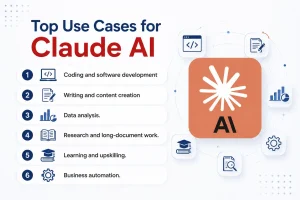
Coding and software development. Claude consistently leads real-world software engineering benchmarks. Developers use it for building features, debugging, refactoring legacy code, writing tests, and reviewing pull requests.
Writing and content creation. Claude is known for a natural, less “AI-sounding” writing style — useful for blogs, emails, reports, scripts, and editing.
Data analysis. Upload a CSV or Excel file and Claude can clean the data, run analysis with actual code, build charts, and explain the findings in plain language.
Research and long-document work. With its huge context window, Claude can summarise, compare, and question hundred-page reports, legal agreements, or academic papers in one go.
Learning and upskilling. Claude works as a patient tutor — explaining machine learning concepts, walking through maths step by step, or conducting mock interviews. Paired with a structured programme like an AI or data science certification, it dramatically accelerates learning.
Business automation. Through Skills, MCP connectors, and Cowork, teams automate reporting, slide creation, CRM updates, and document processing end to end.
Claude vs ChatGPT: Which Should You Use?
The honest answer in 2026: both are excellent, and the right choice depends on your work.
Choose Claude if you prioritise coding ability, long-document analysis, nuanced writing quality, and agentic workflows (Claude Code, Skills). Claude also tends to hallucinate less on factual and analytical tasks.
Choose ChatGPT if you want native image generation, voice conversation, and the broadest consumer feature set.
Many professionals simply use both — ChatGPT for multimedia and quick consumer tasks, Claude for serious work with code, data, and documents.
Go to claude.ai and sign up with your email or Google account.
Start a chat — ask a question, paste text, or upload a file.
Turn on web search for questions that need current information.
Try an artifact: ask Claude to “build a simple calculator app” and watch it create a working tool.
If you code, install Claude Code from Anthropic’s documentation and run it inside a project folder.
Upgrade to Pro only when you consistently hit free limits.
Final Thoughts
Claude has evolved from “the other chatbot” into the AI assistant serious professionals reach for first — especially for coding, analysis, and agentic work that goes beyond chat. With a genuinely useful free tier, the fast-growing Skills ecosystem, and tools like Claude Code redefining how software gets built, 2026 is the right time to add Claude to your workflow.
And if using AI tools has you curious about building a career in this field, structured learning is the fastest route: explore executive AI and machine learning certifications from IIMs and IITs on Jaro Education to turn AI curiosity into a career advantage.
Frequently Asked Questions
Claude is an AI chatbot and assistant made by Anthropic. You type (or speak) requests, and it can write, code, analyse files, search the web, and complete tasks for you.
Claude leads in coding, long-document analysis, and writing quality; ChatGPT leads in image generation and consumer features. For professional and technical work, most benchmarks and developer surveys favour Claude in 2026
Yes. Claude has a free plan at claude.ai with daily usage limits. Paid plans start at $20/month (Pro) for higher limits and the most powerful models.
Skills are reusable instruction packages (folders with a SKILL.md file) that teach Claude specialised workflows — from building Excel models to auditing websites. They work across the Claude app, Claude Code, and the API.
No. Claude can analyse and understand images you upload, but it does not generate images, audio, or video.
Claude is built with Constitutional AI, Anthropic’s safety-focused training method, and is generally considered one of the most reliable mainstream AI assistants. As with any AI, you should still verify important facts and avoid sharing sensitive personal data.
Dr. Sanjay Kulkarni
Data & AI Transformation Leader
Dr. Sanjay Kulkarni is a Data & AI Transformation Leader with over 25 years of industry experience. He helps organizations adopt data-driven and responsible AI practices through strategic guidance and education. With experience across startups and global enterprises, he bridges the gap between theory and real-world application. His work empowers teams to innovate and thrive in AI-driven environments.
 HOME > BLOG > AI and Machine Learning > What Is Claude AI? Features, Use Cases, and How It Works in 2026
 July 16, 2026
 8 min read





 ChatGPT
 Perplexity
 Claude
 Grok
Grok


 Admission Open

 Admission Open
 Admission Open
 Admission Closed
 ROI Calculator