Network scanning isn’t just for hackers anymore, it’s a must-have skill for system administrators, cybersecurity analysts, and IT professionals. Whether you’re checking for open ports, verifying firewall configurations, or testing your organization’s network strength, one tool consistently tops every professional’s toolkit: Nmap.
Short for Network Mapper, Nmap is an open-source command-line tool used to discover devices, identify services, and conduct security audits on networks. It’s powerful, free, and works on almost any platform, but most professionals prefer using the Nmap command in Linux for maximum control and flexibility.
This guide will walk you through the most useful Nmap commands in 2026, from basic scans to advanced scripting, so you can confidently use Nmap for security, auditing, or learning purposes.
Originally developed by Gordon Lyon (Fyodor), Nmap has been a cornerstone of cybersecurityfor over two decades. It uses raw IP packets to determine:
Which hosts are online
Which ports are open, closed, or filtered
What operating system and software versions they’re running
How devices respond to different types of probes
In short, Nmap gives you visibility into your network surface, something every organization needs to manage risk.
While there are many graphical front-ends (like Zenmap), true control lies in the command line. Understanding the right nmap commands can help you find vulnerabilities, detect intrusions, and ensure your configurations are secure.
Installing and Running Nmap in Linux
Nmap is pre-installed on many Linux distributions, especially those used for security testing (like Kali Linux or Parrot OS). However, if you’re learning how to use the nmap command in linux, it’s always best to start by checking whether it’s already available on your system.If not, installation is easy:
sudo apt install nmap
Once installed, you can verify the version to ensure the nmap command in linux is working correctly:
nmap -v
You’re all set.
Pro tip: Always ensure you have permission before scanning. Unauthorized use of Nmap on external networks can violate security laws.
The basic syntax for Nmap is:nmap [options] [target]
Options tell Nmap what kind of scan to perform.
Target can be an IP, domain, range, or subnet.
Example:
nmap -sV 192.168.1.1
This scans the target IP and detects the version of any running services.
Once you understand this structure, the rest of the Nmap command list becomes easy to use and customize.
Top Nmap Commands You Should Know in 2026
*x.com
Let’s go through each category of Nmap commands, from beginner to advanced, with simple explanations and practical use cases.
1️. Basic Host Discovery
Before diving into deep scans, start by identifying which devices are active.
Nmap Command
Description
nmap 192.168.1.1
Scans a single host.
nmap 192.168.1.1-254
Scans a range of IPs.
nmap 192.168.1.0/24
Scans an entire subnet.
nmap -iL targets.txt
Scans multiple hosts listed in a file.
nmap -sn 192.168.1.0/24
Ping scan – lists active devices only.
When to use: Run these scans to map active hosts before performing deeper analysis. They’re quick, lightweight, and ideal for daily health checks.
Example: You’re troubleshooting connectivity in your office network. Running:
nmap -sn 192.168.0.0/24
lists all devices currently online — routers, printers, and user systems.
2. Port Scanning Commands
Port scanning is Nmap’s backbone. It reveals which communication channels are open and what’s running on them.
Nmap Command
Description
nmap -p 80,443 192.168.1.1
Scans specific ports (HTTP, HTTPS).
nmap -p- 192.168.1.1
Scans all 65,535 ports.
nmap –top-ports 100 192.168.1.1
Scans the top 100 most used ports.
nmap -F 192.168.1.1
Fast scan of fewer common ports.
nmap -sS 192.168.1.1
Stealth SYN scan (default).
Why it matters: Open ports represent potential entry points. Knowing which ones are exposed helps you manage firewalls and close unnecessary services.
Example:
nmap -p- 10.0.0.5
You might find port 22 (SSH) open, port 3306 (MySQL) restricted, and port 8080 (web app) accessible — a sign that an internal dev service might be exposed.
3. Service and Version Detection
Identifying that a port is open is one thing but knowing what’s running behind it is what makes Nmap powerful.
Nmap Command
Description
nmap -sV 192.168.1.1
Detects services and versions.
nmap -A 192.168.1.1
Aggressive scan: service, OS, traceroute, and scripts.
nmap –version-intensity 5 192.168.1.1
Increases version detection accuracy.
Why it helps: This is essential for vulnerability assessments. If an outdated service like Apache 2.2.8 is found, it might indicate a patch gap.
Example:
nmap -sV example.com
returns:
80/tcp open http Apache http 2.4.41
22/tcp open ssh OpenSSH 8.2p1 Ubuntu 4
Now you know both the running software and its version.
4️. Operating System Detection
Nmap can guess the target OS by analyzing packet responses.
Nmap Command
Description
nmap -O 192.168.1.1
Detects operating system type.
nmap -O -sV 192.168.1.1
Combines OS and service detection.
nmap –osscan-guess 192.168.1.1
Aggressive OS guessing mode.
Why it’s important: Helps identify outdated devices (e.g., old Windows servers or IoT hardware). Crucial for network inventory and risk assessment.
5️. Timing and Stealth Scans
Nmap offers timing templates to balance speed vs stealth.
Nmap Command
Description
nmap -T0
Paranoid scan (very slow, least detectable).
nmap -T3
Normal timing (default).
nmap -T5
Insane speed (fastest, loudest).
nmap –scan-delay 1s 192.168.1.1
Adds delay between probes.
Use case: When scanning sensitive environments like production servers or third-party networks (with permission), slower scans reduce the risk of detection and system strain.
6. Output and Reporting
Good reporting makes your scans actionable. Save and share your results easily.
Nmap Command
Description
nmap -oN result.txt 192.168.1.1
Saves output to a text file.
nmap -oX result.xml 192.168.1.1
Exports to XML for parsing.
nmap -oA fullscan 192.168.1.1
Saves in all formats (N, XML, grepable).
Tip: Combine Nmap outputs with other tools like ELK, Splunk, or Excel for visual dashboards.
7. Nmap Scripting Engine (NSE)
The Nmap Scripting Engine (NSE) automates deep analysis and vulnerability checks.
Nmap Command
Description
nmap –script http-enum 192.168.1.1
Runs a specific script.
nmap –script “http-*”
Runs all HTTP-related scripts.
nmap –script vuln 192.168.1.1
Checks for known vulnerabilities.
nmap –script smb-* 192.168.1.1
Audits SMB services.
Example:
nmap –script vulners 192.168.1.1
This pulls CVE data, showing if any service on that host is potentially vulnerable.
Why it matters: With NSE, Nmap moves beyond scanning; it becomes a lightweight vulnerability scanner.
Practical Example: Real-World Linux Scan
Let’s simulate a real scenario. You’re a network administrator managing subnet 10.10.0.0/24.
Here are the top pitfalls to avoid when using Nmap:
Unauthorized Scanning – Always get permission; scans can be flagged as attacks.
Overloading Systems – Avoid -p- on live production networks.
Ignoring Output – Analyze your results; open ports mean little without context.
Not Updating Scripts – Outdated NSE scripts may miss new vulnerabilities.
Skipping Timing Controls – Fast scans can overwhelm older hardware or cloud instances.
Best Practices for Using Nmap in 2026
*notes.kodekloud.com
Start with host discovery (-sn) before heavy scans.
Always save results (-oA) for comparison later.
Combine Nmap + vulnerability scanners (e.g., OpenVAS) for better results.
Schedule periodic automated scans using cron jobs.
Keep Nmap and NSE libraries updated.
Use stealth and timing flags for safe, ethical testing.
Pro Insight: In hybrid cloud setups, use Nmap with cloud-specific IP ranges to track dynamic assets and shadow IT.
Extended Nmap Command List (Cheat Sheet 2026)
Purpose
Nmap Command Example
Fast Scan
nmap -F <target>
Full Port Scan
nmap -p- <target>
Detect Version
nmap -sV <target>
OS Detection
nmap -O <target>
Aggressive Scan
nmap -A <target>
Save Output
nmap -oN output.txt <target>
XML Output
nmap -oX output.xml <target>
All Outputs
nmap -oA report <target>
Vulnerability Scan
nmap –script vuln <target>
Ping Sweep
nmap -sn 192.168.0.0/24
Top Ports
nmap –top-ports 100 <target>
Timing Control
nmap -T4 <target>
Advance Your Cybersecurity Career with Jaro Education
In today’s security-driven digital landscape, the professionals who thrive are the ones who combine technical precision with strategic insight. At Jaro Education, we help you build exactly that balance.
Our industry-recognized programs in Cybersecurity, Data Science, and Technology Leadership are designed specifically for working professionals who want to advance without pausing their careers.
So, whether you’re strengthening your technical foundation or preparing for a leadership role in security, Jaro Education gives you the flexibility, depth, and mentorship to grow faster.
The world of cybersecurity changes fast, but Nmap continues to be the industry’s go-to tool for mapping, auditing, and securing networks. Learning these Nmap commands gives you a sharper view of your digital environment, helping you detect issues before attackers do.
Whether you’re studying for a certification or managing enterprise infrastructure, understanding the nmap command list is a foundational skill every IT professional should master in 2026.
Frequently Asked Questions
Nmap commands are used to discover devices, open ports, and services running on a network. They help cybersecurity professionals and system administrators identify vulnerabilities, audit network security, and analyze system configurations.
To use Nmap commands in Linux, install Nmap using sudo apt install nmap, then run a simple scan like nmap <target IP>. Linux provides flexibility with additional flags such as -sV, -A, and -O for version detection, OS identification, and deeper security analysis.
The most common Nmap command is:
nmap -sV <target>
It detects open ports and the version of services running on them — making it the go-to command for quick security assessments.
Nmap commands are safe when used responsibly. Always scan networks you own or have permission to test. Unauthorized scans can be flagged as intrusions by firewalls and security systems.
Beginners can start with:nmap -sn 192.168.1.0/24This Nmap command performs a simple ping scan to find live hosts, an easy and safe way to understand how Nmap works without scanning ports.
While Nmap commands help identify open ports and services, advanced vulnerability scanners (like Nessus or OpenVAS) go further by matching those findings with known vulnerabilities (CVEs). Nmap focuses on discovery and mapping, forming the foundation for deeper assessments.

 December 22, 2025
 7 min read





 ChatGPT
 Perplexity
 Claude
 Grok
Grok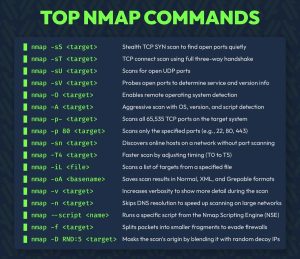 *x.com




 *notes.kodekloud.com




 ROI Calculator