What Is YouTube Monetization (and Why Does It Matter in 2027)?
YouTube Monetization Rules: The Basic Requirements Every Channel Must Meet
YouTube Monetization Eligibility: Tier 1 vs Tier 2
What Changes on February 1, 2027?
Key Insights
YouTube monetization allows creators to earn through ads, YouTube Premium revenue, channel memberships, Super Chat, Super Thanks, Shopping features, and brand partnerships.
The blog explains two monetization tiers: early access requires 500 subscribers and additional activity thresholds, while full monetization currently requires 1,000 subscribers and either 4,000 watch hours or 10 million qualified Shorts views.
From February 1, 2027, new applicants will need 8,000 qualified watch hours or 20 million qualified Shorts views for full ad monetization, while the 1,000-subscriber requirement remains unchanged.
Creators can track eligibility through the Earn tab in YouTube Studio. Original content, authentic engagement, policy compliance, and avoiding fake views or repetitive content can help prevent application rejection.
In this blog, you'll learn about YouTube monetization eligibility, the 2027 rule changes, qualified watch hours and Shorts views, application steps, common rejection reasons, and tips to reach monetization requirements.
If you've ever dreamed of turning your videos into a paycheck, here's some news that matters right now: YouTube is about to make it harder. From February 1, 2027, the bar for earning ad revenue doubles for new applicants. That means anyone planning to cash in on their channel has a limited window left under the current, easier numbers.
Don't panic, though. Whether you're a beginner with ten subscribers or a creator already closing in on your first thousand, this guide walks you through everything in plain language: what YouTube monetization actually is, who qualifies, the rules you must follow, and the exact steps to get paid. Let's dive in.
What Is YouTube Monetization (and Why Does It Matter in 2027)?
YouTube monetization simply means earning money from your channel through YouTube’s own tools. All of it sits behind one gate: the YouTube Partner Program, usually called YPP. You can have a million views and still earn nothing from YouTube if you haven’t been accepted into this program.
Once you’re in, you can earn from ads on your videos, a share of YouTube Premium revenue, channel memberships, Super Chat and Super Thanks, Shopping features, and brand deals through the Creator Partnerships marketplace inside YouTube Studio.
The reason 2027 is such a big deal is simple. YouTube is raising the entry requirements for ad revenue, so understanding the rules now can save you months of frustration later.
YouTube Monetization Rules: The Basic Requirements Every Channel Must Meet
Before we talk numbers, let’s cover the basics. These YouTube monetization rules apply to every channel, no matter how big or small. You can hit every threshold and still get stuck if you miss one of these:
Follow the channel monetization policies. Your content has to be advertiser-friendly and original.
Live in an eligible country or region. YouTube runs YPP in a long list of countries, and the early-access tier has a shorter list than the full program.
Have no active Community Guidelines strikes. Strikes expire after 90 days, but while one is active, your application is blocked.
Turn on 2-Step Verification for the Google account linked to your channel.
Enable advanced features in YouTube Studio.
Link an active AdSense account. This is how you actually get paid.
Think of these as the boring-but-essential paperwork. Fix them early and you’ll never have to worry about them again.
YouTube Monetization Eligibility: Tier 1 vs Tier 2
YouTube now offers two levels of entry. Knowing the difference helps you plan your first milestone.
Tier 1: Early Access (Fan Funding)
This is the starter level, and it’s easier to reach. You need:
500 subscribers
3 public uploads in the last 90 days
Either 3,000 qualified watch hours in the past 12 months, or 3 million qualified Shorts views in the past 90 days
At this tier you can earn from memberships, Super Chat, Super Stickers, Super Thanks, Shopping, and brand partnerships. You can’t earn from ads yet, but for creators with a loyal audience, fan funding can be surprisingly strong.
Tier 2: Full Monetization (Ad Revenue)
This is the big one. Right now, you need:
1,000 subscribers
Either 4,000 qualified watch hours in the past 12 months, or 10 million qualified Shorts views in the past 90 days
This tier unlocks everything from Tier 1, plus ad revenue and your share of YouTube Premium earnings. There’s no upload requirement here.
One thing trips up many beginners: watch hours and Shorts views never combine. You qualify through one path or the other. Having 2,000 watch hours and 5 million Shorts views does not add up to eligibility. Pick a lane and focus.
What Changes on February 1, 2027?
For new applicants, full monetization will require 1,000 subscribers plus either 8,000 qualified watch hours (up from 4,000) or 20 million qualified Shorts views (up from 10 million). The subscriber requirement stays at 1,000, and the 500-subscriber fan-funding tier is staying as it is.
There are a few details worth knowing:
The date that counts is when you apply, not when YouTube makes its decision. If your application reaches YouTube by the end of January 31, 2027 (23:59 UTC), it should be judged under the current thresholds.
Reviews take roughly a month. If you’re rejected, you must wait before trying again, so there’s little room for a second attempt if you apply late.
Already in YPP? You’ll likely need to accept YouTube’s updated terms in Studio before the deadline to keep your monetization features. Check your Studio notifications.
If you’re already close to 4,000 hours, applying early is the smartest move you can make. Aim for early December or sooner, so a rejection still leaves time to fix things and reapply before the cutoff.
What Counts as Qualified Watch Hours and Shorts Views?
Not every view or minute helps. YouTube only counts what it calls “qualified” activity, and this is where many creators lose progress without realizing.
Here’s the sneaky part. If you set an old video to private, its watch hours disappear from your total that same day. Deleting a video is even worse, because the hours are gone for good, even if you re-upload it. So if you’re embarrassed by your first few uploads, resist the urge to hide them until after you’re approved.
Also keep in mind that the Shorts number on your dashboard may not match the number YouTube uses for eligibility. Monetization looks at “engaged views,” a stricter measure, so always cross-check before assuming you’ve crossed the line.
YouTube Monetization Checker: How to Track Your Progress
Good news: you don’t need a third-party website to find out where you stand. The best YouTube monetization checker is already built into your account.
Here’s how to use it:
Open YouTube Studio on desktop or mobile.
Tap or click the Earn tab.
Check the progress bars for subscribers, public watch hours, and Shorts views.
Select Get notified so YouTube emails you the moment you qualify.
That’s it. The Earn tab shows your numbers for both tiers and tells you whether you’re eligible to apply. Be careful with outside “monetization checker” tools that ask for your login or promise guaranteed approval. Stick to the official dashboard for accurate data, and treat anything else as a rough estimate at best.
A handy trick: check your Earn tab once a week and note which videos are bringing in the most watch time. Then make more of that kind of content.
How to Monetize YouTube Channel: Step-by-Step Process
Ready to put it all together? Here’s a simple roadmap for how to monetize YouTube channel growth into real earnings.
Step 1: Pick a clear niche: Channels with a clear topic grow faster and look more professional to reviewers. You don’t need to be an expert, just consistent and useful.
Step 2: Create original, valuable content: Add your own voice, ideas, and personality. Reaction, commentary, and tutorial formats are fine as long as a reviewer can see what you added.
Step 3: Choose your path: Decide whether you’re building through long-form videos, Shorts, or both. Remember that they count separately, so putting all your energy into one path usually gets you there faster.
Step 4: Hit the thresholds: Focus on retention and average view duration, not just upload volume. A video that keeps people watching does more for your watch hours than three rushed ones.
Step 5: Prepare your account: Turn on 2-Step Verification, make sure you have no active strikes, and set up your AdSense account.
Step 6: Apply in YouTube Studio: Go to the Earn tab, accept the base terms, link AdSense, and submit your application. Then wait for the review, which usually takes about a month.
Step 7: Keep creating while you wait: Reviewers look at your channel’s overall theme, your most-viewed videos, your newest uploads, and your titles and descriptions. Keep posting good content and avoid making big changes to your channel while you wait.
Why YouTube Rejects Monetization Applications
Most rejections have nothing to do with the numbers, because those are checked automatically. Instead, the usual culprits are:
Inauthentic content. Mass-produced videos, slideshow-style uploads, AI voiceover over stock footage, or videos made from templates with little original input. This is the most common reason in recent years.
Reused content. Using other people’s clips or music without adding anything meaningful.
Misleading titles and thumbnails that promise something the video doesn’t deliver.
Active strikes or policy violations.
Fake engagement, such as bought views or subscribers, which is a violation by itself.
AdSense problems, like a duplicate, suspended, or unlinked account.
YouTube has also been especially strict on repetitive AI-generated contentand AI personas pretending to be experts on finance, legal, or medical topics. Using AI as a tool is fine. Letting it do all the work with no human input is where channels get into trouble.
What to Do If You're Rejected
A rejection isn’t the end of the road. You have three options:
Appeal within 21 days if you believe the decision was a mistake. A decision usually takes around two weeks.
Reapply after 30 days following your first rejection, once you’ve fixed the problems.
Reapply after 90 days for any rejection after that.
If you decide to fix rather than appeal, focus on the content YouTube flagged. Improve weak titles and thumbnails, add original value to your videos, and publish fresh uploads that clearly show your style. Avoid mass-deleting videos, since that wipes out the watch hours you need.
Make longer, better-retaining videos. Average view duration moves your total faster than posting more often.
Study your analytics. Double down on topics that keep people watching.
Build a community. Reply to comments, ask questions, and invite people to subscribe.
Use Shorts to attract, long-form to convert. Shorts can bring in new viewers, but longer videos build the loyal audience that actually sticks around.
Be patient and honest. Never buy views or subscribers. It can cost you your chance at monetization entirely.
Final Thoughts
YouTube monetization in 2027 will take a bit more effort than it used to, but it’s still very achievable for creators who stay consistent and original. The big takeaway? If you’re anywhere near the current thresholds, don’t wait. Check your Earn tab, clean up your account basics, and apply well before January 31, 2027.
And if you’re just starting out, don’t be discouraged by the higher numbers. Focus on making videos people actually want to watch, and the views, hours, and subscribers will follow.
Note: YouTube updates its policies from time to time, so always double-check the latest details in YouTube Help or your Studio dashboard before applying.
Frequently Asked Questions
From February 1, 2027, new applicants for ad revenue will need 1,000 subscribers plus either 8,000 qualified watch hours in 12 months or 20 million qualified Shorts views in 90 days. The 500-subscriber fan-funding tier stays unchanged.
Yes, but only for a limited time. If your application reaches YouTube by the end of January 31, 2027, it is judged under the current thresholds of 4,000 watch hours or 10 million Shorts views. Since reviews take about a month, applying early is wise.
No. Shorts views and long-form watch hours are separate paths and never combine. You need to meet the threshold through one path or the other.
Use the Earn tab in YouTube Studio. It works as the official YouTube monetization checker, showing your progress toward every requirement and letting you turn on notifications for when you qualify.
It’s possible, but risky. YouTube rejects channels built on mass-produced, repetitive, or low-effort AI content. If you use AI tools, make sure your own voice, ideas, and editing clearly shape the final video.
Priya Sahu
Sales & Digital Marketing Strategist
Sales and Marketing professional with 6+ years of experience in B2B and B2C growth, specializing in business development and digital marketing. Skilled in CRM systems, paid campaigns, and AI-driven strategies to drive revenue, optimize performance, and build lasting client relationships.
Get Free Upskilling Guidance
Fill in the details for a free consultation
Related Courses
Explore our programs
Professional Certificate Programme in AI-Powered Digital Marketing for Performance & Growth

 October 22, 2026
 8 min read





 Key Insights
 ChatGPT
 Perplexity
 Claude
 Grok
Grok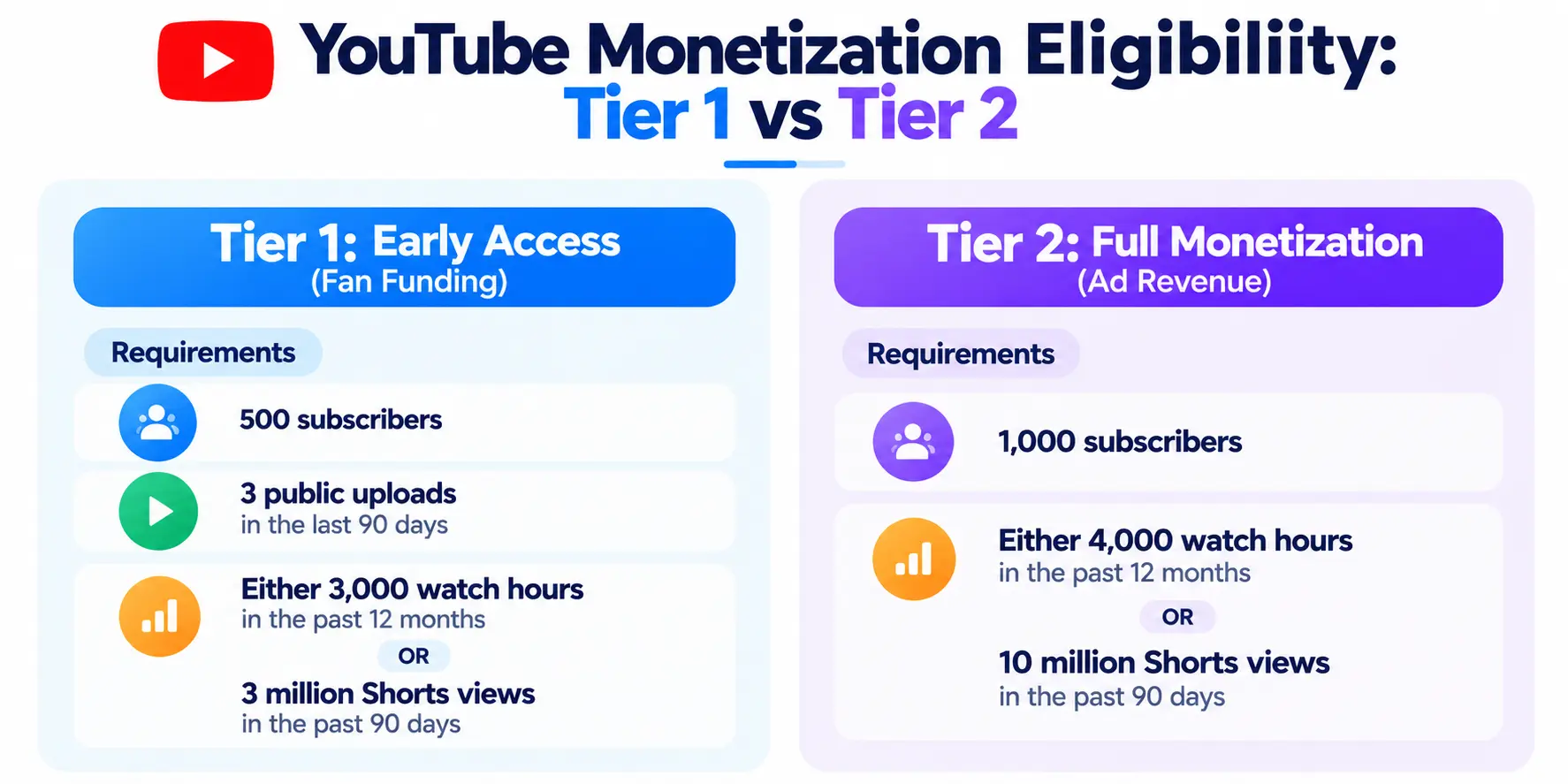









 ROI Calculator