TCP focuses on reliable, ordered data delivery, while UDP uses a connectionless approach with lower overhead and greater emphasis on speed and responsiveness.
TCP uses a three way handshake, acknowledgments, sequencing, retransmission, and flow and congestion control to support reliable communication.
UDP does not provide built in retransmission or guaranteed ordering, making it useful for applications where minimizing delays and maintaining responsiveness are important.
The choice between TCP and UDP depends on application requirements. TCP suits reliable and ordered delivery, while UDP can be useful when low latency, lightweight communication, and application controlled reliability are priorities.
In this blog, you'll learn what TCP and UDP are, how they work, their key differences, common uses, advantages and limitations, and how to choose between them.
Imagine sending an important document over the internet. You would want every page to arrive in the correct order, with nothing missing. Now imagine streaming a live video. In that case, getting the data quickly may matter more than receiving every single packet. This is where TCP and UDP play different roles.
TCP and UDP are two of the most widely used transport layer protocols in computer networking. They help applications exchange data across networks, but they follow very different approaches. TCP focuses on reliable and ordered delivery, while UDP prioritizes speed and low overhead.
Understanding tcp vs udp is important for students, IT professionals, network administrators, developers, and anyone learning how internet communication works. In this blog, we will explore what TCP and UDP are, how they work, their key features, the difference between tcp and udp, and when each protocol is commonly used.
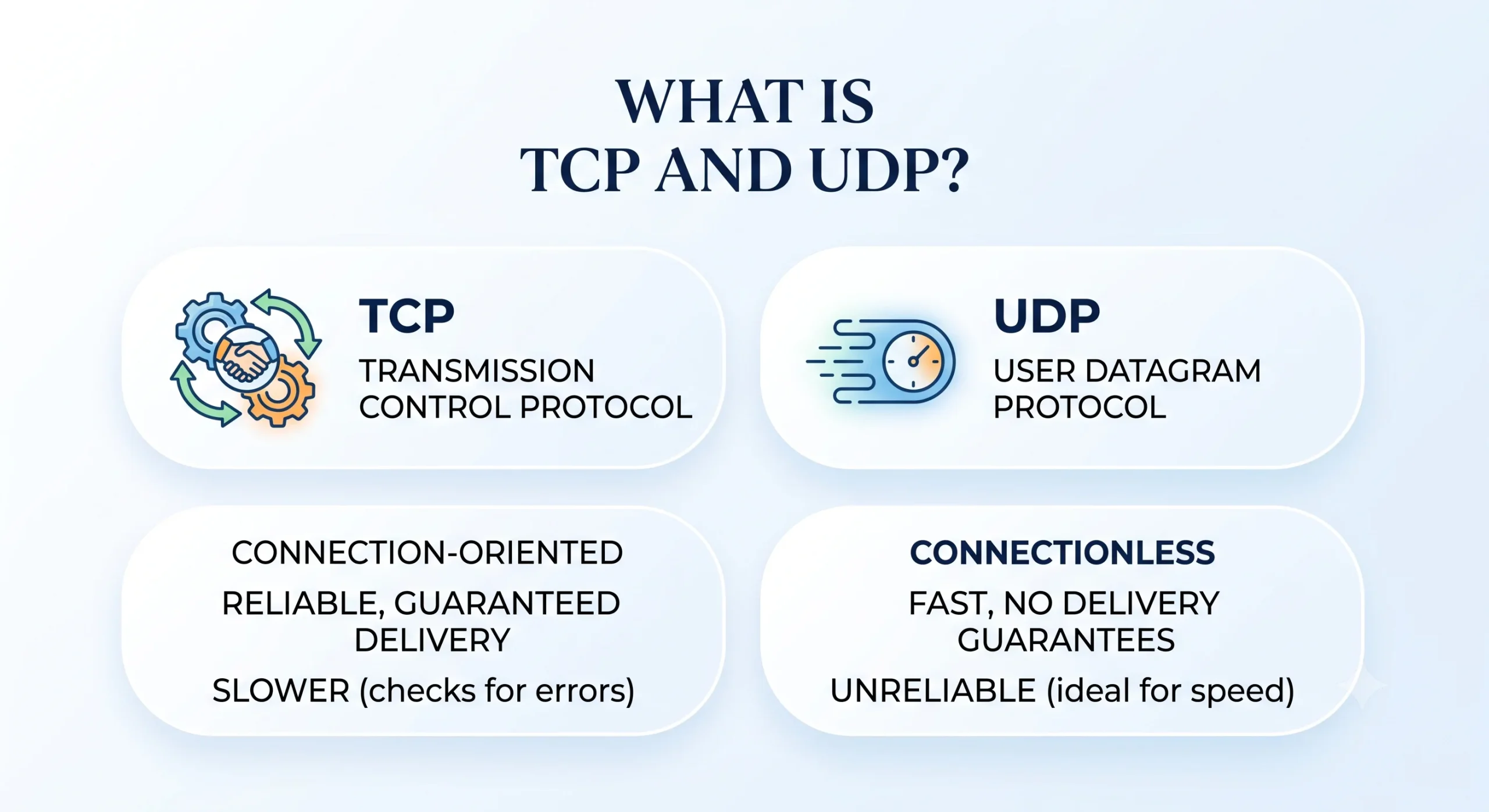
TCP stands for Transmission Control Protocol, while UDP stands for User Datagram Protocol. Both operate at the transport layer of the TCP/IP model and are responsible for transporting application data between devices.
However, their communication methods are different.
TCP is a connection-oriented protocol. Before data is transferred, TCP establishes a connection between the sender and receiver. It then uses mechanisms such as acknowledgments, sequencing, and retransmission to improve reliable delivery.
UDP is a connectionless protocol. It does not establish the same type of connection before sending data. Instead, it sends individual datagrams without waiting for confirmation that each packet has arrived.
A simple way to remember the difference is this:
TCP: “Make sure the data arrives correctly.”
UDP: “Send the data quickly with minimal overhead.”
TCP is designed for situations where accurate and reliable data delivery is important.
Before exchanging application data, TCP typically establishes a connection using a process known as the three-way handshake.
The process involves three main steps:
SYN: The client sends a synchronization request to begin a connection.
SYN-ACK: The server acknowledges the request and sends its own synchronization information.
ACK: The client acknowledges the server’s response.
Once the connection is established, data can be transmitted.
TCP divides application data into smaller units and assigns sequence information to help the receiving device reconstruct the data in the correct order. The receiver can acknowledge successfully received data. If some data is lost, TCP can retransmit it.
TCP also includes mechanisms for controlling how much data can be sent and managing congestion on a network.
These features make TCP useful when missing or incorrectly ordered data could create a problem.
Key Features of TCP
Some important characteristics of TCP include:
Connection-Oriented Communication
TCP establishes a connection before transferring application data.
Reliable Delivery
TCP uses acknowledgments and retransmission mechanisms to help ensure data reaches its destination.
Ordered Data
TCP uses sequence information so that the receiving application can process the data in the appropriate order.
Error Detection
TCP includes mechanisms for detecting problems with transmitted data and responding appropriately.
Flow and Congestion Control
TCP can regulate data transmission based on receiver capacity and network conditions.
These features improve reliability but also create additional processing and communication overhead.
UDP takes a simpler approach to data transmission.
Unlike TCP, UDP does not establish a connection through a three-way handshake before sending data. An application can send a UDP datagram toward its destination without waiting for a connection to be established.
UDP also does not provide TCP’s built-in mechanisms for ensuring that every datagram arrives, arrives only once, or arrives in a particular order.
This makes UDP lightweight and efficient for applications where speed and responsiveness are important.
For example, imagine watching a live video. If one small portion of a frame is lost, waiting for that missing data could sometimes create more noticeable delay than simply continuing with the next information. Applications that use UDP can implement their own techniques when additional reliability is needed.
Key Features of UDP
Connectionless Communication
UDP sends datagrams without establishing a TCP-style connection first.
Low Overhead
UDP has a simpler transport mechanism, which can reduce protocol overhead.
No Built-In Retransmission
UDP does not automatically retransmit lost datagrams in the way TCP does.
No Guaranteed Ordering
Datagrams may not reach the destination in the same order in which they were sent.
Speed and Responsiveness
The lightweight design can be useful for applications where minimizing delay is important.
TCP vs UDP: What Is the Difference?
The difference between tcp and udp becomes clearer when their major characteristics are compared.
Feature
TCP
UDP
Full form
Transmission Control Protocol
User Datagram Protocol
Communication
Connection-oriented
Connectionless
Reliability
Provides mechanisms for reliable delivery
No built-in guarantee of delivery
Ordering
Maintains ordered byte stream
Does not guarantee ordering
Retransmission
Yes
No built-in retransmission
Handshake
Uses connection establishment
No TCP-style handshake
Overhead
Higher
Lower
Speed
Generally more overhead and processing
Generally lightweight
Flow control
Supported
Not provided in the same way
Congestion control
Supported
Not provided in the same way
Common uses
Web communication, file transfer, email and other reliable data transfer
DNS queries, streaming, online gaming, voice and video applications
The comparison between tcp and udp shows that neither protocol is simply designed to replace the other. Their characteristics suit different communication requirements.
TCP vs UDP: Which One Is Faster?
A common question when learning tcp vs udp is which protocol is faster.
UDP generally has lower protocol overhead because it does not establish a TCP-style connection or provide TCP’s reliability mechanisms. This can make it suitable for applications where low latency and responsiveness are priorities.
TCP performs additional work to provide reliable and ordered communication. This can introduce overhead, particularly when retransmissions and other control mechanisms are required.
However, real-world network performance depends on several factors, including network conditions, application design, server performance, distance, congestion, and the way the application handles data.
Therefore, speed alone should not determine the choice between TCP and UDP.
When Is TCP Used?
TCP is commonly used when reliable and ordered data delivery is important.
Typical examples include:
Web Applications
Many web-based applications rely on transport mechanisms built over TCP when reliable delivery is required.
File Transfers
When transferring a file, missing or incorrectly ordered data can corrupt the result. Reliable transport is therefore important.
Email
Email communication involves messages that need to be delivered accurately rather than simply as quickly as possible.
Remote Access
Certain remote access and administration applications require reliable communication between systems.
In these situations, TCP’s reliability mechanisms can be valuable.
UDP is useful for applications where low latency, simplicity, or application-controlled delivery behavior is important.
Online Gaming
Fast responses are important in many multiplayer games. An application may prefer timely information over waiting for every earlier packet to be retransmitted.
Live Streaming
Real-time audio and video can be sensitive to delays. Depending on the application and protocol stack, UDP can support communication where minimizing delay is important.
Voice and Video Communication
Real-time conversations benefit from responsive communication. Excessive retransmission delays can affect the experience.
DNS
DNS commonly uses UDP for many queries because of its lightweight request and response model, although DNS can also use TCP in situations where it is required.
TCP vs UDP: Advantages and Limitations
Looking at the advantages and limitations provides another useful perspective on the difference between tcp and udp.
Advantages of TCP
TCP provides reliable data delivery, ordered communication, error handling, flow control, and congestion control. These features make it suitable for applications where data accuracy is essential.
Limitations of TCP
The additional mechanisms used by TCP can create more overhead. Connection establishment, acknowledgments, retransmissions, and congestion management can affect latency and resource usage.
Advantages of UDP
UDP has a simple structure and lower protocol overhead. It can be useful for applications that prioritize responsiveness and can handle reliability at the application level when necessary.
Limitations of UDP
UDP does not provide TCP’s built-in reliability and ordering mechanisms. Lost or reordered data must be handled by the application if those capabilities are needed.
How to Choose Between TCP and UDP?
Choosing between TCP and UDP depends on what the application needs.
Consider TCP when:
Reliable delivery is important.
Data must arrive in the correct order.
Retransmission of lost data is useful.
The application can tolerate additional communication overhead.
Consider UDP when:
Low latency is a major priority.
The application can tolerate some packet loss.
The application needs a lightweight transport mechanism.
Reliability or ordering can be handled separately when required.
The choice is therefore not simply about which protocol is better. It depends on the communication requirements of the application.
Why Should You Learn TCP and UDP?
TCP and UDP are fundamental concepts in networking. Understanding them helps explain how applications communicate across the internet and why different applications can require different approaches to data transmission.
For students and aspiring networking professionals, learning the comparison between tcp and udp provides a foundation for understanding other networking concepts such as ports, sockets, IP communication, packet delivery, network performance, and application protocols.
For developers, understanding these protocols can also help explain why an application may prioritize reliable delivery in one situation and low latency in another.
Conclusion
TCP and UDP are both essential transport layer protocols, but they are designed around different communication priorities.
TCP focuses on reliable, ordered communication and uses mechanisms such as connection establishment, acknowledgments, retransmission, flow control, and congestion control. UDP takes a simpler, connectionless approach with lower protocol overhead and does not provide the same built-in delivery guarantees.
The difference between tcp and udp is therefore mainly about how they handle communication. TCP is designed to provide reliable transport, while UDP provides a lightweight transport option that can be useful when responsiveness and application-level control are important.
Understanding tcp and udp is an important step toward building a strong foundation in computer networking.
Frequently Asked Questions
The main difference is how they handle data delivery. TCP is connection-oriented and provides mechanisms for reliable and ordered delivery, while UDP is connectionless and does not provide the same built-in delivery guarantees.
UDP generally has lower protocol overhead because it does not establish a TCP-style connection or use TCP’s reliability mechanisms. However, actual application performance depends on network conditions and how the application is designed.
Online gaming can use UDP when low latency and responsiveness are important. The appropriate choice depends on the game’s communication requirements and how it handles lost or delayed data.
Yes. Different parts of an application or different applications can use TCP and UDP depending on their communication requirements. The choice depends on factors such as reliability, ordering, latency, and protocol overhead.
Shubham Lal
Lead Software Developer
Shubham Lal joined Microsoft in 2017 and brings 8 years of experience across Windows, Office 365, and Teams. He has mentored 5,000+ students, supported 15+ ed-techs, delivered 60+ keynotes including TEDx, and founded AI Linc, transforming learning in colleges and companies.

 September 29, 2026
 7 min read





 Key Insights
 ChatGPT
 Perplexity
 Claude
 Grok
Grok










 ROI Calculator