
Presentation Skills Every Professional Should Master
 February 4, 2026
 8 min read





Table Of Content
- What Are Presentation Skills?
- Different Types of Presentation
- Top Presentation Skills Every Professional Should Develop
- Practical Tips to Master Presentation Skills
We’ve all been there. A meeting where the idea was good, the data was solid, yet the presentation didn't quite land. On the other hand, we have also witnessed how a confident, clear presentation can change minds, gain approval, or motivate teams. The importance of presentation skills is immense.
In today’s modern work environment, presentation skills are not just about creating slides and reading out loud in front of audiences. Rather, it’s a secret weapon for delivering a message effectively, conveying ideas, solving problems, and more. In fact, an effective presentation always makes the difference between success and missed opportunities. Thus, it becomes important for you to refine your presentation skills.
As a leader, you will present updates to your leadership team, introduce new concepts to potential customers, train employees, or present products/services to clients. The way you present is most important in all of these situations.
In this blog, we will discuss what presentation skills actually consist of, why they are important to your professional success, and how you can create a lasting and effective development of presentation skills.
 ChatGPT
 Perplexity
 Claude
 Grok
GrokWhat Are Presentation Skills?
So, what is presentation skills exactly?
‘Presentation skills’ refers to the set of abilities that help you communicate ideas, information, or recommendations clearly and confidently to an audience. These skills go beyond speaking. They combine verbal communication, body language, visual storytelling, audience awareness, and adaptability to ensure your message is understood and remembered.
Presentation skills help you:
- Organise your thoughts logically
- Deliver your message with confidence
- Engage different types of audiences
- Handle questions and feedback effectively
- Influence decisions and outcomes
Different Types of Presentation
Every presentation serves a unique purpose. They can be used to guide, persuade, inform, motivate, influence decisions, and much more. Let’s explore the six main types of presentations:
1. Informative Presentation
This type of presentation skill is a powerful tool for enlightening and educating audiences by delivering factual presentations. They are important for diverse settings, such as community events, academia, and business, where they shed light on subjects and bridge knowledge gaps.
2. Instructive Presentation
An instructive presentation is when you guide the audience through a series of instructions or a process. These types of presentations are important for providing step-by-step instructions that help the audience perform a specific task or acquire new skills.
3. Motivational Presentations
Motivational presentations take the lead when you aim to boost and energise the audience. These types of presentations are important; they can invoke emotions, raise morale, and infuse a sense of purpose. It is mostly used for leadership seminars, corporate events, and education programmes, where the goal is to restore eagerness and drive individuals to a common goal.
4. Decision-making Presentations
These presentations are crucial for leading stakeholders to reach informed conclusions or choices. Their significance is in providing accurate or factual information that facilitates effective decision-making. These types of presentations are widely used in project planning sessions, business meetings, and any strategic discussions.
5. Progress Presentations
It comes into play when the objective is to update your stakeholders on the progress of project development or organisational endeavours. Its significance lies in the ability to be transparent and showcase achievements by addressing challenges effectively.
6. Persuasive Presentations
This type of presentation is important for influencing the audience’s attitude and actions. They are a powerful tool for oscillating opinions, achieving desired outcomes, whether in marketing or sales.
Top Presentation Skills Every Professional Should Develop
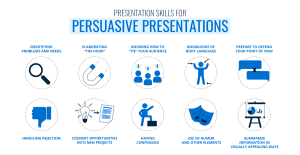
Below are the most important types of presentation skills every professional should focus on.
*slidemodel.com
1. Clarity of Thought
A clear understanding of your thoughts is essential for making an effective presentation. An audience will be able to understand your overall objective much quicker if your information is presented in a structured manner. For example, a manager might state, “Our greatest challenge is delayed approvals. This presentation will identify the causes of these transactions and ways to improve them”.
How to develop:
- Define one main objective before creating slides
- Use simple structures like problem–solution–impact
- Remove unnecessary details
- Practice summarising your message in one sentence
2. Audience Awareness
A great presentation speaks to the room it is in. It only means seeing your audience and then shaping your message around them. This shows that you care about whatever you’re presenting, and in turn, it helps to build trust, relevance, and connections.
For Example:
While presenting project updates to senior leaders, a professional focuses on ROI(Return on Investment)and outcomes instead of technical details.
How to develop:
- Research your audience’s role and expectations
- Adjust tone, examples, and language
- Anticipate questions they may ask
- Focus on what matters most to them
3. Confident Body Language
Your personality talks more than you say a word. So, when you’re going for the high-stakes presentation, whether it’s being held in boardrooms, virtual meetings or client pitches, your posture and facial expressions can make or destroy your credibility. Thus, wear confidence and try to be the best and show your leadership qualities, how you can engage your audiences and build connections.
For Example:
A presenter stands upright, maintains eye contact, and uses natural hand movements while explaining key points.
How to develop:
- Practice in front of a mirror or camera
- Maintain an open posture and steady eye contact
- Avoid fidgeting or crossed arms
- Use purposeful gestures to highlight points
4. Effective Use of Visual Aids
If you’re using visuals, make sure they support your message, not overshadow it. You can use visuals to highlight key data and support comprehension, and engage your audience. When visuals are not used in the right way, they cause distraction.
For example:
Instead of a text-heavy slide, use a simple chart to explain sales growth trends.
How to develop:
- Keep one key idea per slide
- Use visuals, charts, and icons
- Limit text to short bullet points
- Ensure font size and contrast are readable
5. Storytelling Skills
Undoubtedly, facts inform, but stores convince audiences. You can use your storytelling abilities to make data more meaningful and memorable. A presentation with a strong narrative keeps your audience engaged emotionally and intellectually.
Example:
Instead of just sharing data, a manager explains how a small process change helped a team reduce errors and save time.
How to develop:
- Use real-life examples or case studies
- Structure stories with a beginning, challenge, and outcome
- Connect stories to the audience’s experience
- Practice storytelling in everyday conversations
6. Handling Q&A with Confidence
A presentation session is incomplete without Q&A sessions. It can either strengthen your credibility or degrade a well-structured presentation. Thus, it is highly recommended to answer every question politely. This also shows your subject expertise and leadership qualities.
For example:
When asked a tough question, a presenter listens carefully, responds clearly, and offers to follow up if needed.
How to develop:
- Anticipate possible questions in advance
- Practice answering questions aloud
- Stay calm and composed
- Admit honestly when you don’t know the answer
7. Time Management
An effective presentation is all about how you manage your time and ensure all your key points are delivered smoothly. Thus, time management is a crucial factor to consider. Do not rush over time because that leaves you poor impressions.
For Example:
A presenter completes the main content within time and leaves space for discussion.
How to develop:
- Rehearse with a timer
- Prioritise key messages
- Avoid overloading slides
- Plan buffer time for Q&A
8. Persuasion and Influence
In corporate culture, the presentation goal is not just to provide information, but it’s to drive a decision and motivate action. Thus, here, persuasion is all about aligning logic, credibility and emotion to make an informed decision.
For example:
A team lead clearly explains why a proposed strategy benefits both the organisation and employees.
How to develop:
- Clearly define the action you want
- Support arguments with data and logic
- Address possible objections
- Align your message with business goals
Practical Tips to Master Presentation Skills
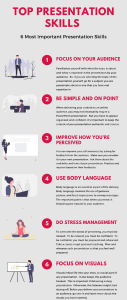
You’ve nailed the content. Your slides are ready. But somehow, your delivery still doesn’t land the way you hoped. This is where technique makes the difference. The tips below aren’t abstract theories; they’re practical, actionable methods you can use immediately. Test them, refine them, and incorporate them into your presentation toolkit.
*weshare.ne
Tip 1: Record and review practice sessions
Recording and reviewing yourself is one of the simplest and most effective ways of improving your presentation skills. Most people just create slides and think that they feel overconfident to present themselves. But sometimes, there can be blind spots, body language issues, and pacing that can ruin your impressions.
Thus, record yourself by using various tools such as Microsoft Teams, Zoom or a phone camera and review whether you’re at the right pace or if you’re speaking too fast or too slow.
Tip 2: Use the rule of three for key points
Do you know our brains are the fastest-working machines when it comes to recognising patterns? This is where grouping ideas in three makes them stick better. Whether your presentation talks about challenges or benefits of stress, break them into three points and give your message clarity without exaggerating them.
Tip 3: Practice Impromptu Speaking
When presenting yourself in front of your client, boss or colleague, try to rehearse how you’re going to put up your ideas or thoughts. You can practice with spontaneous speaking that sharpens your thinking and boosts confidence. This strategy is considered most effective in Q&A sessions.
You can do it by setting a timer and speaking for a minute on any random topic. Also, you can join any speaking group and practice explaining ideas, especially complex ones, in simple language.
Tip 4: Implement the Pyramid Principle
Presentational skills are all about how you are structuring your message for clarity. So, instead of building up slowly, start with your main idea or recommendation first, then explain why. This approach respects your audience’s time and ensures they walk away with the message that matters most.
Tip 5: Always Engage with Micro-Intercations
Every presentation, especially virtual ones, needs audience participation. So, to make it more engaging, involve your audience through polls or open-ended questions, make your talk feel two-way, and increase attention span.
FYI: You can use tools like Zoom Polls and Slido to engage your audience.
Tip 6: Follow the “10-20-30” Rule for Slides
Created by Guy Kawasaki, the “10-20-30” says keep ten slides, twenty minutes, and no font smaller than 30 points. This strategy can help you transform your presentations from snooze-fests to showstoppers.
For instance, you have to pitch a groundbreaking product to your valuable investors. With only 10 slides, you are going to cut the fluff and deliver a focused message. In twenty minutes, you engage them, leaving them eager to learn more. In 30 pony font, your pitch deck is clear and impactful, ensuring everyone notices your key points.
Conclusion
In brief, refining your presentation skills requires ongoing learning and practice. Whether we talk about clear communication, compelling body language, or audience engagement, all these skills are interlinked and play an important role in an effective presentation. So, working on all these aspects only helps you to connect with your audience and make your presentation session successful.
Additionally, if you aim to elevate your executive and leadership skills, enrolling in industry-relevant professional programmes offered by Jaro Education can help you strengthen your communication abilities, strategic thinking, and overall professional presence.
Frequently Asked Questions
Yes, a professional presentation skills course provides structured learning, expert guidance, and practical exercises that help individuals refine communication, leadership presence, and persuasive abilities.

Related Courses
Explore our programs

 Admission Open

 Admission Open
 Admission OpenAdmission Open
Find a Program made just for YOU
We'll help you find the right fit for your solution. Let's get you connected with the perfect solution.

Is Your Upskilling Effort worth it?
 ROI Calculator

Are Your Skills Meeting Job Demands?
Try our Skill Gap tool
Experience Lifelong Learning and Connect with Like-minded Professionals
Explore Jaro Connect

