Tableau transforms data into eye-catching pictures to unlock the power of data visualization. It uses the enhanced comprehension capabilities of graphs, maps, and graphical elements. Visualisations have been demonstrated to be useful throughout history in understanding difficult content and overcoming the limitations of just words. Tableau’s data visualization technology enables decision-makers to see significant patterns amidst many variables as data volumes grow. It allows them to discuss concepts, test theories, and make wise decisions in the future. By actively integrating users, modifying data on the go, and providing spectacular real-time insights, Interactive Visualisation takes it further than static representations.
To understand Tableau and learn about various facets of advanced analytics enrolling in the Professional Certificate Programme in Advanced Analytics & Business Intelligence – IIM Kozhikode can be of immense help. This career-enhancing programme’s rigorous theoretical and hands-on instruction includes a range of data processing methods, programming with software, statistics, machine learning, and more. This curriculum combines experiential live interactive classes with on-campus immersive learning to provide a balance between conventional classroom instruction and technology-enhanced learning.
Let us further dive into the world of data visualization using tableau.
The art of expressing complex data in a graphical style is known as data visualization, making it easier to comprehend and interpret large datasets. Using graphs, maps, charts, and other visual components simplifies complex information while revealing patterns, trends, and connections that help people make wise decisions and gain insightful understanding.
Tableau, a leading software for data visualization and business intelligence, empowers users to connect, explore, and visualise their data effortlessly. With its user-friendly drag-and-drop interface, even individuals without complex coding or programming skills can create stunning visualisations. It offers the flexibility to connect to multiple data sources, ranging from spreadsheets, databases, and cloud services to big data platforms. This versatility allows users to consolidate and analyse data from various sources, providing a unified view of their information.
Technological advancements have greatly amplified the significance of data visualization with Tableau, enhancing business intelligence. Numerous compelling reasons drive the adoption of data visualization, and a selection of them is outlined below:
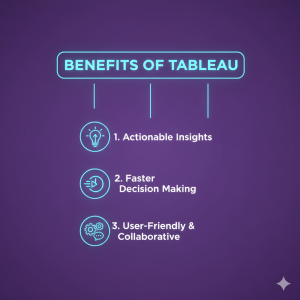
Enhanced Clarity and Insight: Visualization facilitates clear comprehension and deeper insights into complex topics.
Accelerated Decision-Making: The prediction of future trends and insights on more informed decision-making are simplified with data visualization.
Swift Identification of Large Data Volumes: Visual representations enable efficient and rapid identification of patterns and insights within extensive datasets.
Universal Information Communication: Data visualization is a universal language for conveying information, ensuring effective communication across diverse audiences.
Ease of Idea Sharing: Visualizing data simplifies sharing ideas with others, fostering collaboration and promoting a shared understanding.
Business Adjustment Guidance: By visualizing data, individuals gain valuable insights into areas where adjustments can be made to optimise business outcomes.
Scalability: The data visualization provides the flexibility and scalability to handle large and expanding datasets.
Simplified Interpretation: Visual representations make data interpretation more accessible, enabling stakeholders to extract meaning more easily.
Getting Started with Your Tableau Journey
Before diving headfirst into Tableau, one must install and set up the software. Tableau provides different versions tailored to individual users. It offers collaborative environments, and publicly sharing visualisations, namely Tableau Desktop, Tableau Server, and Tableau Public. Once Tableau is installed, you can seamlessly connect to your data sources, whether Excel spreadsheets or SQL databases. The simple and intuitive interface empowers you to import data and embark on exploration and visualisation with just a few clicks.
Crafting Foundational Visualizations
Creating basic visualizations in Tableau is a smooth process. Tableau automatically generates suitable charts or graphs based on the data type by effortlessly dragging and dropping desired fields onto the canvas. Whether bar charts, line graphs, scatter plots, or pie charts, Tableau offers many visualization options. It provides comprehensive customization features to enhance the appeal and informativeness of your visualisations. You can add colours, labels, annotations, and other design elements to meet your requirements.
Elevating Visualizations with Tableau’s Extraordinary Features
To elevate your visualizations, Tableau offers a range of additional features such as filters, parameters, and calculated fields. Filters enable you to focus on specific subsets of data, facilitating deep dives into the details. Parameters provide interactivity, allowing users to manipulate variables and observe immediate impacts on the visualizations.
Amplifying Tableau’s Potential Through Integration
Tableau seamlessly integrates with other tools and applications, amplifying your data visualization workflow. By connecting Tableau with databases, cloud services, and big data platforms, you can access real-time data, ensuring that your visualisations are always up to date. It supports automation and scheduling capabilities, enabling you to automate data updates and refreshes. This ensures that your visualizations remain current, saving time and effort compared to manual data updates.
Best Practices for Effective Tableau Visualization
Best practices to follow for ensuring tableau visualization communicates insights clearly include the following:
Select chart types based on data relevance.
Avoid unnecessary clutter or over-styling.
Keep a logical flow in dashboard layouts.
Highlight key metrics by using color judiciously.
Following these best practices ensures that the data visualization Tableau efforts are not only aesthetically pleasing but also strong from an analyticalperspective. These key principles will make data visualization with Tableau impactful for all levels of decision-makers.
Key Features That Make Tableau the Industry Leader
Tableau is unique in having many features aimed at enabling smooth analytics: real-time dashboards, drag-and-drop interfaces, and an extensive range of visual elements make data visualization tableau very easy both for beginners and experts. The platform also allows users to get advanced analytics, including trend lines, forecasting, and clustering. With these features, tableau visualization is one of the most dynamic solutions for any big data worker. Be it a student, analyst, or business head; extracting skills in data visualization with tableau could greatly increase their analytical prowess.
Future Trends in Data Visualization Using Tableau
The future of analytics is vastly influenced by AI, automation, and augmented intelligence. Tableau has been actively integrating features such as Explain Data and Ask Data that put to work natural language queries and automated insights. With such innovations, tableau visualization is going to become even more intuitive. Organizations that quickly adopt data visualization tableau trends will have the edge in the competition by making quicker and more intelligent decisions. As analytics continues evolving, data visualization using tableau will stay right at the forefront of business intelligence.
Conclusion
Data visualization using Tableau emerges as a powerful instrument for transforming raw data into meaningful insights. With its user-friendly interface, extensive visualisation options, and advanced features, Tableau empowers users to create interactive dashboards and reports, facilitating data-driven decision-making. By leveraging Tableau’s exceptional capabilities, you can unlock the true potential of your data and effectively communicate insights.
You can sign up for the Professional Certificate Programme in Advanced Analytics & Business Intelligence through Jaro Education to ensure a successful future in the area of advanced analytics.
Frequently Asked Questions
Data visualization in Tableau refers to the process by which raw data is transformed into interactive charts, dashboards, and insights via its drag-and-drop functions. With tableau visualization, users are able to explore patterns and trends with ease; hence, data visualization in Tableau is ideal for business intelligence.
The seven data types used in Tableau visualization are String, Number, Boolean, Date, Date & Time, Geographic, and Cluster Group. These guarantee proper structuring of data visualization done through Tableau for correct and meaningful insights on information gathered in data visualization through Tableau.
The 5 Cs-most specifically, Clear, Clean, Concise, Captivating, and Connected-make sure that the insight communicated in tableau visualization is effective. These guide the data visualization user of Tableau in crafting insightful dashboards and enhancing data visualization with Tableau for better decision-making.
The five steps of data visualization are to gather data, clean it, choose appropriate visuals, design the chart, and interpret insights. Clarity, accuracy, and impact in your visuals are guaranteed if you keep these data visualization techniques in mind.
Dr. Sanjay Kulkarni
Data & AI Transformation Leader
Dr. Sanjay Kulkarni is a Data & AI Transformation Leader with over 25 years of industry experience. He helps organizations adopt data-driven and responsible AI practices through strategic guidance and education. With experience across startups and global enterprises, he bridges the gap between theory and real-world application. His work empowers teams to innovate and thrive in AI-driven environments.
Get Free Upskilling Guidance
Fill in the details for a free consultation
Related Courses
Explore our programs
Professional Certificate Programme in Advanced Management

 April 9, 2025
 5 min read





 ChatGPT
 Perplexity
 Claude
 Grok
Grok










 ROI Calculator