 HOME > BLOG > Digital Marketing > Complete Guide To Google Big Query: Importance, Use Cases, Learning Path
Complete Guide To Google Big Query: Importance, Use Cases, Learning Path
 December 30, 2025
 9 min read





Table Of Content
- What is Google BigQuery?
- Why Google BigQuery Matters
- Importance of Google BigQuery
- Key Features of Google BigQuery
In today's data-driven world, businesses generate huge volumes of both structured and unstructured information. To derive actionable insights from raw data, there is a necessity for analytical systems that are immensely scalable, cost-effective, and speedy. It is here that Google BigQuery stands out as one of the most powerful cloud-based data warehouses. Built for speed, flexibility, and analytics on a massive scale, Google Cloud BigQuery lets organizations manage petabytes of data with consistently high performance. Because it is part of the Google Cloud ecosystem, it integrates seamlessly with various tools for data ingestion, transformation, machine learning, and visualization.
As organizations move towards using modern analytics platforms, the need for BigQuery-like solutions on GCP becomes quite fundamental. This is because such a platform thrives on the basis of real-time insight into data with SQL, processes large data volumes with efficiency, and saves valuable infrastructure management costs. Understanding how Google BigQuery works-and how to leverage it effectively – can transform the way you build data pipelines, dashboards, and intelligent systems, whether you're a data scientist, analyst, developer, or business leader.
 ChatGPT
 Perplexity
 Claude
 Grok
GrokWhat is Google BigQuery?
As a part of the Google Cloud ecosystem, BigQuery in GCP natively integrates with Looker Studio, Cloud Storage, Dataproc, Dataflow, Vertex AI, and other key cloud analytics services, making it a complete end-to-end environment for data ingestion, processing, analytics, and machine learning.
Why Google BigQuery Matters
One of the biggest strengths of BigQuery in GCP is its scalability. An organization working with terabytes to petabytes of information is able to run queries that return insights in real time. The platform supports geospatial analytics, log analysis, business reporting, ad performance analysis, and predictive modeling.

Importance of Google BigQuery
1. High-Speed Query Execution
Query execution is lightning-fast because Google Cloud BigQuery uses columnar storage and parallel processing. Complex joins, transformations, and statistical computations execute faster compared to traditional systems.
2. Serverless Architecture
BigQuery in GCP is serverless; that means users don’t maintain hardware or manage clusters. This reduces operational overhead while ensuring consistent performance.
3. Real-Time Analytics
BigQuery can ingest data in real time, which enables organizations to handle streaming data, such as clickstreams, IoT data, financial transactions, and telemetry.
4. Built-in Machine Learning
BigQuery ML enables analysts to build and deploy machine learning models using SQL, placing Google Big Query as one of the most advanced data warehouses available today.
5. Scalability to Petabytes
As data grows, Google Cloud BigQuery maintains consistent performance. Its architecture scales automatically for larger workloads.
6. Strong Security and Compliance
Because BigQuery provides default encryption, IAM access control, and compliance with major global standards on GCP, enterprises depend on BigQuery.
Key Features of Google BigQuery
1. Serverless Analytics Engine
One exciting thing about Google Big Query is its serverless compute layer. This, in turn, enables organizations to run their analytics work without machine configuration or cluster configurations.
2. BigQuery ML
BigQuery ML allows for predictive modeling using simple SQL. It supports regression, classification, time series forecasting, and even deep learning integrations through TensorFlow.
3. BigQuery GIS
For geospatial analysis, Google Cloud BigQuery provides BigQuery GIS, which enables complex geographic computations within SQL.
4. Integration with GCP Ecosystem
BigQuery provides a full data engineering environment in GCP since it natively integrates with Dataflow, Dataproc, Pub/Sub, among others.
5. Data Sharing & Analytics
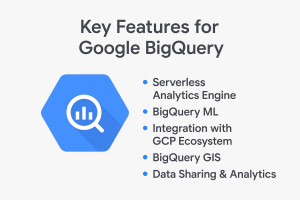
BigQuery enables secure data sharing without redundant copies, reducing storage costs and maintaining consistent datasets across teams.
Use Cases of Google BigQuery
1. Business Intelligence & Reporting
Companies rely on Google Big Query for daily dashboards and business reports. Because BigQuery executes the queries fast, updated insights can be retrieved instantly by the analysts.
2. Real-Time Analytics
With support for BigQuery Streaming Inserts and Pub/Sub, Google Cloud BigQuery is ideal for real-time analytics such as fraud detection, website monitoring, and sensor tracking.
3. Marketing & Advertising Analytics
Within GCP, BigQuery is commonly used by marketers to analyze campaign performance, customer journeys, and attribution metrics. BigQuery integrates with Google Ads and Analytics, making it perfect for digital marketing workflows.
4. Machine Learning Workflows
BigQuery ML lets organizations build predictive models directly within the warehouse by eliminating the need to export large datasets.
5. Log Analytics
Google Big Query is utilized for log processing from applications, firewalls, and cloud systems by security teams. Its speed makes it ideal for threat detection and system monitoring.
6. Geospatial Analysis
BigQuery GIS enables analysts to perform advanced geographical queries, including store location planning, route optimization, and heatmap analysis.
7. E-commerce & Retail Insights
Retailers use Google Cloud BigQuery for inventory forecasting, customer segmentation, trend analysis, and operational dashboards.
8. Financial Analytics
Banks and fintech companies use BigQuery on GCP for risk modeling, transaction analytics, fraud detection in real time, and portfolio analytics.
Learning Path for Google BigQuery
Step 1: Understand Cloud Data Warehousing
Start learning the basics of cloud data warehousing: storage concepts, columnar databases, and distributed computing. This lays the foundation to understand how Google Cloud BigQuery is different from traditional systems.
Step 2: Learn BigQuery Architecture
Study components like datasets, tables, partitions, slots, and the execution of queries. Understanding these will help optimize the use of BigQuery in GCP.
Step 3: SQL Mastery for BigQuery
SQL is at the heart of BigQuery. Practice:
SELECT, JOIN, WHERE
- Window functions
- User-defined functions
- Aggregations
- Analytical queries
Working with Google Big Query requires strong SQL skills.
Step 4: Utilizing Data Ingestion Tools
Learn ingestion methods:
- Batch uploads
- Streaming
- Cloud Storage Transfers
- Integration with Pub/Sub
These ingestion frameworks help you work efficiently with Google Cloud BigQuery.
Step 5: Explore BigQuery ML
Learn how to create machine learning models using SQL in BigQuery inside GCP. Start with simple models before moving into advanced forecasting.
Step 6: Learn Optimization & Partitioning
To reduce costs and improve performance, understand:
- Partitioned tables
- Clustered tables
- Materialized views
- Slot reservations
This knowledge is essential to use Google Big Query at an enterprise level.
Step 7: Integrate BigQuery with BI Tools
- Practice visualizing data using:
- Looker Studio
- Tableau
- Power BI
These platforms connect seamlessly with Google Cloud BigQuery and help build real-time dashboards.
Step 8: Work on Real Projects
You will further your understanding of BigQuery in GCP by building real solutions. Focus on:
- ETL pipelines
- Real-time analytics
- ML models
- Data Governance
- Cost optimization
BigQuery Architecture Explained
1. Storage Layer – Colossus Distributed Storage
BigQuery uses Colossus, Google’s distributed file system, for storage. It employs a columnar format for storing information, which enhances the efficiency of scanning and reduces I/O operations in Google Big Query. It is this columnar architecture that especially accelerates the execution of analytical queries when big datasets are involved. Because this layer operates independently, Google Cloud Big Query can scale seamlessly as storage demands grow. This flexibility adds strong value when deploying BigQuery in GCP for enterprise workloads.
2. Compute Layer – Dremel Execution Engine
The compute layer is powered by Dremel, an engine built for parallel query execution. The architecture used in Dremel is a tree architecture, which enables google big query to process billions of rows in just a few seconds. As data grows in complexity, the system distributes load across thousands of workers. This is one of the reasons for which distributed execution allows Google Cloud Big Query to provide predictable and consistent performance. The companies choose BigQuery in GCP as it handles scale without requiring manual tuning.
3. Services Layer
BigQuery’s services layer manages jobs, metadata, and authentication. It abstracts operational tasks so users can focus on SQL, not infrastructure, in Google Big Query. This layer also handles security policies to ensure datasets remain protected at all levels. Because the control layer interacts directly with Cloud Identity, Google Cloud BigQuery provides enterprise-ready governance features. These capabilities allow for large teams to manage shared environments using BigQuery in GCP.
Pricing Model in Google BigQuery: It provides several pricing options that are adapted to multiple analytics needs. The model is designed to be flexible, enabling users to optimize costs depending on workload type in Google Big Query. Organizations can pay per query, flat rate, or get a discount for long-term storage, depending on the usage pattern. Since it removes upfront investment, Google Cloud BigQuery is perfect for both small startups and large enterprises. Several companies prefer BigQuery in GCP because its pricing remains transparent and predictable.
Conclusion
Among the most current data warehouses, Google Big Query is perhaps the most advanced and scalable. The handling of volumes of data up to petabytes, speed, and integration with a powerful cloud ecosystem make it one of the top choices for organizations across the world. Whether your goal is analytics, machine learning, or real-time insights, BigQuery provides the flexibility and performance required for modern data-driven decision-making.
As companies embrace the digital transformation, the importance of Google Cloud BigQuery keeps growing. Learning BigQuery equips professionals with highly demanded skills and prepares them for roles in data engineering, analytics, and cloud architecture. Mastering BigQuery in GCP opens the door to the most powerful analytics abilities for a beginner or seasoned expert and future-ready professional opportunities.
Frequently Asked Questions








Find a Program made just for YOU
We'll help you find the right fit for your solution. Let's get you connected with the perfect solution.
Is Your Upskilling Effort worth it?
 ROI Calculator

Are Your Skills Meeting Job Demands?
Try our Skill Gap tool
Experience Lifelong Learning and Connect with Like-minded Professionals
Explore Jaro Connect

