 HOME > BLOG > Data and Technology > What is File Management? Functions, Types & Importance Explained
What is File Management? Functions, Types & Importance Explained
 May 20, 2026
 11 min read





Table Of Content
- The Technical Core: What is File Management in an Operating System?
- The 5 Major Activities of File Management
- Why File Management is a Strategic Business Imperative
- The Unstructured Data Challenge: Limits of Traditional Systems
Every enterprise runs on data. Contracts, reports, design assets, compliance records, financial statements — they accumulate by the thousands, and the ability to find the right file at the right moment is the difference between a productive team and a frustrated one.
Office workers spend an average of 1.8 hours every day — 9.3 hours per week — just searching for and gathering information, according to McKinsey & Company. That's nearly a quarter of the standard workweek evaporating into the act of simply locating what already exists.
Effective file management is far more than a tidy folder structure on a shared drive. It's the systematic control of digital assets across their entire lifecycle — from the moment a document is created to the point it's archived or deleted. When that system works well, it's invisible. When it breaks down, it costs real money, creates compliance risk, and erodes the trust between teams that depend on shared information.
As Ginni Rometty, Former CEO of IBM, put it: "Data is the lifeblood of the modern enterprise, but its value is trapped if it cannot be indexed, secured, and retrieved instantly."
That framing matters. Data isn't just storage — it's a strategic asset with compounding value, provided it remains organized, accessible, and protected. Understanding file management at that level starts with something most teams overlook entirely: the operating system working silently beneath every file you've ever saved.
 ChatGPT
 Perplexity
 Claude
 Grok
GrokThe Technical Core: What is File Management in an Operating System?
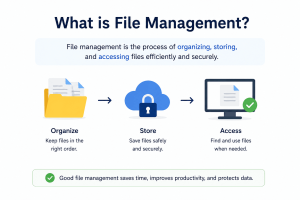
Before exploring enterprise strategy, it helps to understand what’s happening under the hood. What is file management at its most fundamental level? It’s the set of processes an operating system uses to organize, track, and control data stored on physical or virtual drives — the invisible infrastructure that makes every document, asset, and record accessible on demand.
The OS as Traffic Controller
The operating system acts as the central authority over your file hierarchy. It maintains directory structures — the tree of folders and subfolders that organizes data into navigable paths — and mediates every interaction between applications and stored files. Without this layer, software would have no reliable way to locate, read, or write data consistently across a system.
The File Lifecycle: Creation, Modification, and Deletion
Every file moves through a predictable lifecycle. According to Microsoft TechNet, the primary function of file management within an OS includes the creation, modification, and deletion of files, alongside the management of storage space. Creation allocates disk space and registers the file in the directory index. Modification updates both the content and associated metadata — timestamps, size, and ownership. Deletion, often misunderstood as instant erasure, typically removes the directory reference first, with the actual storage space reclaimed over time.
Storage Space and Directory Structures
Effective storage management means more than keeping drives from filling up. The OS tracks allocated and free blocks, manages file fragmentation, and enforces disk quotas where needed. Directory structures provide the logical map that connects file names to physical storage locations — a critical function that scales poorly without deliberate design and governance.
Data Integrity and Security at the OS Level
At the foundation, the OS enforces access permissions, manages file locks to prevent conflicting writes, and — on modern systems — supports encryption at rest. These controls are the first line of defense for sensitive enterprise data, well before any application-level security kicks in.
The OS handles the mechanics, but enterprise file management demands far more: deliberate naming conventions, strict access controls, version tracking, and lifecycle governance.
Understanding these technical foundations sets the stage for the five core activities that translate OS-level capability into real organizational value — which is exactly where we’re headed next.
The 5 Major Activities of File Management
Understanding the function of file management goes well beyond simply saving a file to a folder. At the enterprise level, it’s an interconnected set of disciplines — each one protecting productivity, compliance, and business continuity. As Microsoft TechNet notes, file management systems must implement hierarchical directory structures to ensure data integrity. That structure, though, is only the foundation. Here are the five core activities that build on it.
- File Naming and Metadata Tagging: Consistent naming conventions paired with rich metadata — author, date, department, project code — are what make retrieval fast and reliable. Without these standards, even a well-organized folder hierarchy collapses under the weight of thousands of documents. In practice, enterprises that enforce naming protocols dramatically reduce the time employees spend hunting for critical assets.
- Access Control and Permission Management: Not every employee should see every file. Granular permission settings ensure that sensitive financial records, legal documents, or HR files are only accessible to authorized users. Enterprise content management platforms typically offer role-based access controls that scale across departments and geographies without creating bottlenecks.
- Backup and Disaster Recovery Protocols: Reliable file management is only as strong as its last successful backup. Automated, redundant backup schedules — ideally following a 3-2-1 rule (three copies, two media types, one offsite) — protect organizations from hardware failure, ransomware, and accidental deletion.
- Version Control and Document History: When multiple stakeholders edit the same contract or report, version conflicts can cause costly errors. Proper version control maintains a complete audit trail, so teams can restore previous iterations and track exactly who changed what and when.
- Archiving and Lifecycle Disposal Files don’t live forever – nor should they. A structured document lifecycle policy defines when records move to long-term storage and when they’re securely disposed of, keeping active systems lean and compliant.
Together, these five activities form an operational framework that has direct consequences for every corner of the enterprise — a point that becomes even sharper when you examine the true business cost of getting them wrong.
Why File Management is a Strategic Business Imperative
Most conversations about file management focus on convenience. The real conversation should be about risk, revenue, and competitive speed. When executives can’t retrieve the data they need in real time, decision-making slows — and in fast-moving markets, hesitation has a measurable cost.
As Ginni Rometty, Former CEO of IBM, put it: “File management is the foundational layer of digital transformation.” That framing matters. It shifts the conversation from IT housekeeping to boardroom priority.
The Numbers Behind the Chaos
Consider what “lost” files actually cost. Employees spend an average of 2.5 hours per day searching for documents they need to do their jobs. For a team of 50 knowledge workers, that’s over 6,000 billable hours evaporating annually — often without anyone tracking the loss. The right file management software transforms that drain into recovered productivity.
Beyond wasted time, the legal exposure from poor document practices is significant. During regulatory audits or litigation, companies face e-discovery requests that require rapid production of specific records. Disorganized systems don’t just slow that process — they create liability. Failing to produce required documents on time can result in court sanctions, damaged credibility, and costly legal fees.
Poor Management vs. Strategic Management: A Direct Comparison
| Poor Management Impact | Strategic Management Benefit |
| Hours lost searching for files | Instant retrieval supports faster decisions |
| Version conflicts cause errors | Controlled versioning ensures document integrity |
| Compliance gaps create legal exposure | Audit trails and retention policies reduce risk |
| Sensitive data left unsecured | Granular permissions protect confidential assets |
| Onboarding slows due to disorganized systems | Structured repositories accelerate team ramp-up |
Key insight: Enterprises that treat file management as infrastructure — not afterthought — consistently outperform peers on both operational efficiency and regulatory readiness.
According to SuiteFiles’ guide to document management, organizations that implement structured content practices report stronger collaboration outcomes and significantly reduced compliance risk.
Of course, strategic file management is only as effective as the systems it’s built on — and traditional folder hierarchies are increasingly showing their limits when the data itself resists easy categorization.





The Unstructured Data Challenge: Limits of Traditional Systems
Everything covered in this file management guide so far assumes a degree of order – named files, logical folders, and consistent conventions. But here’s the uncomfortable reality: most enterprise data doesn’t cooperate with that assumption.
Unstructured data refers to information that doesn’t fit neatly into rows and columns. Think PDFs, scanned invoices, presentation decks, video recordings, images, audio files, and email threads. Contrast that with structured data, which lives in organized databases with defined fields and predictable formats. Structured data is easy to search, sort, and analyze. Unstructured data is not, and it makes up the overwhelming majority of what enterprises actually produce.
According to IDC, approximately 80% of enterprise data is unstructured, making disciplined file management essential for categorizing information that databases simply can’t contain.
That statistic reframes the entire challenge. Traditional folder hierarchies were built for a different era — one where a team of 20 shared a filing cabinet and a naming convention written on a sticky note. At scale, those same hierarchies collapse under their own weight. Folders multiply uncontrollably, naming conventions drift, and duplicate files accumulate silently. What was once a tidy organizational system becomes a maze that slows teams down rather than supporting them.
The deeper problem is discoverability. A structured database can be queried with precision. A folder full of PDFs cannot — not without advanced indexing and search capabilities that go far beyond a basic filename search. When a compliance officer needs every contract mentioning a specific vendor, or a marketing team needs all approved brand assets from Q3, a manual folder search is both slow and unreliable.
This is where traditional file management hits its ceiling. Solving the unstructured data problem requires systems designed specifically for it — tools built with intelligent indexing, metadata tagging, and full-text search at their core. Understanding which type of system fits your organization’s needs is the natural next step, and that’s exactly where the conversation is headed.
Types of File Management Systems: From OS to Enterprise Software
Understanding where your organization currently sits on the file management spectrum is the first step towards meaningful improvement. Enterprise file management isn’t a single product — it’s a category that spans everything from a solo workstation to a fully governed content platform. Here’s how the four core system types break down.
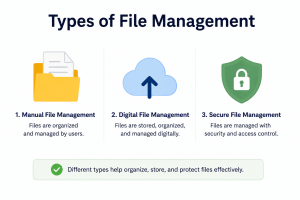
Local File Systems (NTFS, APFS)
Local file systems like NTFS (Windows) and APFS (macOS) form the foundation of how individual machines store and retrieve data. They’re fast, reliable, and require no network dependency, but they create isolated silos the moment more than one person needs access.
- Single-user access by default
- No built-in version control or audit trail
- Dependent on local hardware health and backups
Network Attached Storage (NAS)
NAS solutions extend local file access across teams by centralizing storage on a shared server. As Microsoft TechNet notes, enterprise systems focus on the management of storage space and the implementation of hierarchical directory structures to ensure data integrity.
- Suitable for co-located teams with consistent network access
- Supports folder-level permissions and shared drives
- Vulnerable to on-site disasters without off-site replication
Cloud-Based File Management (SaaS)
Cloud platforms remove geographic barriers entirely, making them the default choice for hybrid and remote workforces. They sync automatically, scale on demand, and eliminate most hardware maintenance concerns.
- Real-time collaboration across locations
- Automatic versioning and recovery options
- Dependent on internet reliability and vendor uptime
Enterprise Content Management (ECM)
ECM platforms are purpose-built for organizations where compliance, governance, and auditability aren’t optional. According to Brandfolder’s ECM overview, these systems manage the full content lifecycle — from creation through archival and deletion.
- Granular access controls and permissions
- Automated retention policies and compliance workflows
- Integration with legal, HR, and finance systems
The system type you choose shapes every downstream decision about structure, access, and governance — which is exactly what the next section addresses with a practical framework for building it right.
The Ultimate Guide to Enterprise-Grade File Organization
Now that you understand the landscape of file management systems, it’s time to put strategy into action. The gap between a functional system and a truly optimized one comes down to five core practices — each one reinforcing the next.
- Tip 1: Lock in standardized naming conventions first. Before anything else, establish a naming protocol that every department follows. A consistent structure — such as [Department]_[ProjectName]_[MMDDYYYY]_[Version] — eliminates ambiguity and makes automated search exponentially more effective. Without this foundation, even the most sophisticated system breaks down at the human layer.
- Tip 2: Choose your architecture intentionally — Search-First or Folder-First. A Search-First architecture prioritizes metadata, tags, and indexed keywords, allowing users to retrieve files without knowing exactly where they’re stored. A Folder-First approach suits teams with highly predictable workflows. In practice, most modern enterprises benefit from a hybrid: structured folders for governance and search functionality for speed.
- Tip 3: Let automated metadata tagging do the heavy lifting. Manual tagging is inconsistent. Enterprise Content Management platforms increasingly use AI-driven tagging to auto-classify documents by content type, department, date, and sensitivity level. This directly addresses the unstructured data problem covered earlier — turning chaotic file dumps into searchable, governed assets.
- Tip 4: Build tiered access permissions into your architecture from day one. Not every employee needs access to every file. Role-based access controls (RBAC) balance security with operational speed — restricting sensitive data while keeping shared resources freely accessible. What typically happens when permissions are intelligently designed from the outset, avoiding a chaotic mix of exceptions and workarounds that hinder efficiency.
- Tip 5: Schedule regular audits to prune your digital environment. Outdated files create noise, inflate storage costs, and introduce compliance risk. A quarterly audit cadence — flagging duplicates, archiving inactive projects, and deleting obsolete drafts — keeps the system lean. According to McKinsey & Company, effective file management is critical for reducing search time and boosting executive productivity.
Implementation Checklist:
- Define and distribute naming convention standards company-wide
- Select Search-First, Folder-First, or hybrid architecture
- Enable automated metadata tagging in your platform
- Configure role-based access controls across all departments
- Schedule recurring audits (quarterly minimum)
A well-governed file environment doesn’t just save time — it actively shapes how competitive your organization can be.
Conclusion: Turning Data into a Competitive Advantage
File management isn’t housekeeping — it’s a strategic asset that directly shapes how fast your organization moves, decides, and competes. Every folder structure, naming convention, and access protocol either accelerates your team or quietly drains it.
The numbers reinforce this reality. Employees who reclaim time lost to disorganized files — up to 9.3 hours per week — aren’t just more productive; they’re free to focus on work that actually drives growth.
Effective file management transforms raw data into organizational intelligence.
The organizations that win aren’t necessarily the ones with the most data. They’re the ones who can find, trust, and act on it faster than anyone else.
Now is the time to evaluate your current systems against genuine enterprise needs — and close the gap.
Frequently Asked Questions

Related Courses
Explore our programs





Find a Program made just for YOU
We'll help you find the right fit for your solution. Let's get you connected with the perfect solution.

Is Your Upskilling Effort worth it?
 ROI Calculator

Are Your Skills Meeting Job Demands?
Try our Skill Gap tool
Experience Lifelong Learning and Connect with Like-minded Professionals
Explore Jaro Connect

