
Unlock Best Video Editing Softwares
 February 8, 2026
 10 min read




Table Of Content
- What is Video Editing
- Types of Video Editing
- Our Top Choices for the Video Editing Software
- How to Edit Videos: Step-by-Step for 2026 Creators
To make a video, having a high-quality camera is not enough; you need the right software to bring your story to life. Even the best lenses can’t fix bad cuts, messy audio, or dull pacing.
That’s where video editing software becomes your creative command centre. In 2026, editing tools have become smart and quick assets that seemed impossible just a few years ago, thanks to technology and AI. For example, tools that used to take hours to create a video can now be used to create one with AI.
There are multiple video editing tools that work across mobile, desktop, and laptop platforms and are built for anyone, from beginners to professionals. In this blog, we will look at all available options for experience, budget, and platform. Also, we shall talk about what video editing is and its types. Let's begin.
 ChatGPT
 Perplexity
 Claude
 Grok
GrokWhat is Video Editing
Video editing is the process of selecting, arranging, trimming, and enhancing video clips to create a final, polished output. It also includes sound design, colour grading, visual effects, transitions, subtitles, pacing, storytelling, etc. Editing has become an innovative form of creativity and technical skill. It has also made great strides over the years.
In 2026, modern video editing software is easier than ever to access thanks to automated processes, drag-and-drop timelines, AI enhancements, and cloud collaboration.
From simple home AI video to professional post-production work, editing helps create emotion, clarity, and engagement in viewers for every video frame. Without editing, raw footage is simply video content; with editing, it becomes a means of communicating with your audience and making an impact, and at times even a work of art.
Types of Video Editing
*offshoreclipping.com
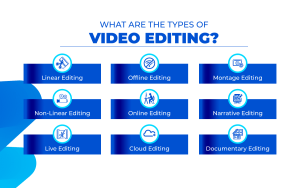
Here are some of the most common types of video editing that you should know:
Linear Editing
In this type of video editing, one can edit footage in a fixed sequence from start to end. It is commonly used in live broadcasts and tape-based workflows where scenes can’t be rearranged freely.
Non-Linear Editing (NLE)
This type of video editing lets you jump, move, and edit any clip at any time on the timeline. It is used in modern video editing methods and is supported by all professional video editing software.
Offline Editing
It edits raw clips in compressed or low resolution to build a structure quickly. Then the final high-quality files are relinked later for polishing and finishing.
Online Editing
It is the final stage where complete resolution footage is colour-graded and enhanced for clarity. It is done with mastering, clean-ups, effects refinement, and export for delivery.
Cloud-Based Collaborative Editing
In these types of video editing, multiple editors work on the same timeline remotely in real time. It is ideal for teams handling fast approvals, shared assets, and synced workflows.
AI-Assisted Editing
It uses AI video editing to automate cuts, captions, face blur, and audio fixes. It aids in speeding up production while creators still control the final creative decisions.
Vision-Based Editing (VR/360/AR)
It is mainly designed for immersive and spatial video formats with multi-directional frames. Used for virtual tours, gaming visuals, training modules, and AR content.
Our Top Choices for the Video Editing Software
*9digitsmedia
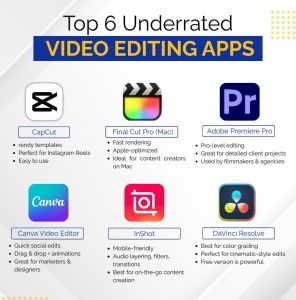
Whether you’re looking for the best video editing software for PC, Mac or phone, here are a list of software that you can consider:
CyberLink PowerDirector 365
PowerDirector 365 remains one of the most approachable yet powerful video editing software choices. It supports all of the must-have tools to create professional videos including multi-camera editing, 360-degree videos creation, motion tracking, automatic captioning and features using AI such as anime effects and blurring faces without tracking. The user interface is clean, well organised and incredibly simple for beginners to learn how to use.
Also, the rendering speed is incredible, making this software popular among YouTube video makers, creator Course delivery, business and editing projects that require editing of very large 4K or VR-type videos, all accomplished without experiencing any lags or delays in processing.
Pros
- Extremely fast rendering engine
- Beginner-friendly and clean User Interface
- Massive library of effects
- AI-powered tools included
- Screen recording support
- Strong multicam capabilities
- Excellent format and codec support
| Paid/Free | Cost (USD) | Best For | Features |
|---|---|---|---|
| Paid | $54.99/year | PC, VR, YouTube | AI effects, captions, screen recording, multicam, motion tracking, 360° editing |
Adobe Premiere Pro
Adobe Premiere Pro continues to be the backbone of professional editing. It supports film-level colour tools, sound auto-tagging, AI transcript editing, generative clip extension, stabilisation, and unlimited multicam angles. Teams love it for collaboration and workflow organisation. The subscription model is pricey but justified for creators delivering commercial, cinematic, and broadcast-level work. Its evolution in AI video editing features makes it future-ready for content pipelines.
Pros
- Industry-standard software
- Top-tier colour grading suite
- Excellent stabilisation
- AI transcript editing
- Unlimited multicam angles
- Collaboration-friendly
- Professional audio tools
| Paid/Free | Cost (USD) | Best For | Features |
| Paid | $22.99/month | Film, broadcast, PC/Mac | AI audio tagging, captions, stabilisation, generative extension, multicam, colour manager |
Apple iMovie
For casual creators and beginners, Apple has developed iMovie as the most user-friendly video editing software on the market, thanks to its simple drag-and-drop interface and many different options available to make videos stand out.
Because of its ease of use and the number of features that are available, such as chroma keying, audio filters, picture-in-picture, and support for iPhone mode, it is often used by Apple customers for editing videos. The movement from an iMovie to a Final Cut Pro is a smooth one, making it a great choice for students, professional editors, and mobile videocasters.
Pros
- Super simple interface
- Best for beginners
- iPhone cinematic mode support
- Good chroma keying
- Free on Apple devices
- Great templates
- Lightweight performance
| Paid/Free | Cost (USD) | Best For | Features |
| Free | $0 | iPhone/Mac beginners | Templates, iPhone cinematic mode, chroma key, PIP, audio filters |
Microsoft Clipchamp
Clipchamp has grown from a basic editor into a surprisingly capable tool. It offers templates, transitions, subtitles, AI captions, AI voiceovers, brand kits, and 4K exports on subscription. It comes bundled with Windows, making it one of the most accessible video editing software for pc choices for quick projects. Ideal for office demos, screen-cam videos, and social-ready exports.
Pros
- Bundled with Windows
- Clean, modern UI
- Good for screen recording
- AI captions included
- AI voiceover generator
- Great templates
- 4K support on subscription
| Paid/Free | Cost (USD) | Best For | Features |
| Freemium | $11.99/month | PC screen-cam + social | Templates, 4K export, captions, voiceovers, soundtrack, transitions, brand kit |
HitFilm Express
HitFilm Express is a hybrid video editor and visual effects software that has gained popularity with YouTubers and independent filmmakers. It provides compositing capabilities, layered VFX, cinema-quality special effects, and timeline editing from a unified interface.
While it is freely available to use, many feel that the capabilities of HitFilm Express exceed the features of many commercial offerings within the $294 to $700 price range (based on user testimonials); therefore, it stands out among creators who want to achieve the blockbuster look without the expense.
Pros
- VFX + editing in one tool
- Completely free
- Great for cinematic creators
- Supports compositing
- Strong community support
- Frequent updates
- Great learning resources
| Paid/Free | Cost (USD) | Best For | Features |
| Free | $0 | PC cinematic + VFX | VFX compositing, transitions, audio layers, cinematic effects, timeline editor |
OpenShot
OpenShot is a beautifully simple way to edit videos. You can edit videos using this open-source and lightweight program that has been tested on multiple platforms and is very stable.
An extremely clean timeline and easy-to-follow interface make OpenShot great for novices who are just beginning to learn about video editing and/or looking for a free quality video editing application for PCs that won’t be overwhelming. OpenShot allows for editing unlimited tracks, transition animations, speed changes via slow motion, and some basic keyframing.
Pros
- 100% free and open source
- Extremely lightweight
- Beginner-friendly UI
- Stable cross-platform support
- Unlimited tracks
- Good for basic transitions
- Great for learning
| Paid/Free | Cost (USD) | Best For | Features |
| Free | $0 | PC/Mac/Linux beginners | Drag-drop timeline, unlimited tracks, slow motion, transitions, simple UI |
DaVinci Resolve 18
DaVinci Resolve 18 is the best video editing application available for colour grading and professional post-production. The free version of Resolve offers an impressive amount of functionality. However, if you wish to unlock the latest features, including the neural engine AI, motion blur, HDR, and cutting-edge noise reduction capabilities, you will need to purchase DaVinci Resolve Studio.
Editors who want to gain career-building software experience and create videos for clients will find Resolve (Studio) to be priceless and an excellent choice for editing films, commercials, documentaries, and high-quality social media content on PC and Mac platforms.
Pros
- Best colour grading tools
- Powerful free version
- AI neural engine (Studio)
- HDR mastering
- Great audio tools
- Noise reduction
- Professional export formats
| Paid/Free | Cost (USD) | Best For | Features |
| Freemium / Paid (Studio) | $295 one-time | PC/Mac pro colour + audio | Colour suite, Fairlight audio, neural AI, multicam, noise reduction |
Final Cut Pro
Final Cut Pro remains one of the fastest Mac editors. Magnetic timeline, AI object tracking, ProRes optimisation, motion templates, and buttery performance make it unmatched for Apple hardware users. For 2026 creators working with iPhones and MacBooks, it’s a dream video editing software ecosystem for performance + simplicity.
Pros
- Blazing fast on Mac
- Magnetic timeline
- Best for the Apple ecosystem
- ProRes support
- AI object tracking
- Smooth learning curve
- Great motion templates
| Paid/Free | Cost (USD) | Best For | Features |
| Paid | $299 one-time | Mac + iPhone creators | AI tracking, ProRes, motion templates, multicam, clean UI |
Filmora 13
Filmora is the top choice of social media influencers, boasting a plethora of automated editing tools powered by AI, motion graphics, filters, transitions, stock assets and preset templates for TikTok and YouTube.
It’s one of the most engaging best video editing software for pc picks for creators who want fast, stylish, non-technical editing.
Pros
- Social-ready templates
- Massive effects library
- AI video tools
- Fast learning curve
- Budget-friendly
- Great UI
- Best for short form
| Paid/Free | Cost (USD) | Best For | Features |
| Paid / Freemium | $49.99/year | PC + short form | Templates, AI tools, filters, stock library, presets |
CapCut Desktop + Mobile (AI Video Editing favourite)
CapCut is the breakout AI video editing favourite. From auto-captions to beat-sync cuts, background removal, smooth slow-mo, and trending templates, it makes creators look pro with zero stress. It works across PC, Mac, iOS, and Android, making it one of the most versatile video editing software picks.
Pros
- Best for AI auto editing
- Trending templates
- Vertical exports
- Beat-sync editing
- 4K exports
- Background removal
- Free on most features
| Paid/Free | Cost (USD) | Best For | Features |
| Free / Pro $9.99/mo | $0 or $9.99/mo | PC/Mac/Mobile + AI editing | Auto captions, beat sync, 4K, background removal, templates |





How to Edit Videos: Step-by-Step for 2026 Creators
If you want to know how to edit videos, follow these simple steps:
- Import your raw video footage into either a Desktop or Mobile version of Video Editing Software.
- Utilising a Non-Linear Editor (NLE), you can easily add video clips to your timeline by dragging them from your library.
- You can remove any mistakes, long pauses or anything unnecessary using the Trim and Cut tools, thus tightening up your story.
- The use of noise reduction, levelling and clarity tools to Clean-Up and Enhance the sound quality of your audio file.
- Automatic Subtitles, produced by AI-based programs, allow for quicker subtitles but they may need to be manually fixed for grammar and/or tone.
- Add transitions (fades, zooms, motion effects, etc.) and overlay graphics/effects to provide a smooth transition from one scene to the next.
- Add Motion Graphics, Background Removal or Trending Presets to Create Interesting Effects
- When colour correcting or applying Cinematic Colour Grading to Achieve a Consistent or Theatrical Effect.
- Preview your video’s Pacing, Emotional Impact and Visual Rhythm before making the final cuts to your video.
- Export your uploads in either 4K or HD Quality.
- You need to optimise your video for the platform you want to upload it to. Examples include horizontal video for YouTube or Personal Computer, vertical video for Reels/Tiktok, and wide/letterbox video presentation.
Video Editing Skills You Must Master in 2026
Mastering the skills below can help you become a professional video editor:
- Audio enhancement and noise clean-up
- Motion tracking for moving subjects and effects anchoring
- Multicam editing for podcast, interviews, or event footage
- Colour grading for cinematic storytelling and brand aesthetics
- Keyframing for custom animations, zooms, and motion effects
- AI video editing tool proficiency (auto-cuts, captions, blurs, enhancements)
- Export optimisation for resolution, compression, and platform presets
- Subtitle storytelling to improve retention and accessibility
- Creative effects usage without overwhelming the narrative
- Visual pacing to maintain engagement and emotional flow
Conclusion
The world of video editing software in 2026 offers something for everyone, from students learning what is video editing, to pros mastering video editing skills, to office creators searching for best video editing software for pc, and social creators relying on AI video editing for faster workflows. Cameras capture moments, but editors create stories.
The best tool isn’t always the most expensive one, it’s the one that fits your platform, pace, and purpose. Whether you choose Resolve for colour, Premiere for collaboration, PowerDirector for effects, iMovie for learning, or CapCut for AI speed, the magic lies in how you use it. Start experimenting, keep learning, and keep creating. Because in 2026, great videos aren’t just shot, they’re edited with intention.
To truly master these video editing tools and stay ahead in a fast-changing digital world, structured learning makes a big difference. This is where Jaro Education can help, by connecting learners with industry-relevant technology and creative courses designed to build real-world skills.
Whether you want to strengthen technical abilities or explore AI-driven content creation, our tech-focused programmes help you learn from top institutions, gain practical exposure, and grow confidently in your creative career. Visit our website to explore our wide range of courses now.
Frequently Asked Questions

Related Courses
Explore our programs
 Admission Open
 Admission OpenAdmission Open
 Admission Open
Find a Program made just for YOU
We'll help you find the right fit for your solution. Let's get you connected with the perfect solution.
Is Your Upskilling Effort worth it?
 ROI Calculator

Are Your Skills Meeting Job Demands?
Try our Skill Gap tool
Experience Lifelong Learning and Connect with Like-minded Professionals
Explore Jaro Connect
